

Question
VisualForce widget in Salesforce Account is now too tall
With the UI revamp, the Gainsight VisualForce widget for the Salesforce Account page is now to tall.
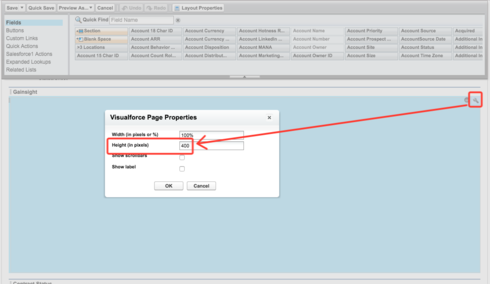
Firstly, I had to make the section in the Page Layout taller, doubling it from 200px to 400px:
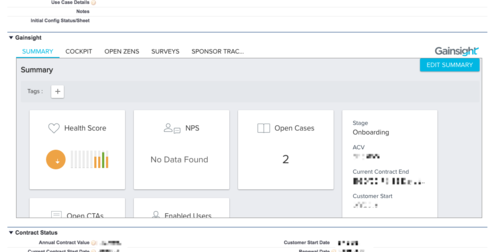
However, the information in the widget is still being cropped:
However, if I make the page section even taller, the Gainsight box does not continue to expand to fill it; I just end up with a bunch of empty space in the section.
Even if it [i]did expand, that would probably not be the best approach, since screen real estate on the Account page is at a premium, and I don't want to drop a 1000-pixel app into the middle of it. The content of the VisualForce page would ideally be drastically condensed, removing as much whitespace as possible.
Thanks, as always!
Firstly, I had to make the section in the Page Layout taller, doubling it from 200px to 400px:
However, the information in the widget is still being cropped:
However, if I make the page section even taller, the Gainsight box does not continue to expand to fill it; I just end up with a bunch of empty space in the section.
Even if it [i]did expand, that would probably not be the best approach, since screen real estate on the Account page is at a premium, and I don't want to drop a 1000-pixel app into the middle of it. The content of the VisualForce page would ideally be drastically condensed, removing as much whitespace as possible.
Thanks, as always!