Frank
Product Guru
May 23, 2018

How To Erase A User From Your Community

  • May 23, 2018
  • 19 replies
  • 1302 views
The right to erasure, also referred to as the right to be forgotten, is one of the main principles of the EU General Data Protection Regulation (GDPR). It sets a new standard for how companies use and protect EU citizens’ data and applies from 25 May 2018.

The Regulation describes erasure as the process by which information is rendered inaccessible and unusable for all relevant parties. Personal data can be erased in a number of ways, including by masking the relevant personal information, so long as the erasure is irreversible, even by the institution carrying out the erasure process. That is also known as the anonymization of personal data records.

You can erase a user via our API, or by using the ‘Erasure User’ feature available on the user profile page in Control.
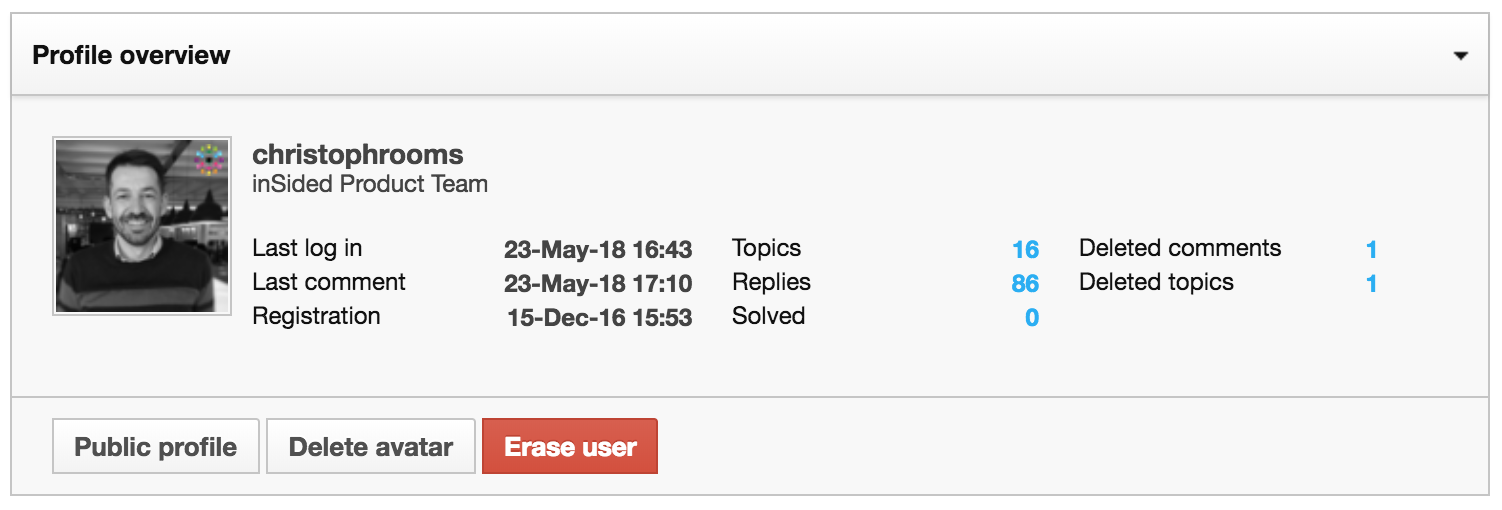

The feature initiates the user erasure process, which can take up to 30 days.

The system will remove the following data from our platform:
  • The user’s profile (including all profile fields).
  • The user’s private message conversations (any conversation which the user was in - including for the other user in the conversation).
  • References to the user in our analytics platform.
  • References to the user in our search platform.
  • Subscriptions from the user to specific content.
  • Ranks/Badges received by the user.
  • The user’s position on the leaderboards
We will also anonymize all the user’s posts and likes. Erasing the posts of a specific user from a community would drastically affect the integrity and consistency of community conversations and render them unusable to transfer knowledge and help other customers. To avoid this, we will be using true anonymization for the posts to make sure we don’t have to remove public community content, while ensuring that personal data in fact will be removed where needed.

Personal data from the specific user in the following data containers will be erased in the next 23 days.
  • Log files
  • Backup files
  • References to the user in all data exports.
We store audit log files for 180 days to ensure the capability to investigate possible threats. These log files only contain IP addresses, and no reference to the user profiles.

⚠️ Once a user is erased, it is not possible to recover the account.

19 replies

ThomasMalingre
Contributor ⭐️⭐️⭐️
August 7, 2018
Hey Shane,

Thanks for the update on this! :)

Cheers,
Thomas
Jr. Community Manager Simyo >> Always happy to share info and experiences
Contributor ⭐️⭐️⭐️
March 6, 2023

Hi there.

I’m having difficulty with restoring access to my community for a customer. When they attempt SSO, it asks them to create a new account, but then rejects them because the account already exists.

They don’t receive the reset password email, which I assume is because of SSO.

Could I erase this user and then ask them to create a new account with the original credentials? Not ideal, but starting to think this is my only option.

Could I change their primary role to ‘unregistered’ and then have them attempt SSO again and it may work?

Cc: @Frank @christophrooms @Vishwas Katti 

Julian
Gainsight Employee ⭐️⭐️⭐️
March 13, 2023

Hi,

I happened to stumble on this reply, happy to help:
What seems to happen is that, after the user attemtps to register, the system finds that the sso id (which is being sent from your identity provider) already exists somehow.

It is strange that the platform behaves that way, as usually (if a match has been found) the user should simply be logged in with that account.

I could imagine a conflict, but I have a hard time thinking of a regular scenario where this could occur (e.g. when the email address does not match, it should simply overwrite the previous email address). 

I would recommend to reach out to the support team about this - you could also do an all-time user export, and then search for the sso id or email in the sheet.


It could be that someone in your CRM changed the email address of this user, and that resulted in such a mismatch. In this case, you could simply update the user records manually (e.g. replacing the old email address) and the login should just work.

As the user was active in the community already, I would advise not to erase the user, as it will be impossible to link the activity back to that user.

Hope this helps!

I follow my nose, it always knows
Contributor ⭐️
October 23, 2023

Hi there, 


Would using the Erase User feature also remove their signature? Their signature displays personal information such as their name and the name of their webshop. Would this also be anonymised or deleted?

Julian
Gainsight Employee ⭐️⭐️⭐️
October 23, 2023

It would completely remove all records that are associated with a user profile - so this would also include all profile fields and the signature.

I follow my nose, it always knows
DCampos
Contributor ⭐️⭐️
August 28, 2025

Found this post which is great as it provides some details on erasing a user, but one additional question is if that user comes back to register again will they be able to?

At the moment are community is just for active customers, so when we get registrations from prospects or others we want to remove them but if they happen to become customers in the future do not want an erase to limit that ability.

Does anyone know if they get erased they have the ability to sign up again.

Kenneth R
Expert ⭐️⭐️
September 2, 2025

Hi ​@DCampos - Once a user has been erased, there is no longer any record of an account with that email address, so yes that user could come back and register again.  In cases where you don’t want a user to be able to register again with that email address, it’s better to ban them rather than erase the account.  In your case, if it’s about a prospect that might later on become a customer, both options would work.  Once erased, they could re-register later on, or if you’ve banned them, you would be able to unban them later.

DCampos
Contributor ⭐️⭐️
September 4, 2025

Hi ​@DCampos - Once a user has been erased, there is no longer any record of an account with that email address, so yes that user could come back and register again.  In cases where you don’t want a user to be able to register again with that email address, it’s better to ban them rather than erase the account.  In your case, if it’s about a prospect that might later on become a customer, both options would work.  Once erased, they could re-register later on, or if you’ve banned them, you would be able to unban them later.

Excellent thanks for confirming.

Contributor ⭐️
October 28, 2025

And what about 'plain text' mentions? If I understand correctly all the @Niels Kamper (mentions) will be converted to the ‘anonymous’ name. However, a lot of users also use a mention without the @ feature, eg: “ Hi Niels Kamper, Hi N Kamper or Hi Kamper. These are plain text ‘mentions’ and usually used when quoting a comment. So you have an anonymized post, but right below the anonymized post a user referring to the original poster. Does this fall outside the purview of the GDPR? Or do we need to make an export of all the posts and lookup/edit the plain texts mentions ?


We will remove next to all @Mentions, all references to the username. We we are not removing variations of that name. There is simply no way for us to do that.

If a user complains about this, then the posts should be updated one by one by a moderator.


To clarify this point, links to the user profile that are created from @mentions will be removed, but the text of the username itself will not be changed for the same reason name variations are left unchanged.