

New Idea

C360/R360 UI Improvements

Related products:CS C360 & R360 & P360
  • August 26, 2024
  • 4 replies
  • 52 views

ajitshukla
Forum|alt.badge.img

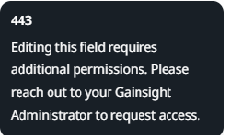
Please see the screenshot attached. Is there a way to make this hover a more meaningful like probably providing a description/help text for user to under what that data shows, instead of showing "Editing this field requires additional permissions. Please reach out to your Gainsight Administrator to request access." ? This does not make any sense and it would be nice if we can configure it to show some meaning text that is configurable by admins.

 

4 replies

marcos.beinder
Forum|alt.badge.img+4
  • Contributor ⭐️⭐️⭐️
  • August 26, 2024

I whole heartedly agree. These help texts would be more meaningful if the admin could define them at the field level, similar to descriptions in 360. In fact at the report level as well it would  be very helpful to have a description text that would appear upon hover over the column header when viewing a report in list view. Slightly unrelated to this idea, but similar in that the admin should be able to control such messages in the UI for end users.


saltamash
Forum|alt.badge.img+8
  • Helper ⭐️⭐️
  • August 26, 2024

+1000

Ideally, I’d love to see the “description” that we put in while creating fields to appear here so that its easier for our end users to know what that field actually represents.


Not every field on C360 is meant to be edited.


saltamash
Forum|alt.badge.img+8
  • Helper ⭐️⭐️
  • August 26, 2024

Also, a similar post that wasn’t created long ago.


Option to remove "non-editable" error message on C360 Widgets | Gainsight Community


Feel free to upvote this. @ajitshukla @marcos.beinder 


kstim
Forum|alt.badge.img+7
  • Helper ⭐️⭐️
  • August 26, 2024

Gainsight is reverting this change per comments in the below post: