
darkknight
Expert ⭐️
October 25, 2019
Released

Report on Timeline Comments?

Related products:CS Timeline & Activity Tracking
  • October 25, 2019
  • 32 replies
  • 778 views

I’m trying to determine if my CSMs are leveraging the Comment function in Timeline.  I don’t see a way to pull comments into an Activity Timeline report.  Is this possible?
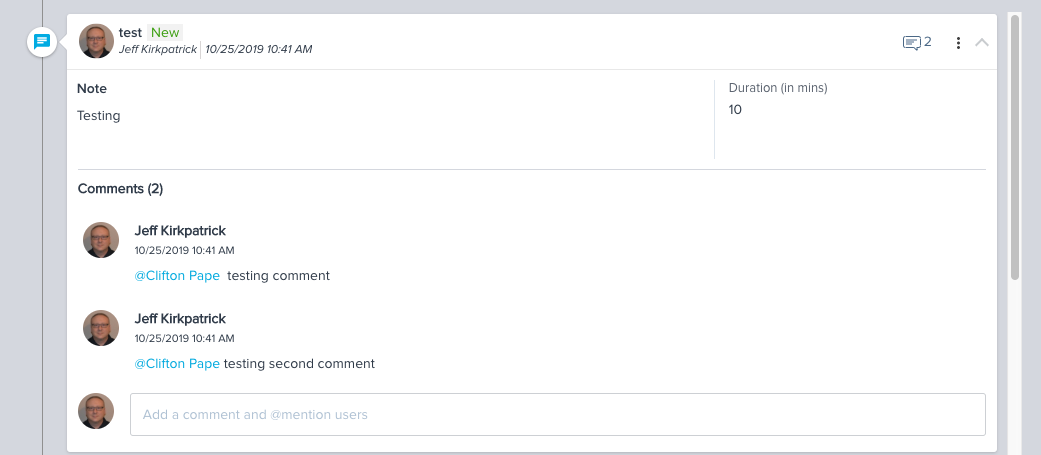
 

Timeline entry with comments


Activity Timeline report grouped by Subject


32 replies

darkknight
Expert ⭐️
February 12, 2020

@davebrown2242  @sierra_evans @heather_hansen  sadly it appears GS flagged this as “Not Planned”


Jeff Kirkpatrick
davebrown2242
Helper ⭐️
February 12, 2020

@darkknight @sierra_evans @heather_hansen; I am also out of luck migrating our previous Scorecard 1.0 comment to the Scorecard 2.0 > Overall measure AND post to global timeline. Support said I am out of luck on that one.  I am working on shifting our CSMs to leverage Timeline for updates and activities over the previously leveraged CTAs for history.


Why is there not an option in the migration using Rules Engine to publish the measure to Account Timeline?  


I could not find an idea/discussion on this but I am still hunting in the search.  Seems short sided to not allow us to determine what we publish to account timeline… think about a team using a previous CS platform; or moving from older functionality to newer functionality.  A simple checkbox on Set Score 2.0 action would solve this (in my humble opinion).


From GS Support:
 

However, I want to let you know that these comments will not be logged in the Global timeline or Account timeline.

After migration, there are two ways to set score, manually or rules:

  • If you set the comment manually, the comment will be logged in the Scorecard timeline and Global timeline too.
  • If you set the comment via a rule, the comment will be logged in the Scorecard timeline but not in the Global timeline.


Hence, in this case too, we have possibilities of logging comments as activities only in the Scorecard timeline and Global timeline but it is not possible to log at Account level.

DB
heather_hansen
VIP ⭐️⭐️⭐️⭐️⭐️
February 13, 2020

@darkknight @sierra_evans @davebrown2242  Yikes.  Yeah, I basically just told our team to stop using it for now because we’re not able to report on it.  Our use case was a little different than Sierra’s.  One of our team uses a custom Timeline activity to track at risk accounts with actions taken, and they were using the comment to update where they were with mitigating the risk.  (I didn’t suggest this...they came upon this themselves.)  I agree that if someone can add data somewhere, we need to be able to report on that, otherwise, it’s kind of useless.

darkknight
Expert ⭐️
February 13, 2020

@nitisha_rathi  Can this please be reconsidered?

Jeff Kirkpatrick
dan_ahrens
Expert ⭐️⭐️⭐️
February 13, 2020

@darkknight @sierra_evans @davebrown2242  Yikes.  Yeah, I basically just told our team to stop using it for now because we’re not able to report on it.  Our use case was a little different than Sierra’s.  One of our team uses a custom Timeline activity to track at risk accounts with actions taken, and they were using the comment to update where they were with mitigating the risk.  (I didn’t suggest this...they came upon this themselves.)  I agree that if someone can add data somewhere, we need to be able to report on that, otherwise, it’s kind of useless.

 Hi @heather_hansen - the most common workflow we see around the use case you describe, and which we recommend is to use a CTA to track the risk (which gives you broader visibility and allows application of a playbook, etc). Then on the CTA, you can track every update as a distinct Timeline update. This gives you better visibility over time vs. just creating a single timeline activity entry and adding comments to it. Further, using the CTA Timeline allows you to track different activity types and customer meetings (with respective internal and external attendees) that are associated with that Risk event. It’s truly a complete Timeline of consciousness around that Risk event.


Here’s an example of how that CTA Risk activity feed would look in practice (we use this process internally at Gainsight): 


VP of Customer Success at Forcepoint
darkknight
Expert ⭐️
February 13, 2020

@dan_ahrens Then, what is the point of the Timeline comments?  Inevitably someone is going to reply to an entry with important information/updates.  We cannot police every end user to make sure they are consistently crossing every T and dotting every lowercase J.

I agree with @heather_hansen  and several other commenters on here:  if we’re capturing data - any data - in Gainsight, then we should have the ability to extract it from the system.

Jeff Kirkpatrick
sierra_evans
Contributor ⭐️⭐️⭐️⭐️⭐️
February 13, 2020

@dan_ahrens our team is undergoing a large-scale effort to switch from logging CTAs to using Timeline to track our engagements with clients. This has been a positive change as our team and execs have embraced the enhanced functionality of timeline. We are using it for executive updates and executive meetings, which aren’t always risks that would necessitate the launch of a CTA. I agree with others that it seems shortsighted to provide functionality that teams like and use, but which cannot be reported on. Please reconsider, as the workflow you cite does not fit all use cases.

@darkknight @heather_hansen @davebrown2242 @nitisha_rathi 

darkknight
Expert ⭐️
February 13, 2020

Agree @sierra_evans - not everyone is going to do it like Gainsight.  Need to be flexible to other intentions and use cases.

Jeff Kirkpatrick
heather_hansen
VIP ⭐️⭐️⭐️⭐️⭐️
February 13, 2020

@dan_ahrens Ideally, that would be the path that I would take.  However, that team isn’t currently using CTAs and is only using Timeline Activities, so it’s not currently an option.

dan_ahrens
Expert ⭐️⭐️⭐️
February 13, 2020

 @dan_ahrens Then, what is the point of the Timeline comments?  Inevitably someone is going to reply to an entry with important information/updates.  We cannot police every end user to make sure they are consistently crossing every T and dotting every lowercase J.

I agree with @heather_hansen  and several other commenters on here:  if we’re capturing data - any data - in Gainsight, then we should have the ability to extract it from the system.

Hi Jeff - the purpose of Timeline comments is to have a dialog/discussion primarily related to the specific update. For example, a CSM might have an onsite EBR with a customer and post their notes and a copy of the deck to Timeline. They may @mention some other team members for questions or follow up. Those teammates might then add their comments or input as a comment associated with the EBR event. A new event (customer email, phone call, survey response, etc) would logically be a new Timeline activity event. It’s very similar to the feed/social experience in business apps like Chatter or consumer apps like Facebook.

VP of Customer Success at Forcepoint
