
New Idea
Success Plans: Is it possible to link a custom SFDC object to add editable fields in the 'Plan Info' section?
Use Case: Our CS Ops team is working on bringing in a new team into GS. The team is a services team responsible for implementation projects. In their current workflow, they create a new record on a custom SFDC object for every new project. They use the object's fields to add details about projects and update project statuse, and this process won't be going away when we bring them into GS.
Ideally, what I'd like to do is create a success plan template where I could link a SP to a record of the existing custom object and give our implementation team the ability to edit fields directly from the Plan Info section of the success plan.
e.g.
I think I can kind of get this by linking the object to CTAs and adding a section to the objectives where I could make fields editable (although, I haven't actually done this yet), but I would like the fields to also be visable from the Plan Info section for quick reference in GS w/o needing team members to go into SFDC to view project records.
Also, for context, we use Relationships to track usage and infomation about this particular product's subscriptions. And it's likely that one relationship will have more than one project (and hopefully SP) added to it over time.
Hoping some SP pros that have implemented workflows involving some kind of services activities can help w/ some best practices, tips, guidance, etc.
cc: @emily_zurow
Ideally, what I'd like to do is create a success plan template where I could link a SP to a record of the existing custom object and give our implementation team the ability to edit fields directly from the Plan Info section of the success plan.
e.g.
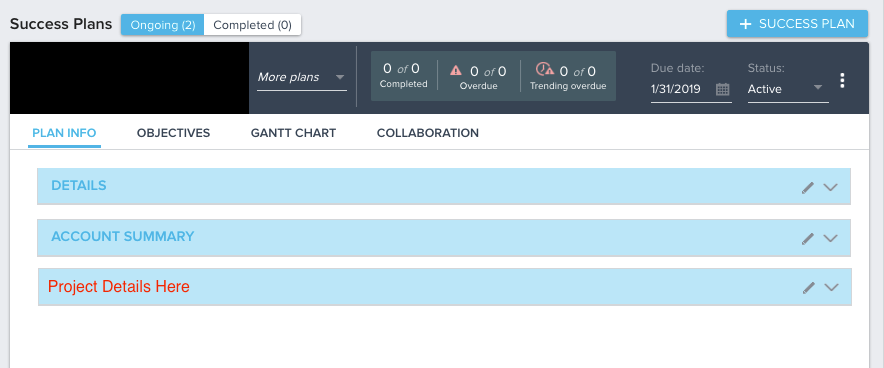
I think I can kind of get this by linking the object to CTAs and adding a section to the objectives where I could make fields editable (although, I haven't actually done this yet), but I would like the fields to also be visable from the Plan Info section for quick reference in GS w/o needing team members to go into SFDC to view project records.
Also, for context, we use Relationships to track usage and infomation about this particular product's subscriptions. And it's likely that one relationship will have more than one project (and hopefully SP) added to it over time.
Hoping some SP pros that have implemented workflows involving some kind of services activities can help w/ some best practices, tips, guidance, etc.
cc: @emily_zurow