

kelly
Helper ⭐️⭐️⭐️
March 4, 2021
New Idea

Why Aren't Null Values Considered When Filtering 'Excludes' in a Multi-Picklist field?

  • March 4, 2021
  • 30 replies
  • 766 views

If I filter on a multipicklist field in my program by doing ‘Excludes’ and select the values that I want to be excluded from the query, you’d think that would bring in any account that doesn’t have the excluded value.

But after troubleshooting why certain accounts weren’t meeting my criteria I realized that it was due to their field value being null. Essentially if you are filtering a multipicklist field, it limits the audience to only the accounts that have a value in that field and any account with a null is not considered in the filter logic. 

You’d think by definition an account with a null value meets the criteria because it does not have the excluded value. This is not at all intuitive to a user.


Adding the screenshot from similar idea and merging the Idea

Hi.

Currently, we don’t have an option to choose/select the “Include Null Values” for the Multi-Select Picklist fields in Rules and/or JO Query Builder.

When ever we drag the multi select picklist field in to a filter section (Ex: in Rules) we have to choose either Includes or Excludes option only and unable to select the “Include Null Values” as well. Like how we have this option for Picklist Data type fields.

Screenshots for the same:
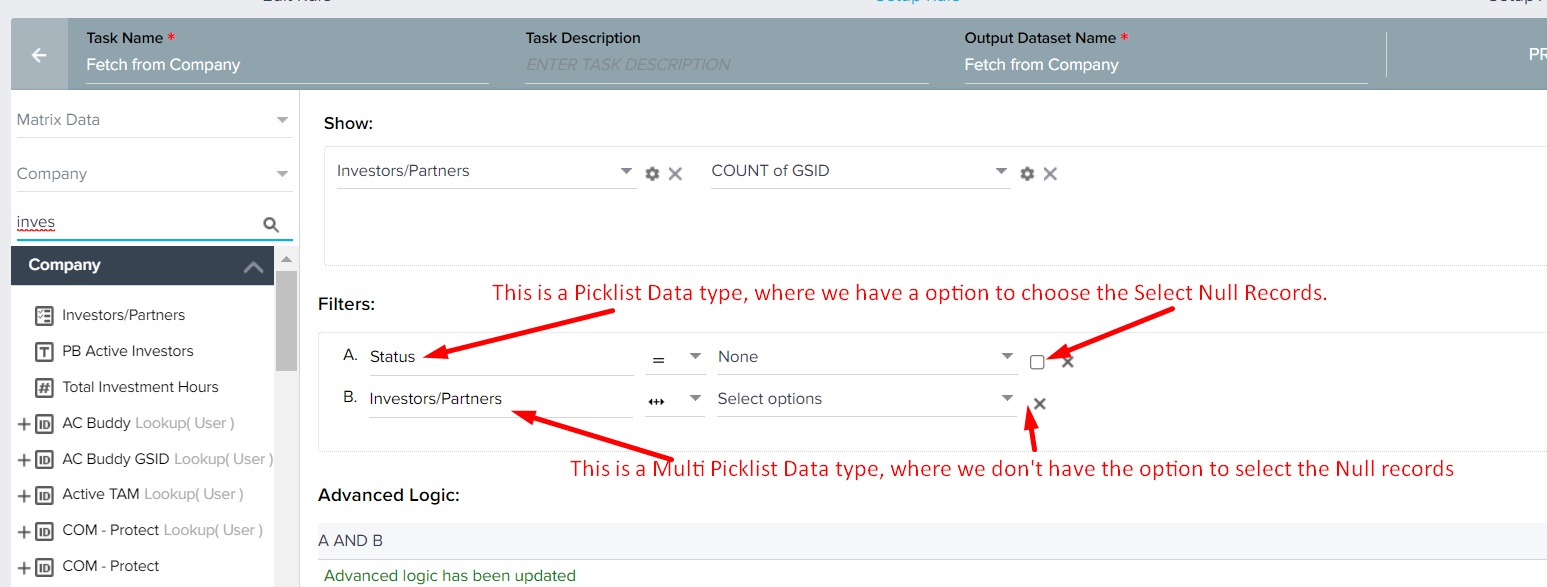
 

Due to unavailable of this option we are unable to get the Null value rec

30 replies

anirbandutta
Expert ⭐️
July 22, 2022

@anirbandutta may we get this converted to an idea? Thx!

Thanks everyone, converted to an Idea to vote.

@PavanCh on your radar.

It's an opportunity for engagement
TMaier
Helper ⭐️
July 22, 2022

Repeatedly steals a day from me every time it comes up. Please do something to tame the null menace!

jparker
Contributor ⭐️⭐️⭐️⭐️⭐️
July 25, 2022

I’ve not had problems with this myself but I have with boolean fields and it’s completely counter-intuitive

“Does not equal” filters should always return everything that isn’t equal to the value(s) you are explicitly trying to exclude — including nulls

This should be implemented in an intuitive, logical and consistent way across the whole platform

Looking for my next role: Gainsight Lead / CS Ops Product Council Member. Let's connect: https://www.linkedin.com/in/jon-parker/
romihache
VIP ⭐️⭐️⭐️⭐️⭐️
August 25, 2022

I would love to be able to +1 a post more than once! 
I had to stick a note on my screen that says ADD OR NULL in caps and highlighted. I fell for the null trap more times that I can count

Continuous improvement is better than delayed perfection
anirbandutta
Expert ⭐️
August 25, 2022

Thanks everyone, converted to an Idea to vote.

@PavanCh on your radar.

@Bhawya could you pl let us know about the latest?

It's an opportunity for engagement
rakesh
Gainsight Employee ⭐️
Lets put your data to work!
August 29, 2022

Hi All,

I understand how limiting this can be. I also believe that we have solved this problem in Reporting part of Gainsight. Posting what we have in Reporting to confirm if this is more elegant way to solve the problem:


We have plans to enhance the filtering capability across Gainsight, for this functionality, I want to ascertain if the above works. 

kelly
kellyAuthor
Helper ⭐️⭐️⭐️
August 29, 2022

@rakesh - would that require two filters or does the Industry dropdown allow for selecting values and checking the null checkbox? So Industry has A and B and the Include null values can be checked as well?

bradley
Expert ⭐️
August 29, 2022

@rakesh - would that require two filters or does the Industry dropdown allow for selecting values and checking the null checkbox? So Industry has A and B and the Include null values can be checked as well?

Looks like it allows for selecting values either as in/not in, as well as checking the box to include nulls should you so desire. At least in reports.

Contributor ⭐️⭐️⭐️⭐️
January 30, 2023

Perhaps, the most annoying part of this is the inconsistency with which GS handles multi-select fields when you query Salesforce objects. In the filter options for a multi-select field on a SF object, you can have field ‘in’, ‘not in’, ‘is null’, ‘is not null’. The same multi-select field on a GS object allows only and ‘include’, ‘exclude’ filter. 

The 2nd most annoying part is the inconsistency with which GS treats the same field across the different features.

For the same field in company:

In DD, I can have the field ‘in’ and ‘not in’.

In Rules, I can have the field ‘include’, exclude’.

In reports, I can have the field ‘in’, ‘not in’, ‘is null’, ‘is not null’. You still need 2 filters to exclude something and to include nulls. At least this is close to how SF querying is handled. 

In a case statement in a rule, the ‘exclude’ filter will capture the null values. 

@rakesh - any plans to fix this across the platform?

bradley
Expert ⭐️
January 30, 2023

Perhaps, the most annoying part of this is the inconsistency with which GS handles multi-select fields when you query Salesforce objects. In the filter options for a multi-select field on a SF object, you can have field ‘in’, ‘not in’, ‘is null’, ‘is not null’. The same multi-select field on a GS object allows only and ‘include’, ‘exclude’ filter. 

The 2nd most annoying part is the inconsistency with which GS treats the same field across the different features.

For the same field in company:

In DD, I can have the field ‘in’ and ‘not in’.

In Rules, I can have the field ‘include’, exclude’.

In reports, I can have the field ‘in’, ‘not in’, ‘is null’, ‘is not null’. You still need 2 filters to exclude something and to include nulls. At least this is close to how SF querying is handled. 

In a case statement in a rule, the ‘exclude’ filter will capture the null values. 

@rakesh - any plans to fix this across the platform?

@jivanova FWIW the Horizon Rules should at least close the gap between DD and current rules in that regard, as rules and DD will be mostly the same in terms of design, meaning your options will be the same for filters.