

How to Show External Content in the Search Results (Federated Search)
Last Updated On: May 13, 2025
With the Federated Search API, you can unify external content into the search results displayed in your community.
Federated search via API is a paid add on. Please contact your CSM to start using it.
How do federated search results appear in your community search?
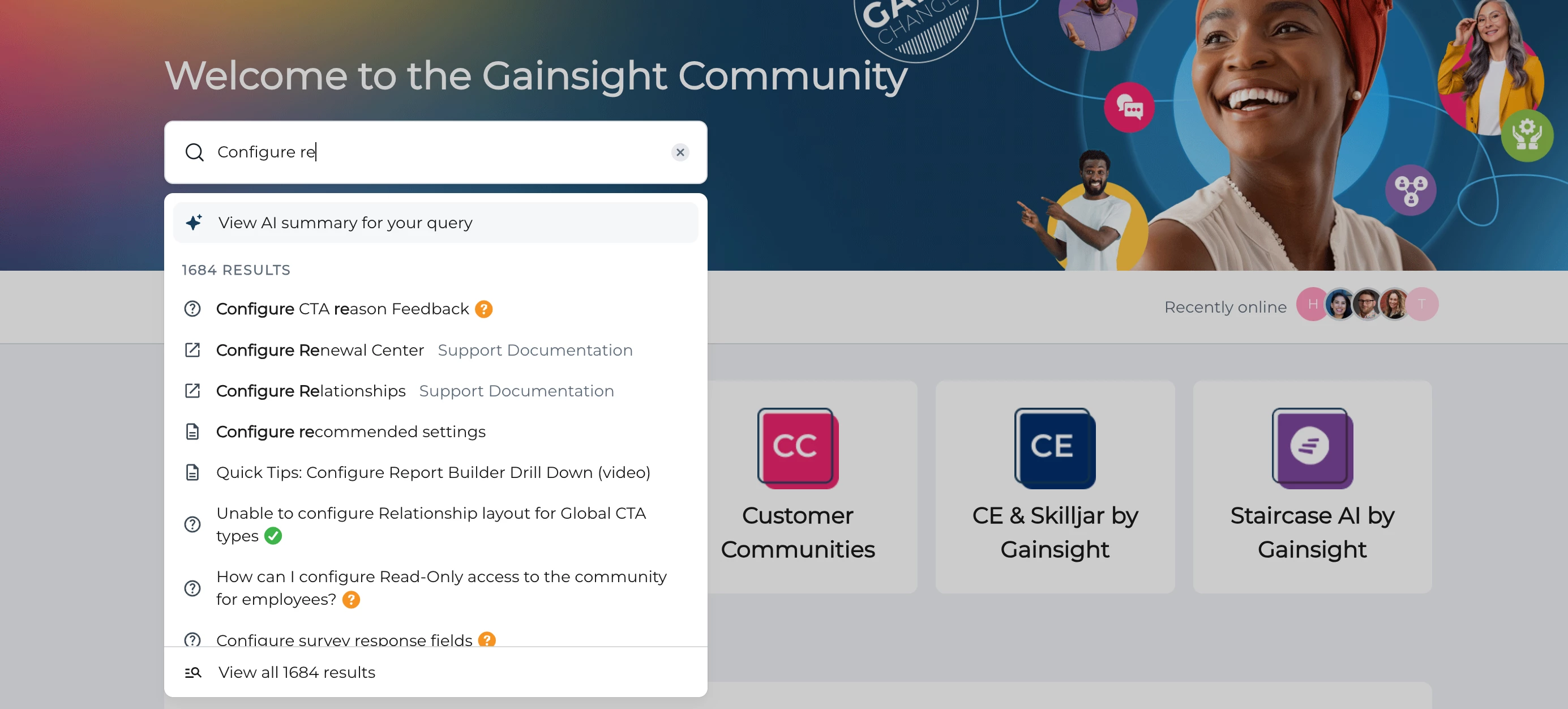
Live search dropdown
Content from various federated sources, easily identified by a unique icon and the source name in metadata color, will appear in the live search dropdown alongside community-posted content.
Search result page
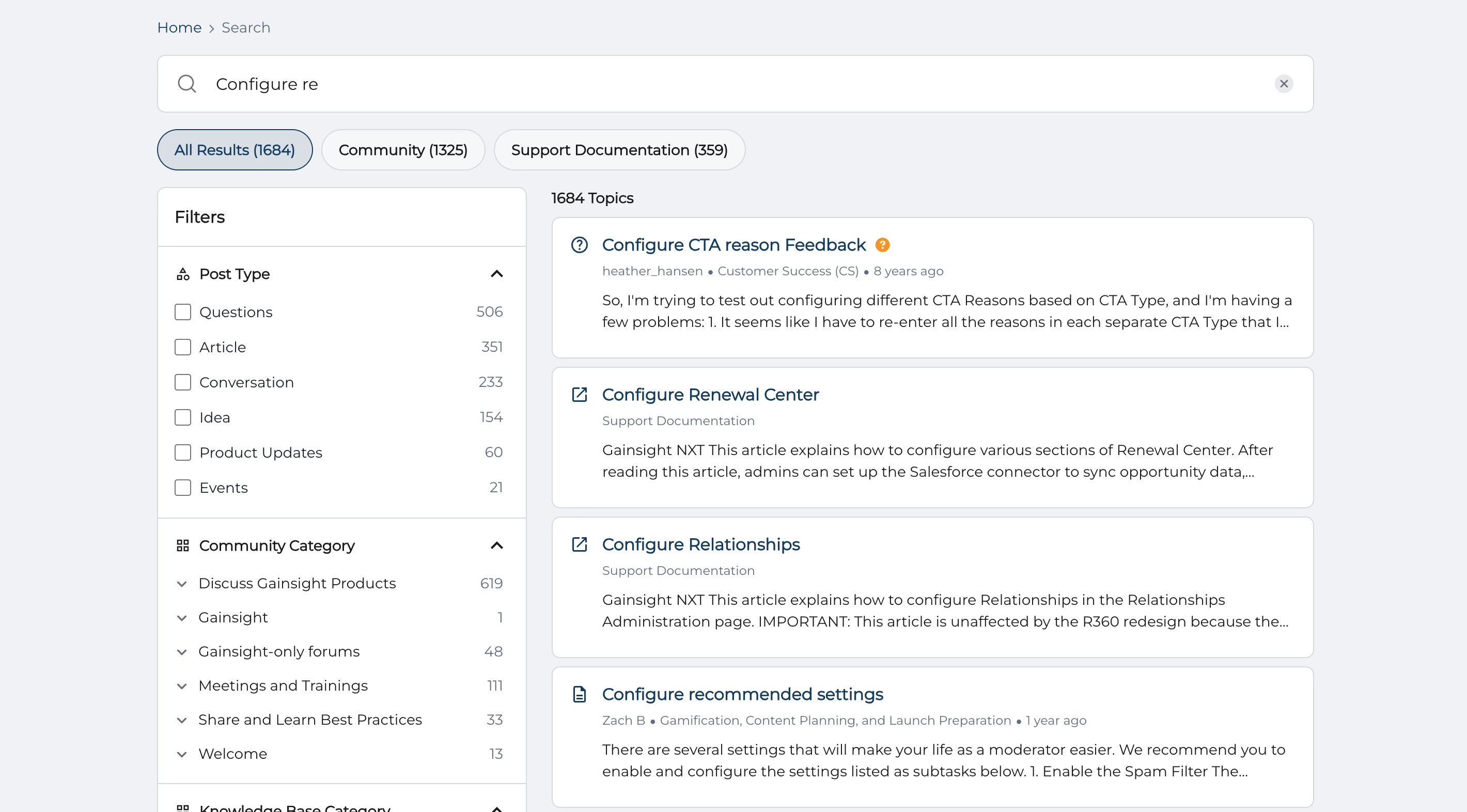
On the search results page, federated content is displayed with community content. A filter located just below the search bar allows users to narrow results to specific federated sources. When indexing content, ensure all HTML tags are removed, as they will not be visible in search results.
How do I set up a federated search integration through the API?
Note: You will need the help of a developer to use this API and integrate federated content. Alternatively, you can reach out to your CSM to discuss options of our Professional Services team helping you build this integration.
Access the API documentation:
- Europe: https://api2-eu-west-1.insided.com/docs/search/
- USA: https://api2-us-west-2.insided.com/docs/search/
For more information on how to access our API, refer to the API Documentation & How To Get API Credentials article.
You can decide to implement the integration in two different ways:
- Either the federated content gets updated at defined frequency. For example once a day the content is synchronised. So if you delete one URL, it will still appear as a search result for a few hours. This first option is usually the simplest to implement.
- Either the federated content gets updated in real time. So as soon as a URL is deleted for instance it will not show up anymore in the search results. This option is usually more complex to implement
Good to note is that you need a scraping tool in order to set up the data structure before using the APIs.
Here is an example flow we recommend to push a single source of data into the community by API. You will want to create a workflow per source:
- Obtain API credentials from both the community and the external platform. If you are federating multiple sources, we recommend setting up client credentials per source within the community.
- In the workflows engine of your choice follow these basic steps (Workato, Zapier, Google AppScripts, etc)
- Create a trigger. Most customers use a time-based trigger to run the full workflow on a recurring basis during off hours.
- Clear all Federated search results for that particular source using a POST request and passing the source name originally provided.
- This is an optional step but helpful when you have data that was recently removed from the external source that you don't want indexed anymore.
- GET request to pull data from the external source API. Normally looping through pagination of some sort of "Get all" Endpoint.
- You'll need to decide if the response from this endpoint gives you the content necessary to provide enough keywords for the search. For example, if it only returns an ID, you'll want to make another request to pull more information.
- Alternatively, you can scrape a public website if an API is not available.
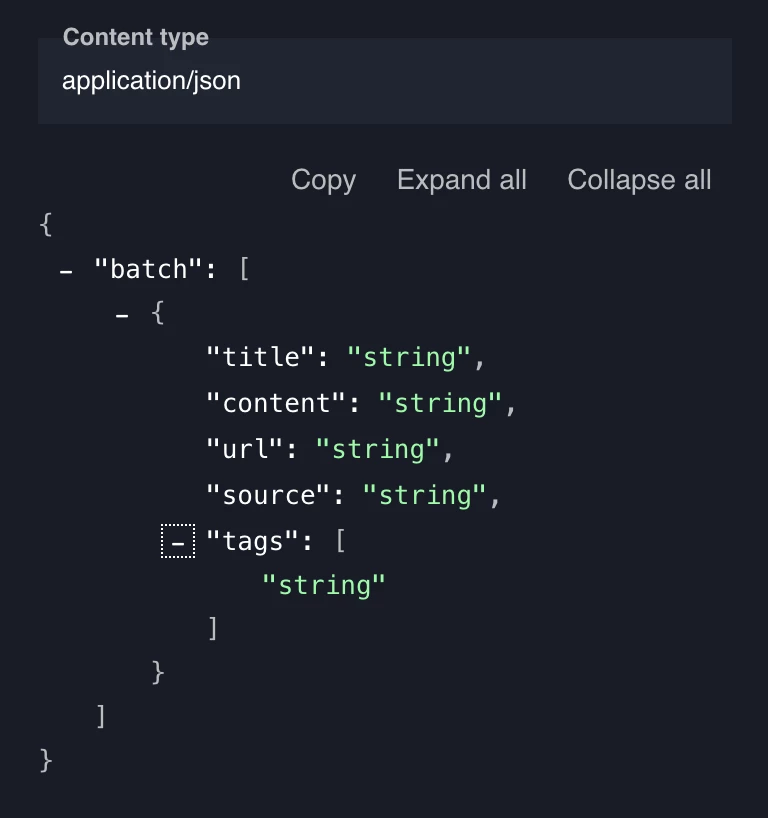
- Organize the data into a batch of objects with 5 parameters: Title, Content, URL, Source and Tags.
- The source name will always be the same per source.
- The content is where you can store as much text as you think is necessary. This content is what is used for keywords when users are searching
- POST the data in batches into the community
Frequently asked questions:
How do I add the source for a federated search integration, so we can differentiate these in our search results?
You need to add ‘source’ to the payload through the API (see example below). After that, it will show the source you entered there (i.e. externalAcademy) as a category in the search results. For “source” make sure there are no numbers and only alpha characters in there.
You can then use Phrases to change that name to a friendly name (i.e. Academy).
How much external content can I federate in my search results?
A maximum of 1000 records per batch is allowed, and you can federate up to 25,000 records per index (source). One record equals to one search result.
Can I federate content from different languages?
Yes, you can add any content, no matter the language.
Will the federated content appear in the Embeddable widget?
No, the search in the Embeddable widget will not show any federated content. The Embeddable widget will only show Community content and Knowledge base content).
Will the federated content appear in the topic creation form in the "Related topics" section?
No, the "Related topics" section will only show community topics.