

Subscription Trends Dashboard
This article helps community managers understand the KPI widgets under the Subscription Trends dashboard.
Overview
The Subscription Trends dashboard provides insights into community subscription activity. It helps community managers, product teams, and engagement analysts track subscriptions and unsubscriptions across categories, groups, topics, event page and product updates using key metrics and filters.
Core metrics such as new subscriptions and new unsubscriptions deliver a clear view of community engagement and content interest. Percentage change indicators compare performance across selected periods, enabling quick identification of growth or decline in subscription activity.
By consolidating subscription metrics into an interactive and filterable view, the Subscription Trends dashboard enables teams to evaluate content performance, identify engagement patterns, and refine participation strategies to support sustained community growth.
Global Filters
To support targeted analysis, the Subscription Trends dashboard provides the following global filters:
- Date Filter: Applies to subscription and unsubscription activity within the selected date range, such as when a user subscribed to or unsubscribed from a category, group, topic, or product updates.
- User Primary Role: Applies to subscription and unsubscription metrics based on the user’s Primary Role and applies the most recent role update. If the user’s Primary Role has changed over time, only the last or current role is considered.
- User Custom Role: Applies to subscription and unsubscription metrics based on the user’s Custom Role and applies the most recent role update. If the user’s Custom Role has changed over time, only the last or current role is considered.
- User Rank: Applies to subscription and unsubscription metrics based on the user’s Rank and applies the most recent rank update. If the Rank has changed over time, only the last or current rank is considered.
Access and Manage Subscription Trends Dashboard
The Subscription Trends dashboard is an out-of-the-box (OOB) dashboard that can be viewed from the Analytics page.
To view the dashboard:
- Log in to Control.
- Navigate to Analytics > New Dashboards.
- From the dropdown list, select the Subscription Trends dashboard. The Subscription Trends dashboard appears.
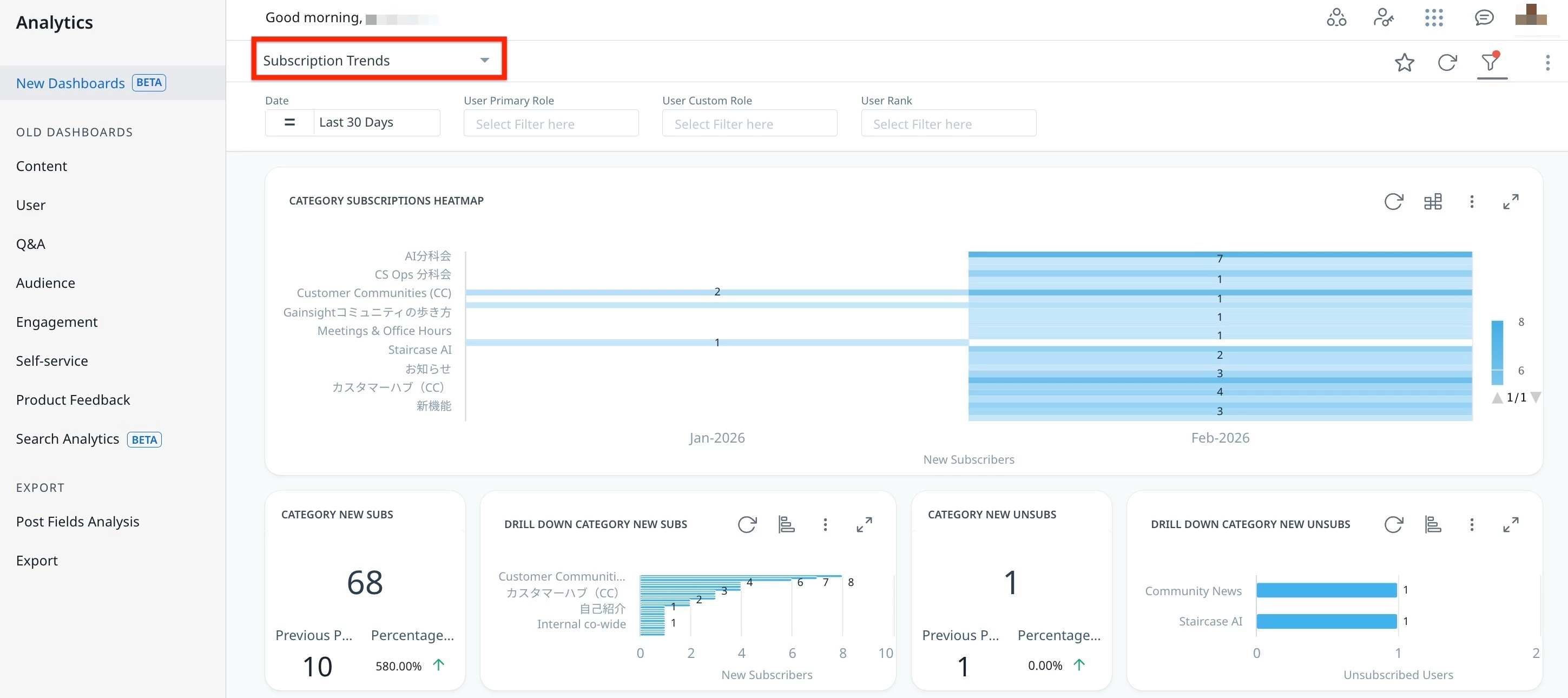
You can interact and customize the dashboard using features such as global and individual filters, report visualization options, and more.
Note: The dashboard data is displayed in UTC.
For more information on how to customize Dashboards, Widgets, and Reports, refer to the Customize New Dashboards article.
Understand the Key Performance Indicators
To effectively use the Subscription Trends dashboard and accurately interpret performance insights, it is important to first understand the key performance indicators it tracks. The KPIs in the Subscription Trend dashboard help track users subscribed to or unsubscribed from a category, group, topic, or product updates.
Percentage Period to Period Change and Previous Period
Admins are equipped to understand performance shifts using the % Period to Period Change and Previous Period metric, which provides a clear comparison over matching timeframes.
% Period to Period Change
This metric represents how a KPI has increased or decreased over time. It compares two time periods of the same length to give a fair and clear view of performance changes. For example, if you select the last 15 days, it compares them to the 15 days right before that.
Previous Period
The previous period metric is always the same number of days as the time period you choose. If you select April (30 days), the system looks at the 30 days just before April (selected Date), not the full month of March. This helps make sure the comparison is even and accurate.
The following table describes each KPI available in the Subscription Trends dashboard:
| KPIs | Definition (For the Selected Period) | Drill Down Action |
| CATEGORY SUBSCRIPTIONS HEATMAP | Monthly distribution of new subscribers by category. | Click a category to view detailed category insights and subscriber information. Use '+' to add or remove columns in the drill-down view. |
| CATEGOR NEW SUBS | Number of new subscribers per category, with comparison to the previous period and percentage change. | NA |
| DRILL DOWN CATEGORY NEW SUBS | Distribution of new subscribers across categories. | Click a category to view detailed subscription information. Use '+' to add or remove columns in the drill-down view. Use '+' to add or remove columns in the drill-down view. |
| CATEGOR NEW UNSUBS | Number of users who unsubscribed per category, with comparison to the previous period and percentage change. | NA |
| DRILL DOWN CATEGORY NEW UNSUBS | Distribution of unsubscriptions across categories. | Click a category to view detailed unsubscribe information. Use '+' to add or remove columns in the drill-down view. |
| GROUP NEW SUBS | Number of new subscribers per group, with comparison to the previous period and percentage change. | NA |
| DRILL DOWN GROUP NEW SUBS | Distribution of new subscribers across groups. | Click a group to view detailed subscription information. Use '+' to add or remove columns in the drill-down view. |
| GROUP NEW UNSUBS | Number of users who unsubscribed per group, with comparison to the previous period and percentage change. | NA |
| DRILL DOWN GROUP NEW UNSUBS | Distribution of unsubscriptions across groups. | Click a group to view detailed unsubscription information. Use '+' to add or remove columns in the drill-down view. |
| TOPIC NEW SUBS | Number of new subscribers per topic, with comparison to the previous period and percentage change. | NA |
| DRILL DOWN TOPIC NEW SUBS | Distribution of new subscribers across topics. | Click a topic to view detailed subscription information. Use '+' to add or remove columns in the drill-down view. |
| TOPIC NEW UNSUBS | Number of users who unsubscribed per topic, with comparison to the previous period and percentage change. | NA |
| DRILL DOWN TOPIC NEW UNSUBS | Distribution of unsubscriptions across topics. | Click a topic to view detailed unsubscribe information. Use '+' to add or remove columns in the drill-down view. |
| PRODUCT UPDATE NEW SUBS | Number of new Product Updates subscribers, with comparison to the previous period and percentage change. | NA |
| DRILL DOWN PRODUCT UPDATE NEW SUBS | Number of new Product Updates subscribers. | Click to view detailed subscriber information. Use '+' to add or remove columns in the drill-down view. |
| PRODUCT UPDATE NEW UNSUBS | Number of users who unsubscribed from Product Updates, with comparison to the previous period and percentage change. | NA |
| DRILL DOWN PRODUCT UPDATE NEW UNSUBS | Number of users who unsubscribed from Product Updates. | Click to view detailed unsubscribe information. Use '+' to add or remove columns in the drill-down view. |
| EVENT PAGE NEW SUBS | Number of new Event Page subscribers, with comparison to the previous period and percentage change. | NA |
| DRILL DOWN EVENT PAGE NEW SUBS | Number of new Event Page subscribers. | Click to view detailed subscriber information. Use '+' to add or remove columns in the drill-down view. |
| EVENT PAGE NEW UNSUBS | Number of users who unsubscribed from Event Page with comparison to the previous period and percentage change. | NA |
| DRILL DOWN EVENT PAGE NEW UNSUBS | Number of users who unsubscribed fromEvent Page. | Click to view detailed unsubscribe information. Use '+' to add or remove columns in the drill-down view. |