Frank
Product Guru
Dec 4, 2018 1:06 PM UTC

How To Configure Fonts

  • Oct 7, 2026 2:28 PM UTC
  • 25 replies
  • 2671 views
  • Translate All

Who shot the serif, or do you prefer a sans-serif typeface? Ariel, Helvetica, Georgia or Times New Roman, you can decide which font-family you want to use.


How to configure fonts

  1. Sign in to a community account with user role Community Manager or Administrator
  2. Click the Style button and select Fonts 
  3. Provide a font-family that you want to use (e.g. font-family: "Times New Roman", Times, serif;)
  4. Click Publish


How to use Google Fonts

Want to make use of Google fonts in your platform, expand the spoiler and follow the steps below

  • Go to http://fonts.google.com/
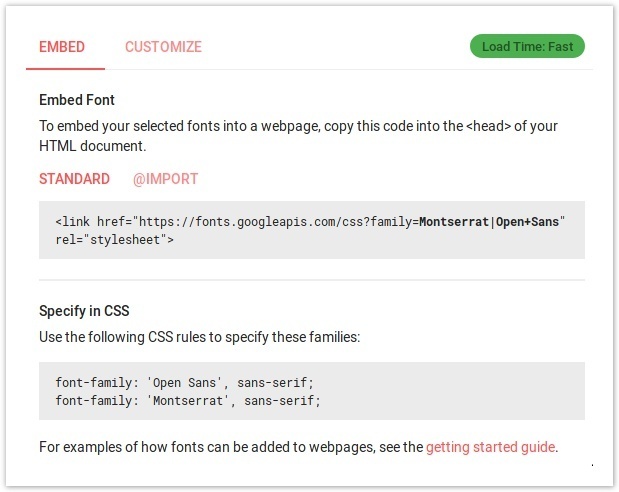
  • Select fonts to use and copy the embed code from the interface using the HTML code (Standard)
f5cd1ae9-0388-4314-8722-5a0460900ab2.jpg

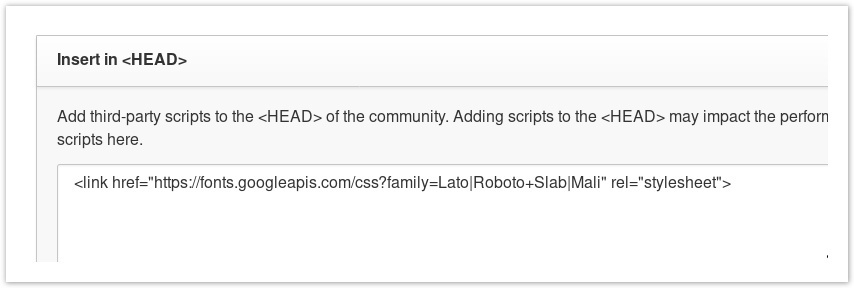
  • Go to Control → Customization → Third-party Scripts and paste the code in the <Head> section
a2d4f9c7-2aad-460c-a783-7cf00dd403ea.jpg

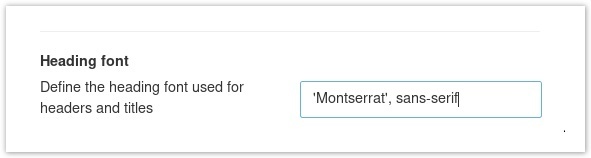
  • Go to Community → Style → Fonts
  • Change the desired fonts as instructed by google fonts (the Specify in CSS section)
db2315c8-99bb-4a68-b3d3-35399ae05b37.jpg

  • Click Publish


How to use your company custom font

Want to make use of the official fonts that match your brand guidelines? For this you’ll need to inject or link to your custom fonts via the platform, there are a couple ways of doing this.

  • Include @font-face via Custom CSS
  • Include @font-face via Third-party Script
  • @import CSS stylesheet
  • Want to ensure EVERYTHING is using the same font? Use the * (anything) selector in your CSS to apply the rule to everything 
    * {
    font-family: customfont;
    }


Include @font-face via Custom CSS

  1. Sign in to a community account with user role Community Manager or Administrator
  2. Click the Style button and select Custom CSS
  3. Include your custom font with the following code
    @font-face {
    font-family: "Custom";
    src: url("https://link-to-font.com/Custom.woff");
    }
  4. Click Publish to close Custom CSS sidebar 
  5. Open Style → Fonts
  6. Provide the font-family that you want to use (e.g. font-family: "Custom”, serif;)
  7. Click Publish


Include @font-face via Third-party Script

  1. Sign in to the control environment with user role Community Manager or Administrator
  2. Navigate to Customization → Third-party Scripts
  3. Include your custom font in the “Insert in <head>” 
    <style  type="text/css">
    @font-face {
    font-family: "Custom";
    src: url("https://link-to-font.com/Custom.woff");
    }
    </style>
  4. Press Save changes
  5. Sign in to a community account with user role Community Manager or Administrator
  6. Click the Style button and select Fonts 
  7. Provide a CSS font-family that you want to use (e.g. font-family: "Custom”, serif;)
  8. Click Publish


@import CSS stylesheet

  1. Sign in to a community account with user role Community Manager or Administrator
  2. Click the Style button and select Custom CSS
  3. Include a link to your CSS file with the following code
    <style  type="text/css">
    @import url(https://link-to-css.com/stylesheet.css);
    </style>
  4. Click Publish to close Custom CSS sidebar 
  5. Open Style → Fonts
  6. Provide the font-family that you want to use (e.g. font-family: "Custom”, serif;)
  7. Click Publish


More information on working with font-family https://www.w3schools.com/cssref/pr_font_font-family.asp

25 replies

revote
VIP ⭐️⭐️⭐️⭐️⭐️
Feb 25, 2022 12:27 PM UTC

I want to test our custom font, I have tried this option: Include @font-face via Custom CSS

I dont get any errors but our custom font doesnt work. Font itself works ok when I test the url (.woff file).

Any hints to test or can Insided help me? :)


Edit:

Problem solved, I accidentally tested Fonts like this and our custom font works ok:


Before this I had this kind of font family:

font-family: "Custom”, custom_font_name;

Is there something I dont understand now?

Translate
revote
VIP ⭐️⭐️⭐️⭐️⭐️
Feb 28, 2022 12:19 PM UTC

And today custom fonts doesnt work anymore, I havent done any changes.

I have tested with this font-family

font-family: "Custom”, custom_font_name;

But it doesnt work with that either. Any tips?

Translate
revote
VIP ⭐️⭐️⭐️⭐️⭐️
Oct 14, 2022 9:55 AM UTC

Body font is too small, how to adjust that? With custom CSS? Currently size is 14px and we would like to use 16px. This is matter of accessibility as well.

Translate
Alistair FIeld
Expert ⭐️
Oct 14, 2022 10:04 AM UTC

Hi @revote 

I will round up the troops to help you out!


@olimarrio or @leo-inspired any advice on this?

Translate
The needs of the many, outweigh the needs of the few. 🖖
revote
VIP ⭐️⭐️⭐️⭐️⭐️
Oct 19, 2022 7:05 PM UTC

Hi @revote 

I will round up the troops to help you out!


@olimarrio or @leo-inspired any advice on this?

Ping :)

Translate
olimarrio
Gainsight Employee ⭐️
Oct 21, 2022 10:04 AM UTC

Hi @revote 👋,


Apologies for the delay, I’ve been out of office!


Yes this would need to be done with Custom CSS. So to increase the font size of all <p> elements that are size 14px you could add the following code:

p {
font-size: 16px;
}


You may find that you also need to scale up other elements on the page as you’ve increased all <p> elements in the body. So you could also use similar code but instead target h1, h2, h3 etc.


For example:

h3 {
font-size: 22px;
}


If you need any help targeting other elements that you feel need an increase in font-size, let me know or contact support@insided.com


Thanks 😁

Translate
revote
VIP ⭐️⭐️⭐️⭐️⭐️
Oct 25, 2022 9:29 AM UTC

Thanks a lot @olimarrio , seems pretty straight forward task :)

Translate
JessicaMendez
Contributor ⭐️⭐️⭐️⭐️
Jan 17, 2023 3:30 PM UTC

Hello inSided Community! I’m looking to change the font size across our community. Any advice or guidance on how to do this (if possible) ?

Translate
revote
VIP ⭐️⭐️⭐️⭐️⭐️
Jan 17, 2023 5:06 PM UTC

Hello inSided Community! I’m looking to change the font size across our community. Any advice or guidance on how to do this (if possible) ?

Look the Oliver’s comments above, does these suits for your need? I asked this same thing earlier 😃

Translate
JessicaMendez
Contributor ⭐️⭐️⭐️⭐️
Jan 17, 2023 5:07 PM UTC

@revote I missed Oliver’s response!! Thank you so much for pointing that out! Have a great rest of your day!

Translate