kate_green
Helper ⭐️⭐️
July 31, 2018
Solved

"Continue" in Journey Orchestrator Program

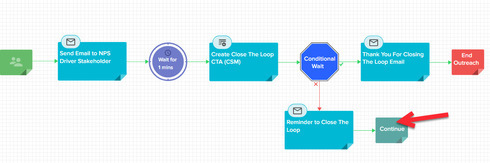
I'm trying to find some documentation on the functionality around "Continue" in a Program in Journey Orchestrator:


What does Continue mean?  Does it just wait until the Conditional Wait Time Limit is up?  What would be the next step in the program shown above if the conditions were met?  Weren't met?

I couldn't find any information here: https://support.gainsight.com/Product_Documentation/CoPilot_and_Automated_Email/Overview/Available_M...

Or here: https://support.gainsight.com/Product_Documentation/CoPilot_and_Automated_Email/Overview/CoPilot_FAQ...

Or here: https://support.gainsight.com/Product_Documentation/CoPilot_and_Automated_Email/Overview/Advanced_Ou...

...which is where I would think I'd find it.
meenal_shukla
Gainsight Employee ⭐️⭐️
July 31, 2018
If the participant reaches the 'continue' step, they skip the immediate step after the conditional wait. In the diagram you have shared, the participant who reaches the 'continue' state will SKIP the 'Thank you for closing the loop' email step and directly go to the 'end outreach' step. Continue is an option that shows up only in a vertical step i.e after a conditional statement.
Outplay. Outwit. Outlast.

14 replies

meenal_shukla
Gainsight Employee ⭐️⭐️
July 31, 2018
If the participant reaches the 'continue' step, they skip the immediate step after the conditional wait. In the diagram you have shared, the participant who reaches the 'continue' state will SKIP the 'Thank you for closing the loop' email step and directly go to the 'end outreach' step. Continue is an option that shows up only in a vertical step i.e after a conditional statement.
Translate
Outplay. Outwit. Outlast.
kate_green
Helper ⭐️⭐️
July 31, 2018
Thanks Meenal - so then if I want them to just wait until my Conditional Wait is met, and then send them the "Thank you for closing the loop" email... do I just remove the Continue?  How often then will a Reminder email be sent?
Translate
cameron_wright
Gainsight Employee ⭐️⭐️
July 31, 2018
Hey Kate, I know Meenal replied but in this doc: https://support.gainsight.com/Product_Documentation/CoPilot_and_Automated_Email/Admin_Configuration/...

It mentions the continue section at the end. :)


Translate
Cameron Wright - Sr. Security Engineer
cameron_wright
Gainsight Employee ⭐️⭐️
July 31, 2018
Yikes not the end more like the middle. sorry!
Translate
Cameron Wright - Sr. Security Engineer
kate_green
Helper ⭐️⭐️
July 31, 2018
Thaaanks Cam! I don't know why I have such trouble searching the documentation.
Translate
cameron_wright
Gainsight Employee ⭐️⭐️
July 31, 2018
I honestly google search what I want and add "gainsight" to the end. #protip 🙂
Translate
Cameron Wright - Sr. Security Engineer
meenal_shukla
Gainsight Employee ⭐️⭐️
August 1, 2018
The reminder email will be sent once. If you want to close the outreach after the reminder email, you should keep the 'Continue' on. This way a participant gets one reminder email and then the outreach ends. If you want to send multiple reminders, then you need to add another conditional wait that looks at the previous step and determines whether a second reminder needs to be sent (based on the action taken by the participant in the previous step). 
Translate
Outplay. Outwit. Outlast.
dan_ahrens
Expert ⭐️⭐️⭐️
August 2, 2018
And a pro pro tip - if you use Chrome - add a custom keyboard shortcut just to search GainsightGo: 

Then in the address bar just type "gg" followed by a space and then your search string. It will automatically search just in Gainsight Go
Translate
VP of Customer Success at Forcepoint
kate_green
Helper ⭐️⭐️
August 2, 2018
Dan, you're such a pro pro!
Translate
faust_belarmino
Helper ⭐️⭐️
August 2, 2018
Oh daaaang!.. Thanks Dan! 😃
Translate