Solved
"Continue" in Journey Orchestrator Program
I'm trying to find some documentation on the functionality around "Continue" in a Program in Journey Orchestrator:
What does Continue mean? Does it just wait until the Conditional Wait Time Limit is up? What would be the next step in the program shown above if the conditions were met? Weren't met?
I couldn't find any information here: https://support.gainsight.com/Product_Documentation/CoPilot_and_Automated_Email/Overview/Available_M...
Or here: https://support.gainsight.com/Product_Documentation/CoPilot_and_Automated_Email/Overview/CoPilot_FAQ...
Or here: https://support.gainsight.com/Product_Documentation/CoPilot_and_Automated_Email/Overview/Advanced_Ou...
...which is where I would think I'd find it.
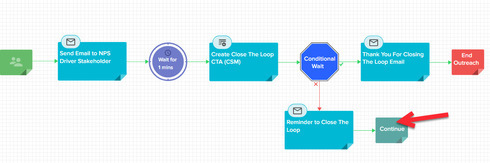
What does Continue mean? Does it just wait until the Conditional Wait Time Limit is up? What would be the next step in the program shown above if the conditions were met? Weren't met?
I couldn't find any information here: https://support.gainsight.com/Product_Documentation/CoPilot_and_Automated_Email/Overview/Available_M...
Or here: https://support.gainsight.com/Product_Documentation/CoPilot_and_Automated_Email/Overview/CoPilot_FAQ...
Or here: https://support.gainsight.com/Product_Documentation/CoPilot_and_Automated_Email/Overview/Advanced_Ou...
...which is where I would think I'd find it.