

andrew_cummins
Helper ⭐️
February 22, 2018

Ability to concatenate within a column via bionic rules

  • February 22, 2018
  • 20 replies
  • 417 views
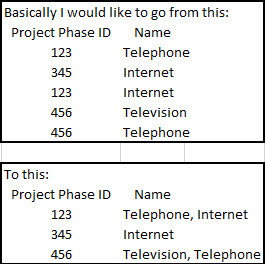
Currently concatenate only works with bringing together two separate columns of data with the same unique identifier. What I would like to do is concatenate the the same column from multiple rows with the same unique identifier. For instance if you have a project phase with multiple associated assets I would like to concatenate all the asset names into one column for that project phase in an email.
 

20 replies

seth
Expert ⭐️
March 14, 2018
I guess the point I want to be clear about is that [i]combinations of things aren't a blocker. If you have 20 possible options, that could create a gazillion possible combinations, but there are still just 20 underlying options.
AI Transformation @ Gainsight
andrew_cummins
Helper ⭐️
March 14, 2018
Haha! yes, you are correct. Good option just not plausible for what I need to do 🙂
seth
Expert ⭐️
March 14, 2018
Ok great, I'm happy that you understand and sad that you're still up a creek 🙂
AI Transformation @ Gainsight
brad_jennings
Contributor ⭐️⭐️⭐️
April 24, 2018
I am looking for exactly this.

We want to be able to concatenate account names (which will then be a token) for Advanced Outreaches to individual emails.

My issue is that I have a variable number of account names (generally increases every day) and varying amount of email addresses. Emails can be assigned to any number of accounts, but I only want to email that person once, with a list of all accounts they're associated with. If there's an elegant solution and I'm missing it, I'd be happy to hear it, but I've spent quite a bit of time searching for one, and I don't believe there is yet. Glad to hear other people have already presented the idea.
karl_rumelhart
Expert ⭐️
April 25, 2018
Thanks for the post, Brad.  This is a very strong use case for the concept discussed earlier in the thread -- Concatenation as an aggregation option when grouping in a query.  The team is looking into this.  I unfortunately don't have a terrific work around for you (though with folks like Andrew and Seth on the thread I wouldn't be surprised if someone else had more ideas than me!) but here is one thought just in case it could fit your scenario.  Let me suppose that you have already solved the problem up to some point but need to add in some new accounts.  In other words, you have a table that looks like  EMAIL ADDRESS || Union of All ACCTS for that EMAIL.   However, you now get a bunch of new customers and you need to add them in.   So you have a second table with EMAIL ADDRESS || NEW Account.   (For simplicity, I am going to assume that in the second table each email can show up at most once.)   If your problem can be structured like this (maybe or maybe not) then you can solve it by doing an outer join (merge) of the current state table and the new table on the Email Address column and then using the row level Concat function.  
seth
Expert ⭐️
April 25, 2018
WOAH HOLD ON MIND EXPLODING

Using a Rule to recursively concatenate values onto an existing list??

So, each time you run the Rule, if there's an Account that's not already present in the list for a certain email address, the Rule concatenates the existing list of Accounts with the new Account.

If multiple Accounts are being added to the list, the Rule may take several runs to add all the items. It just doesn't work if you need to [i]remove items from a list.

Karl, am I just repeating what you had in mind, or am I going off on a different tangent (that may or may not actually work given the devil in the details)?
AI Transformation @ Gainsight
karl_rumelhart
Expert ⭐️
April 25, 2018
Yes, that is what I have in mind.  And you are right, as stated it doesn't work for removing.  If you had a way to easily split the original data set into subsets where at most one account per email address was included, you could make this work as a general solution.  For example, suppose we had a date column and each email address would never show up twice with the same quarter.  Then you could fetch one data set for each quarter and then just join them all on the email field and concatenate.  In theory you could do this even without the extra field by pulling off the 'first' row for each email address (by some sort), subtracting it from the base data set, and then repeating up to the max number of accounts with the same email address.  However, this would be VERY PAINFUL so I don't really recommend this direction unless your data naturally makes splitting the data out more straightforward. 
andrew_cummins
Helper ⭐️
April 26, 2018
So do everything as described but throw in the date field on the second table to be updated (upsert) to current date when you run the rule to populate that. So if it finds a record then the date will be updated but if it does not find a record then the date will be old. Then create another column on the second table "Active" and run a rule to populate that field with a "yes" if date = current date and "no" if date is older than rule date. Then run your rule to concatenate by rows and throw in the filter of Active = "Yes" and build your reporting off the concatenated data set. 
kyle_handley
Contributor ⭐️⭐️⭐️⭐️
September 20, 2018
 Here is basically what I'm trying to do:


May your day continue to be filled with awesome
andrew_cummins
Helper ⭐️
September 20, 2018
What do you want the concatenation to look like?