

steve_davis
Gainsight Employee ⭐️⭐️
October 10, 2017

Ability to use numbers and special characters in Score help text

  • October 10, 2017
  • 6 replies
  • 50 views
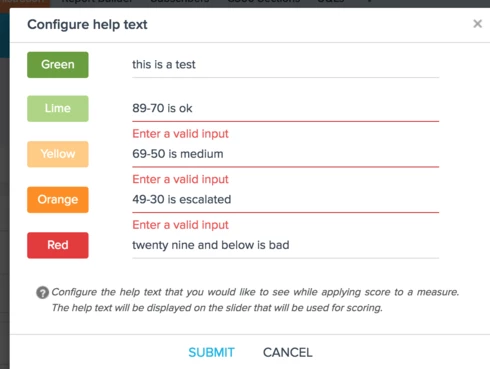
Recently, we've noticed that you cannot put in numbers and dashes in the help text for scoring. Can we get this ability added in as the customer doesn't want to have to type out this range. 
    6 replies

    loma_miller
    Contributor ⭐️
    October 11, 2017
    This would be very beneficial in guiding our CSMs to know what the ranges mean.  Especially for check boxes, that need to be a specific number.
    aditya_marla
    Helper ⭐️⭐️⭐️
    October 12, 2017
    Hi,

    Currently, the help text cannot start with a number or special character (they can be used anywhere else after that). Let me know if this workaround helps.


    Thanks for sharing the feedback, will get it fixed

    Regards
    azhar_uddin
    Helper ⭐️⭐️
    November 1, 2017
    Hello from Engineering team.. 
    I investigated this and actually do not see any reason why this is not allowed. I think any things should be allowed in the input area. 
    I will do some basic testing after removing this restriction. If every thing works will ship it.

    Thanks 
    chris_mudd
    Gainsight Employee ⭐️
    Gainsight Employee ⭐️
    February 15, 2018
    Hey Azhar,

    Do we have any update on this?  Currently I have a customer asking about this when Gainsight will support this feature.   Any update would be greatly appreciated.

    Thanks,

    Chris 
    steve_davis
    Gainsight Employee ⭐️⭐️
    February 15, 2018
    This post was inadvertently set to internal only. I am making this post public again. Please leave in a public status.  -Steve Davis
    ashley
    Contributor ⭐️
    February 20, 2018
    Please fix this. Having to write out "percent" or "greater than or equal to" instead of "%" and ">=" takes up a lot of space, not to mention having to put a letter in front of the actual message "z 89-70" so it can just say "89-70" is silly.