

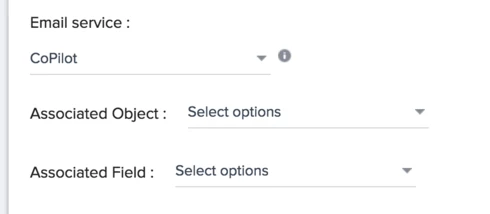
Associated object/fields in surveys - Make this more clear in setup
Can there be some sort of tool tip regarding the Associated objects/fields in surveys? I see a lot of people get tripped up here because they think it is required to map the survey back to an account. Most people will not use associated objects/fields so I feel like we should link to the documentation or say something along the lines of "If you don't know what this is, don't use it" 🙂 (Kinda harsh but it is what I default to when explaining it)
Maybe add it under something like "Advanced Settings" to avoid confusion?
As I understand it, this feature was introduced to link surveys back to specific data like salesforce cases so you know what case a survey was in reference to.
In order to do use this, you need to have the object/field come through in your powerlist/query so you can pass the data through the system. A lot of times people will try to save an outreach and get a message saying that the associated field is not present.
Docs regarding associated objects/links here.
Maybe add it under something like "Advanced Settings" to avoid confusion?
As I understand it, this feature was introduced to link surveys back to specific data like salesforce cases so you know what case a survey was in reference to.
In order to do use this, you need to have the object/field come through in your powerlist/query so you can pass the data through the system. A lot of times people will try to save an outreach and get a message saying that the associated field is not present.
Docs regarding associated objects/links here.