darkknight
Expert ⭐️
May 7, 2018

C360: Change fields on the "Edit Summary" pop-up?

  • May 7, 2018
  • 5 replies
  • 89 views
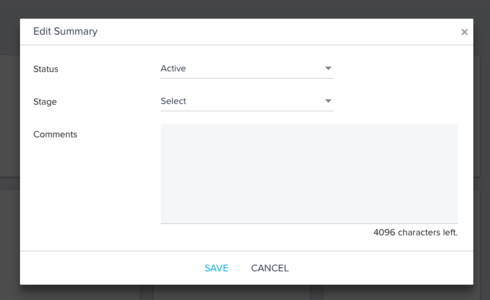
Is there any way to change out the fields on the Edit Summary pop-up on the C360?


    5 replies

    marcelo
    Helper ⭐️
    May 7, 2018
    I would like to be able to add fields to be editable by CSMs. Right now I have to add a section to C360 just to edit 2 fields.
    sidhu
    Gainsight Employee ⭐️
    Gainsight Employee ⭐️
    May 21, 2018
    Hi Jeff and Marcelo, 

    Are you trying to edit fields that are already added to the summary section either in the widgets pane or the fields pane?

    Will the following enhancement help? 
    1) Allow making the field added to Summary section as editable
    2) Show all the editable fields in the Edit Summary pop-up

    For now, the only way to edit field from 360 (apart from Stage, Status, and Comments) is by adding them to the Attributes section. And if they were already added to the Summary section, then you would also have to add them to an attribute section to be able to edit them.

    Thanks, 
    Sidhu
    darkknight
    Expert ⭐️
    May 21, 2018
    Sidhu, yes - but also want to remove the Stage field (we're not using it) and the "Active/Inactive" field (because I don't want CSMs controlling that).

    Yes right now we have duplication because we're adding some fields to both Summary and Attributes.
    Jeff Kirkpatrick
    marcelo
    Helper ⭐️
    May 21, 2018
    Sidhu,

    That would definitively help. I think that if we can set what is editable, viewable or hidden, it will help. Right now I have a general section for all attributes I want people to be able to edit.

    Thanks!
    manuel_damian
    Contributor ⭐️⭐️⭐️
    September 6, 2018
    Hi. I have the same request as Marcelo, I want to be able to add new fields in the Summary and edit them. I'm using the workaround for now (added in the Attributes) but that's not great. Thanks.