

Email Templates 2.0 - Changing the color of a button could be improved
Hopefully this helps some people! I have seen this come through support a few times and I figured I would post this as an idea to see what the feedback was.
With the introduction of email templates 2.0(which is great!) I found that changing the color of a survey button or regular button can be kind of hard to get the hang of. Going from 1.0 where you just clicked the button to change it I was really thrown off learning how to do it with 2.0 templates.
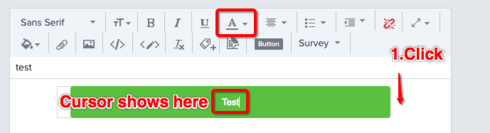
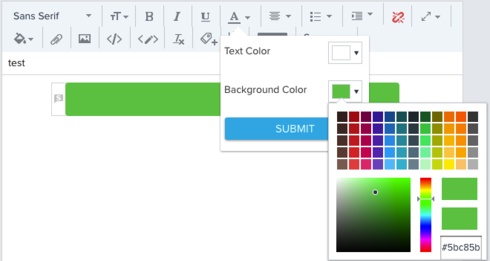
Here is how to change the button color now.
I feel like this could be a little more user friendly.
With the introduction of email templates 2.0(which is great!) I found that changing the color of a survey button or regular button can be kind of hard to get the hang of. Going from 1.0 where you just clicked the button to change it I was really thrown off learning how to do it with 2.0 templates.
Here is how to change the button color now.
I feel like this could be a little more user friendly.