

emil_niclas_hofseth
Contributor ⭐️
Dec 21, 2017 2:12 PM UTC

Mouseover pop-up help

I would love to have a mouseover pop-up or a help-icon explaining some of the fields (without moving away from the page). 
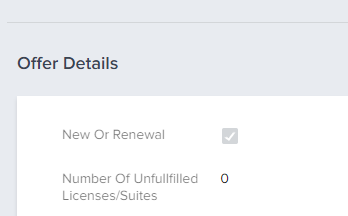
Like in this snip, if I could mouse over the "new or renewal" to get a short sentence explaining what this really means, I would be grateful!

There are so many offers, so many new CuSMs (like me) and with scorecards changing, it's not always easy to remember everything. Thanks! :-)
    6 replies

    sai_ram
    Expert ⭐️⭐️
    Dec 27, 2017 3:49 PM UTC
    Hey, we are sorry for the inconvenience, I agree with what you said. Could you please let us know in which screen are you finding the difficulty?
    We have recently introduced In-app guides in our application in most of the areas. Please click on the icon as shown below for more information. 

    Translate
    dstokowski
    Gainsight Employee ⭐️⭐️
    Dec 27, 2017 6:34 PM UTC
    I think the ask here is to be able to have help text specific to custom fields that can be put on the screen to aid users.
    Translate
    dan_ahrens
    Expert ⭐️⭐️⭐️
    Dec 27, 2017 8:01 PM UTC
    It looks to me like this might be on the Attributes section of the C360?
    Translate
    VP of Customer Success at Forcepoint
    emil_niclas_hofseth
    Contributor ⭐️
    Jan 2, 2018 7:06 AM UTC
    Hi, and thanks for the patience!

    Yes, Denise, you are right - that is exactly what I meant.

    And yes, Dan, this screenshot was from one of the attributes sections that we use to keep track of the different stages of the customer engagement.

    The guides are great, Sai, thanks! On a day to day basis though, some of the attributes could be easily explained with a simple description box from a hover/"mouseover", making our workflow even smoother. Sometimes the naming of the attribute isn't self explaining 🙂
    Translate
    dan_ahrens
    Expert ⭐️⭐️⭐️
    Jan 2, 2018 5:20 PM UTC
    HI Emil, thanks for clarifying. In the case of the Attributes section, the fields represented are customized by your Gainsight Admin and are fields that are present on the Account in SFDC. This brings good news and bad news related to your specific ask.

    So the good news is that it's highly customizable, but the bad news is that this means that hover over tips can't be added since each of those fields could be changed by your Admin. 
    Translate
    VP of Customer Success at Forcepoint
    emil_niclas_hofseth
    Contributor ⭐️
    Jan 3, 2018 9:07 AM UTC
    Thanks, Dan. I guess this would involve a change in the GS software and workflow itself, having the admin entering both the name [i]and the hover over tips. Let's just aim at admins keeping the naming clear and concise. I will bring that back to my organisation!

    Have a nice day! 🙂
    Translate