

Report Scaling when Adjusting Legends
Hey team!
After our last update, we reworked the way that reports show on dashboards and report builder. Namely, we no longer rescale the report once certain legends are removed or added back to a report.
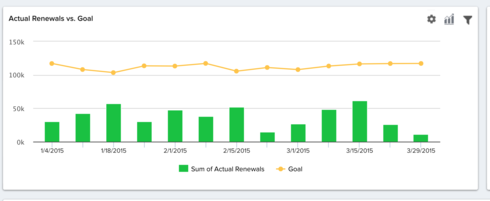
In previous releases, customers could adjust reports by removing one element from the report, and the rest of the report would be rescaled to reflect this change. For example, in the below report from my Demo Org, once the bars are removed, the line remains a bit compressed.
After de-selecting the bar chart portion:
This affects the readability of reports and changes certain functionality that some customers were used to!
It seems that redrawing the report after removing legends or adding an "Apply" button like we have in report builder would give users the option of having this graph rescale to the changes made.
Thanks for your time!
Logan Thome
After our last update, we reworked the way that reports show on dashboards and report builder. Namely, we no longer rescale the report once certain legends are removed or added back to a report.
In previous releases, customers could adjust reports by removing one element from the report, and the rest of the report would be rescaled to reflect this change. For example, in the below report from my Demo Org, once the bars are removed, the line remains a bit compressed.
After de-selecting the bar chart portion:
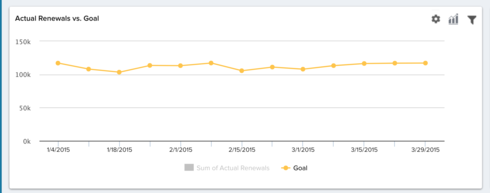
This affects the readability of reports and changes certain functionality that some customers were used to!
It seems that redrawing the report after removing legends or adding an "Apply" button like we have in report builder would give users the option of having this graph rescale to the changes made.
Thanks for your time!
Logan Thome