Show Data Points in Report Builder
I have a customer that uses the Report Builder tool outside of Gainsight to put in her presentations at work. Report builder works as it should. (confirmed with L2).
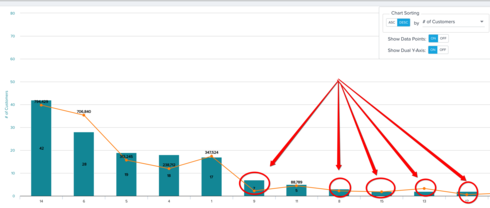
The part in question is "show data points", it only shows above a certain threshold depending on the data in the report.
In the image you can see that Show Data Points is "ON" but data only shows at certain points. Can you make it to where all data points show?
Use case: I want to screen shot the image and put it in a powerpoint to show the data over time in an image. In a screenshot you wont be able to "hover" to view the data.
The part in question is "show data points", it only shows above a certain threshold depending on the data in the report.
In the image you can see that Show Data Points is "ON" but data only shows at certain points. Can you make it to where all data points show?
Use case: I want to screen shot the image and put it in a powerpoint to show the data over time in an image. In a screenshot you wont be able to "hover" to view the data.