

darkknight
Expert ⭐️
May 17, 2018 1:54 PM UTC

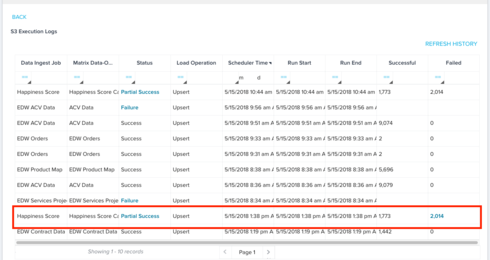
When S3 job is "partial success" the email comes through as "Data Load Successful"

When an S3 job is a "Partial Success" because X number of records failed, the email is coming through as "Data Load Successful"


I reported this issue, and L2 support came back and said "this would be an enhancement request as it is working per design as the job overall started and finished."

This should be considered a bug, because not all Data was Loaded Successfully and now I have to go look at all my S3 jobs that were "successful" to determine whether or not it was actually a "Partial Success" EVERY. SINGLE. DAY.

The email should indicate that there was a Partial Success, so that I will be notified when there is something that didn't process successfully, without having to go check it every day.

And frankly, this should not be Partial Success it should be Partial Failure, because in what universe is a failure to load even one record a Success??
    9 replies

    sumesh
    Helper ⭐️⭐️
    May 18, 2018 2:33 PM UTC
    Jeff,

    Agree with your analysis here, and sorry that we weren't able to give you an acceptable response. We are in the process of strengthening our S3 integration with Bionic Rules Engine, and will ensure that this bug is fixed in the process.

    Thanks,
    Sumesh   
    Translate
    darkknight
    Expert ⭐️
    May 18, 2018 2:41 PM UTC
    Sumesh can you give me a ballpark timeframe?  As I said, this requires me to go back and check every S3 job every day.  If for some reason I miss one, it can have adverse affects on our automated workflow.  

    Are we talking a month? 6 months? a year?
    Translate
    Jeff Kirkpatrick
    sumesh
    Helper ⭐️⭐️
    May 23, 2018 4:12 PM UTC
    Jeff, I will get back with a schedule by the end of this week. Thanks!
    Translate
    sumesh
    Helper ⭐️⭐️
    May 25, 2018 4:44 PM UTC
    Hi Jeff, We will get the fix implemented within the next 2 months. Thanks!
    Translate
    sai_ram
    Expert ⭐️⭐️
    Jul 4, 2018 7:15 AM UTC
    Hi Jeff, It's an enhancement request. Hence, changing this to an "Idea" post. This is to inform you that your request is considered and will be in the release soon. 
    Translate
    kunal_bhat
    Helper ⭐️⭐️⭐️
    Aug 17, 2018 8:49 AM UTC
    Hi Jeff,

    We've updated the notification email to include the Success and Failure counts. You should already be seeing this change.

    Thanks,
    Kunal
    Translate
    darkknight
    Expert ⭐️
    Aug 31, 2018 4:01 PM UTC
    This makes me very happy!

    Translate
    Jeff Kirkpatrick
    darkknight
    Expert ⭐️
    Sep 4, 2018 12:38 PM UTC
    I spoke too soon.  I like that the emails now contain the Failure count BUT it still doesn't count as a failure as it pertains to notifications.

    I forced a Partial Failure to test this.  I removed my email address from the "Send Notification Email to" On Success box (keeping my email address in the On Failure box)   I forced a partial failure.  I got NO email.


    I added my email address back to the "Send Notification Email to" On Success box.  I forced a Partial Failure again.  This time I DID get the email.  So it still considers a Partial Failure to be a Success. 

    I do not want to have to look at every email to determine whether or not it failed.  I want to get an email ONLY when the job fails or partially fails.  IMO this is a BUG and is still not fixed.
    Translate
    Jeff Kirkpatrick
    samantha_braastad
    Contributor ⭐️⭐️⭐️⭐️⭐️
    Sep 4, 2018 2:33 PM UTC
    Agree! I route all my emails to different folders based on the status to help prioritize. 
    Translate