

Pre-Work Guidebook: Your First 90 Days with Skilljar
Welcome to Skilljar. This guidebook is your roadmap for the next 90 days, from gathering your brand assets before you log in for the first time, to generating your first quarterly report and telling the story of how training is helping your business.
Each section maps to a phase of your onboarding journey. You do not need to read it all at once. Start with this Week 0 pre-work, then return to each section as you reach that phase. Think of it as a reference you will come back to, not a document you read once and set aside.
Focus: Make a few key decisions and gather your assets before your first login so your first sessions in the dashboard are productive, not spent hunting down a logo file.
Here is what this guide covers:
- Gather Your Brand Assets. Have your logos, colors, and email banner ready before you log in for the first time.
- Choose Your Training Domain. Decide on your Skilljar subdomain name.
- Determine Your Primary Audience. Pick one audience to focus on at launch.
- Determine Your Sign-In Approach. Decide how your learners will access your training domain.
- Round Up Your Existing Content. Take stock of what you already have so course-building goes faster.
- Identify Your Team. Know who your Dashboard Admins, SMEs, and internal champion are before you build.
Where to find help along the way
- Skilljar Help Center: Step-by-step articles on every feature and setting. support.gainsight.com/Skilljar
- Community: Connect with other Skilljar customers, ask questions, and share what is working. communities.gainsight.com/ce-skilljar-by-gainsight-18
- In-app guidance: Look for tips and checklists directly inside your Skilljar dashboard as you work.

Your Skilljar training domain should look and feel like your brand from day one. Learners trust training that feels like an extension of your company, not a third-party tool they have never seen before. If your company or marketing team has a brand guidelines document, that will be your best starting point.
Logos
You will upload your company logo to appear on your training domain, catalog pages, certificates, and emails sent to learners.
- Header Logo. Displayed in the navigation bar across your training domain. PNG format recommended, ideally 162px tall with a transparent background.
- Favicon. The small icon that appears in browser tabs. Most companies use a simplified version of their logo or a logomark. PNG format, recommended size 16x16px.
- Email Banner Image. The image at the top of automated emails sent to learners from your Skilljar domain. JPEG or PNG, maximum 800px wide and 200px tall. A color banner with your logo works well here.
Brand Colors
Skilljar uses your brand colors for buttons, links, headers, and other visual elements across your training domain. You will need hex codes for at least:
- Primary color (buttons, links, key accents)
- Secondary color (optional, for additional contrast)
- Background color (if you use something other than white)
If you do not have these on hand, check with your marketing team or pull them from your company's brand guidelines. A browser color picker extension can also grab hex codes directly from your company's website.
DO THIS NOW
Create a folder and drop in your logo files and a document with your brand hex codes. You do not need to organize it yet. Just get it in one place before your first login.

Your Skilljar training domain is the URL where your learners will find, access, and complete your training. At this tier, your training site will live on a Skilljar subdomain in the format yourname.skilljar.com. No DNS changes, no IT coordination, no waiting. It is ready the moment you create it.
Choose a name that is simple, recognizable, and easy for learners to remember. Your subdomain becomes part of every link you share, so it is worth taking a few minutes to get it right.
What makes a good subdomain name
- Use your company or product name: highpointacademy.skilljar.com, or acme-training.skilljar.com
- Keep it short: learners will type this. Avoid hyphens and numbers where possible.
- Avoid version-specific names: "training2024" will feel dated. "training" or "learn" ages better.
DO THIS NOW
Decide on your subdomain name before your first login. You will enter it during domain setup in Week 1.

Before you build your first course, get clear on who you are building it for. Most training programs serve more than one audience, but trying to serve everyone at launch is one of the most common mistakes new admins make. Pick one audience to focus on first. Get them trained well, validate the experience, and then expand.
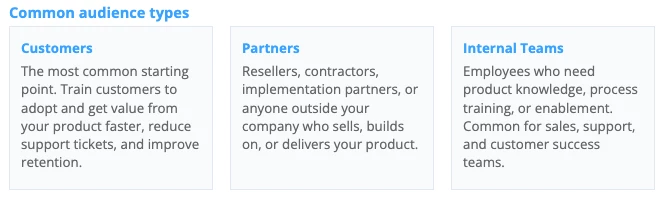
Some teams also use training as a pre-sales or trial conversion tool, giving prospects early access to content that demonstrates product value.
Define a specific persona
Once you have chosen your audience, narrow it to one specific persona. Work through these questions:
- Who is the most important group to train right now?
- What do they need to be able to do after completing your training?
- What happens if they do not get trained? (slow adoption, support tickets, lost deals)
- What role or job title does this person hold?
- How technical are they? Do they need conceptual overviews or step-by-step instructions?
- What does success look like for this person 30 days after completing your training?
DO THIS NOW
Write down one audience and one persona you will design for at launch. A focused launch is easier to measure, easier to improve, and gives you a clearer story to tell leadership. You can always add audiences later.

How will your learners sign in to your training domain? Skilljar supports multiple sign-in options, and the right choice depends on your organization and your learners.
Our recommendation: Start with Skilljar native signup forms
For most teams, Skilljar's built-in signup and login forms are the fastest way to get up and running. Learners create an account with their email address and a password, and they can immediately access your training. No external tools required, no IT coordination, no dependencies on other systems.
You can always add or change your sign-in method later without disrupting your existing learners. Starting with native forms gets you live faster and gives you time to validate the experience before introducing more complexity.
When SSO makes sense
If your organization already uses an identity provider like Okta, Azure AD, or OneLogin, you may want to configure Single Sign-On (SSO) so learners can access Skilljar with their existing company credentials. SSO is a great option, but it requires coordination with your IT team and typically takes longer to set up. You can launch with native signup forms and add SSO at any point.
Learn more
DO THIS NOW
Decide now: will you start with native signup forms (recommended), or do you need SSO from day one? If SSO, loop in your IT team early so they can begin planning the integration.

You do not need polished, production-ready training materials to get started. Skilljar supports a range of content types, and you can build and refine as you go. But having a rough inventory of what you already have saves real time when you sit down to create your first course.
Take stock of what already exists
- Slide decks or presentations used for customer onboarding or enablement
- Screen recordings, product demos, or walkthrough videos
- PDF guides, quick-start documents, or help articles
- FAQ documents or knowledge base content
- Existing quizzes or assessments
Think about your learners
- What are the top 3 to 5 things your learners need to know or be able to do?
- What questions does your support team answer most often?
- If you could only teach your learners one thing, what would it be?
A note on content formats: Skilljar lessons can include video, text and image content, HTML, embedded documents, SCORM packages, and more. If you have content in any of these formats, it can likely go straight into a lesson with minimal rework. You do not need to recreate everything from scratch.
DO THIS NOW
Create a folder and drop in anything you already have: slides, videos, PDFs, help articles. Do not organize it yet. Just get it in one place. When you reach the course-building phase in Weeks 3 to 6, having even a rough inventory will make a meaningful difference.

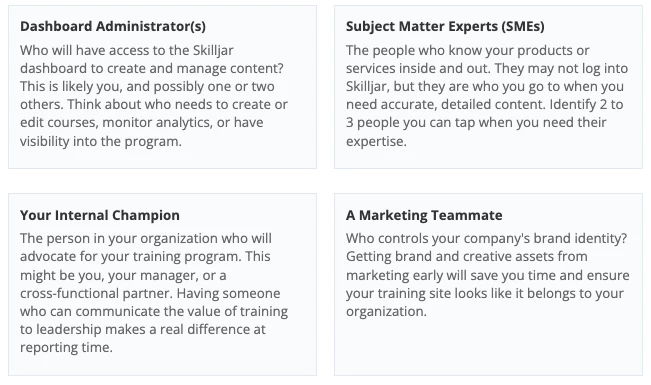
Training works best when it is not a solo effort. Even if you are the primary administrator, identify the people who can help you build and maintain a strong training program. You do not need to formally assign anyone yet. Just know who your go-to people are.
DO THIS NOW
Write down the names and roles of your Dashboard Admins, 2 to 3 SMEs, a marketing contact, and your internal champion.

Before you move on to Week 1, confirm that you have the following ready or in progress. You do not need every item complete to start. But the more you have ready, the faster your first sessions in the Skilljar dashboard will go.
- Logo files gathered (Header Logo, Favicon, Email Banner Image)
- Brand hex codes documented (primary, secondary, background)
- Subdomain name decided (yourname.skilljar.com)
- Primary audience identified and one persona defined
- Sign-in approach decided
- Native signup forms (recommended)
- SSO with IT team looped in
- Content inventory started (existing materials gathered, rough topic list drafted)
- Team identified
- Dashboard Admin(s)
- Subject Matter Experts (2 to 3)
- Marketing Contact
- Internal Champion
