xiaoyu-shen
Helper ⭐️⭐️
April 12, 2019
Product Design

Visual Guide v2.0

  • April 12, 2019
  • 23 replies
  • 3889 views

Our Visual Guide v2.0 is here!

The use of nice visuals and images is an important part of creating an attractive community.

To help you to choose or create suitable images for your community, we have updated our visual guidelines for you. Below you can find explanations of the most prominent images and their dimensions used in our platform.

Tip: Click on the images to see the enlarged version.
 

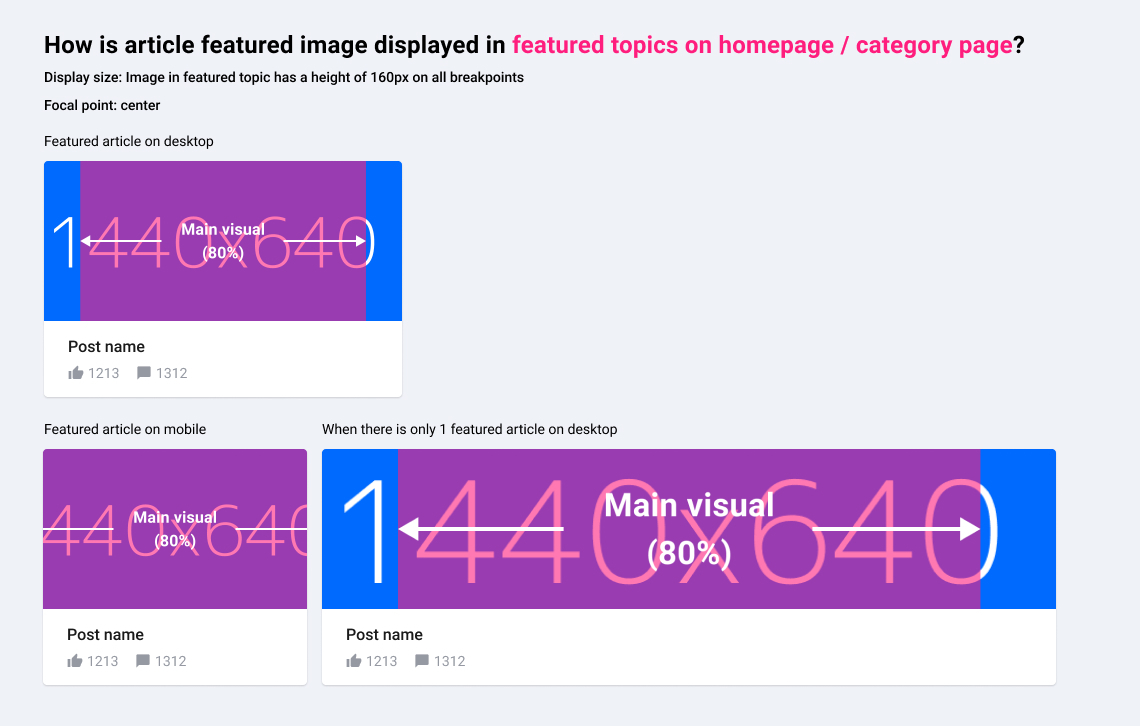
Homepage Hero Image

Example: https://community.insided.com/
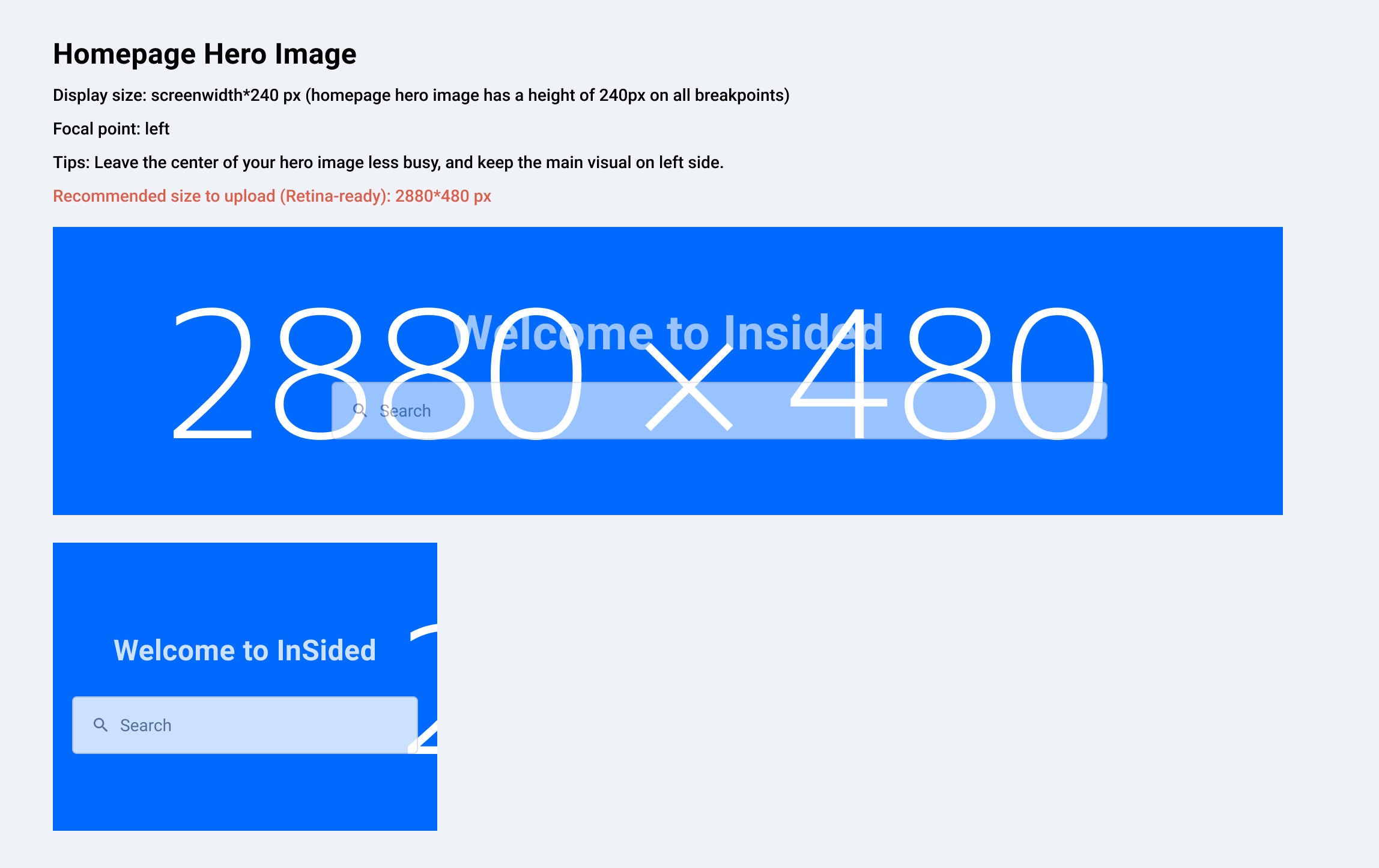
 

Parent Category Hero Image

Example: https://community.insided.com/platform-36
2a499c9e-91b3-4fc0-8459-46ec65ed26f4.jpg


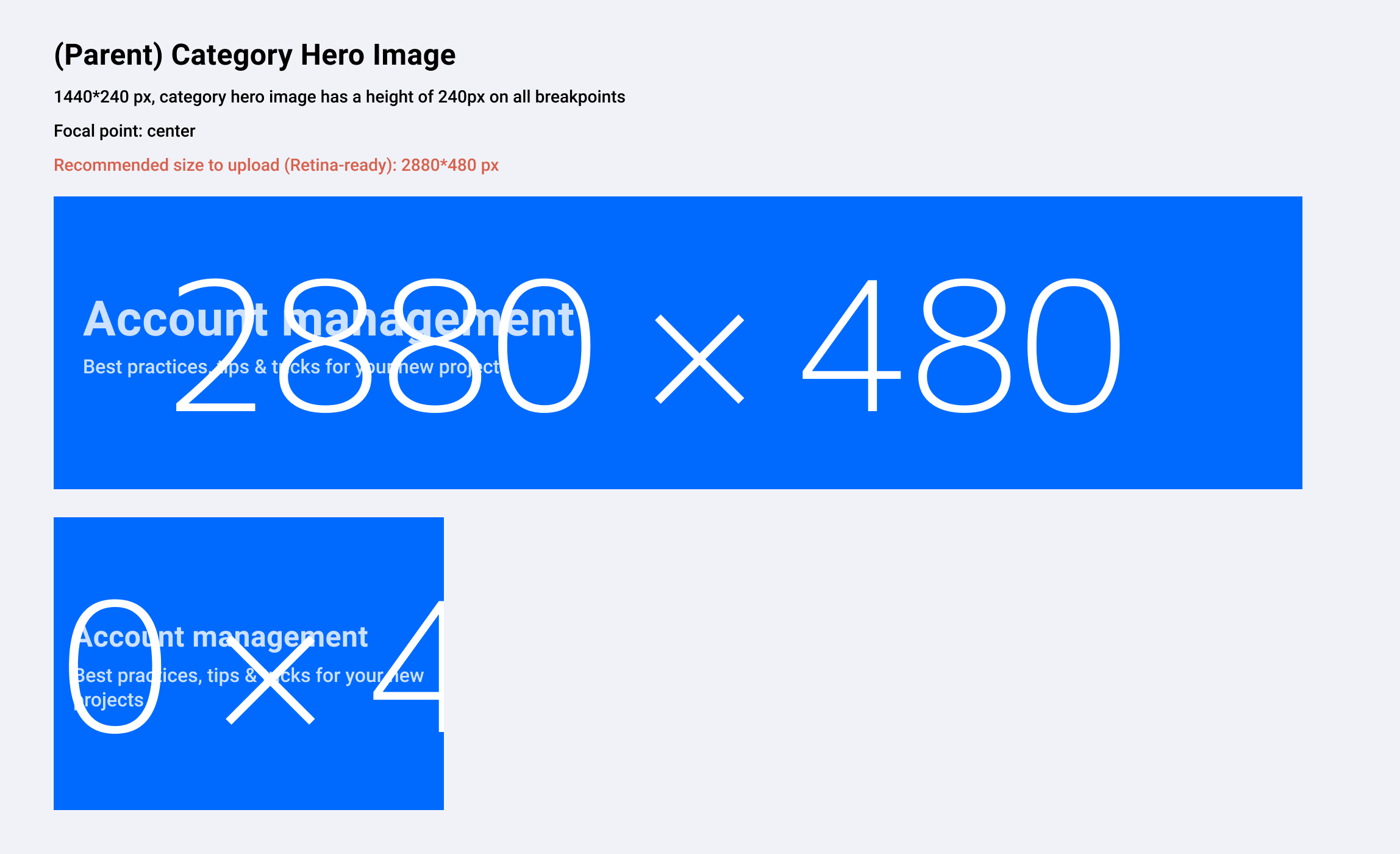
Category Thumbnail (Homepage)

Example: https://community.insided.com/
b052e921-436f-43be-9828-7951a2a78648.jpg


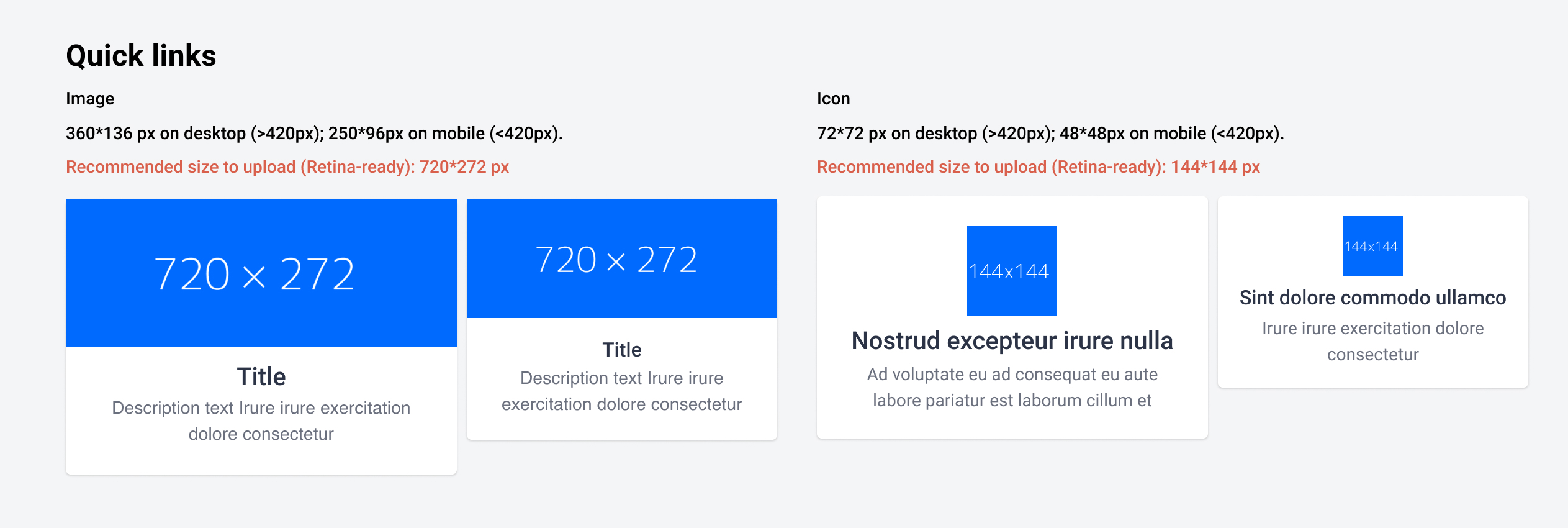
Quick Links (Homepage)

Example: https://community.insided.com/
 

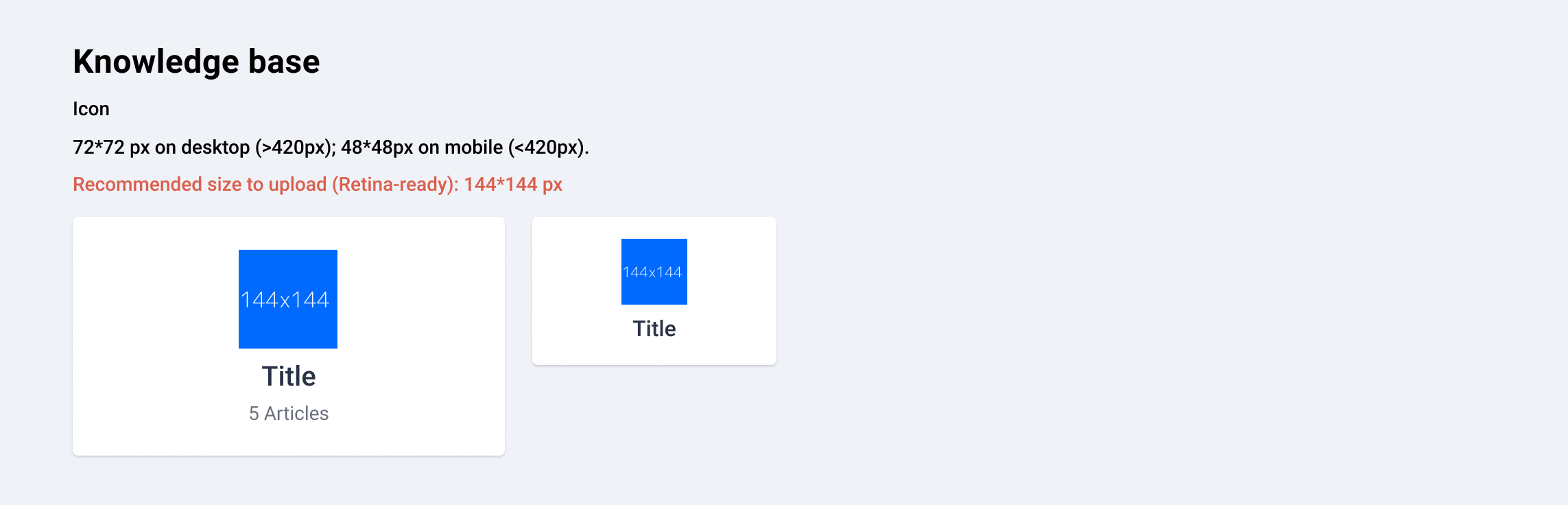
Knowledge base (Homepage)

Example: https://community.insided.com/
 

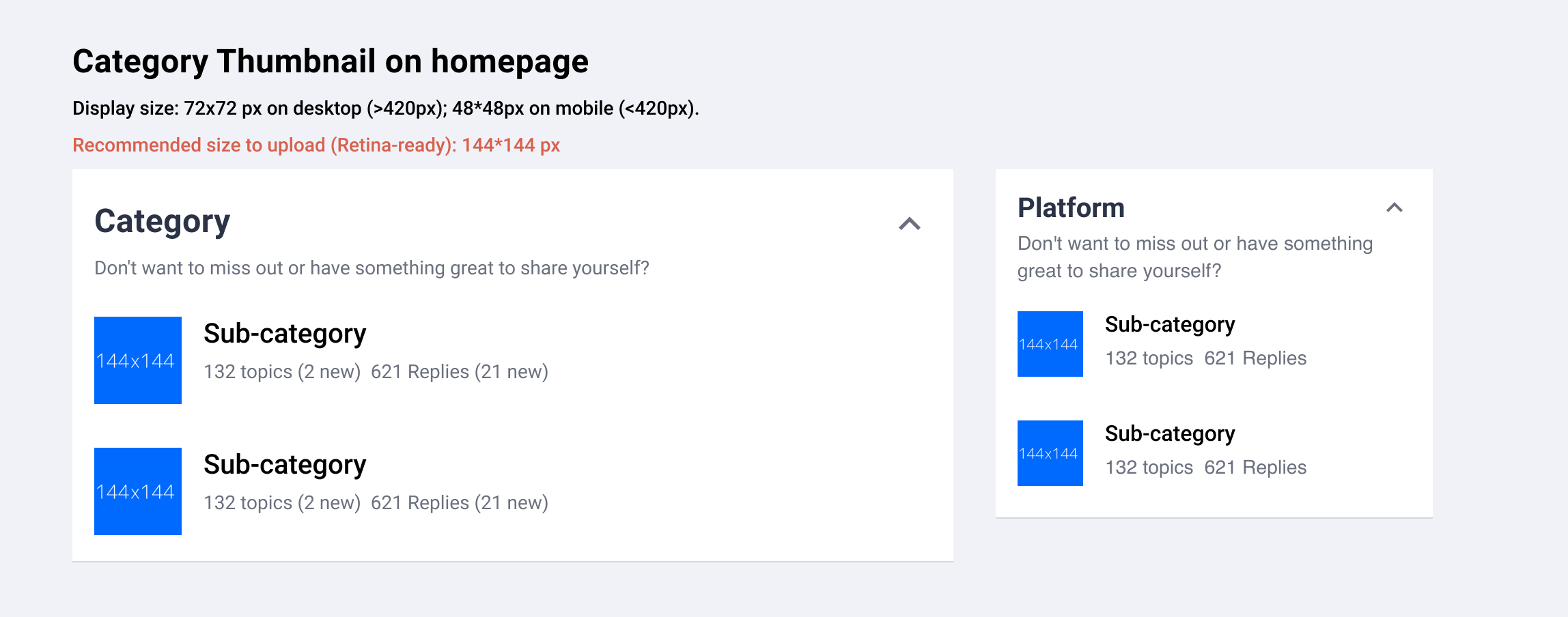
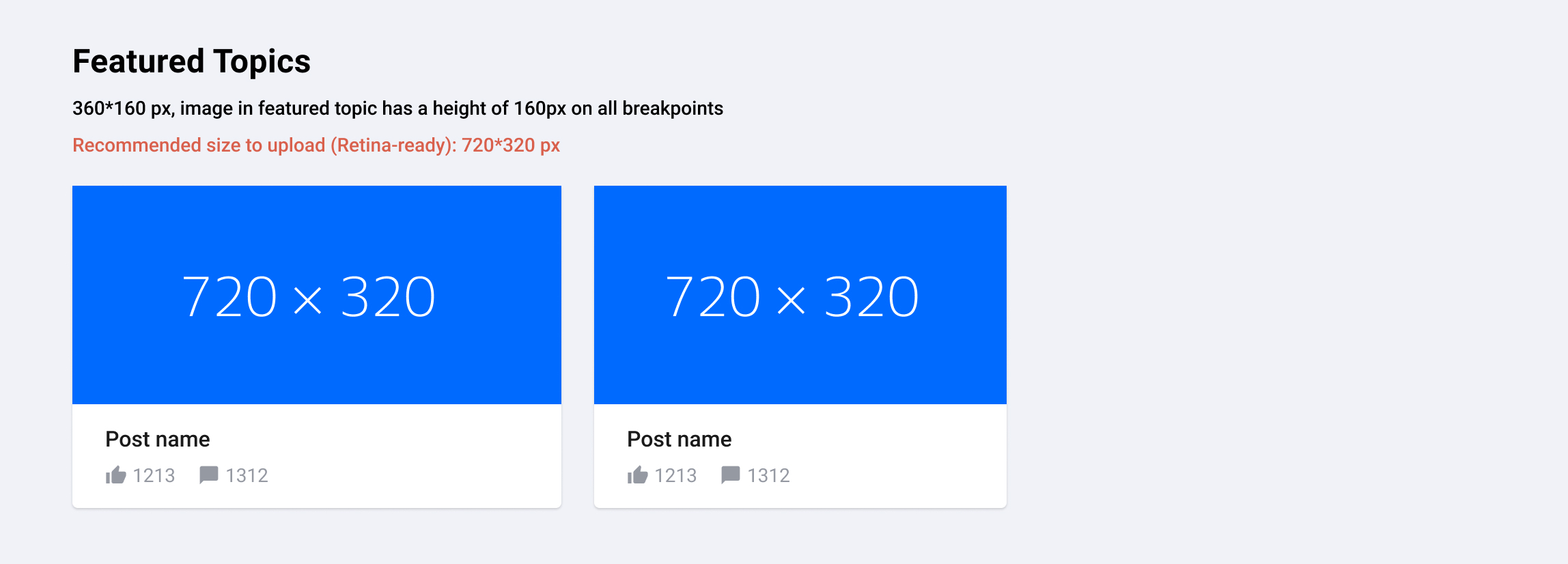
Featured Topics (activated optionally on top of Category- or Homepage)

Example: https://community.insided.com/news-platform-updates-16
88c2b27e-9686-4b44-933d-34c73295793b.jpg


Badge

Example: https://community.insided.com/
Recommended size (Retina-ready): 90*90 px


User profile picture

Recommended size (Retina-ready): 90*90 px


Rank Icon

Always shown above user avatar
Recommended size (Retina-ready): 36*36px


Username Icon

Shown next to username.
Example: Profile page
Recommended size (Retina-ready): 24px*24px

-----
Article image visual guide is updated on 26 Jun, 2019


Article featured image
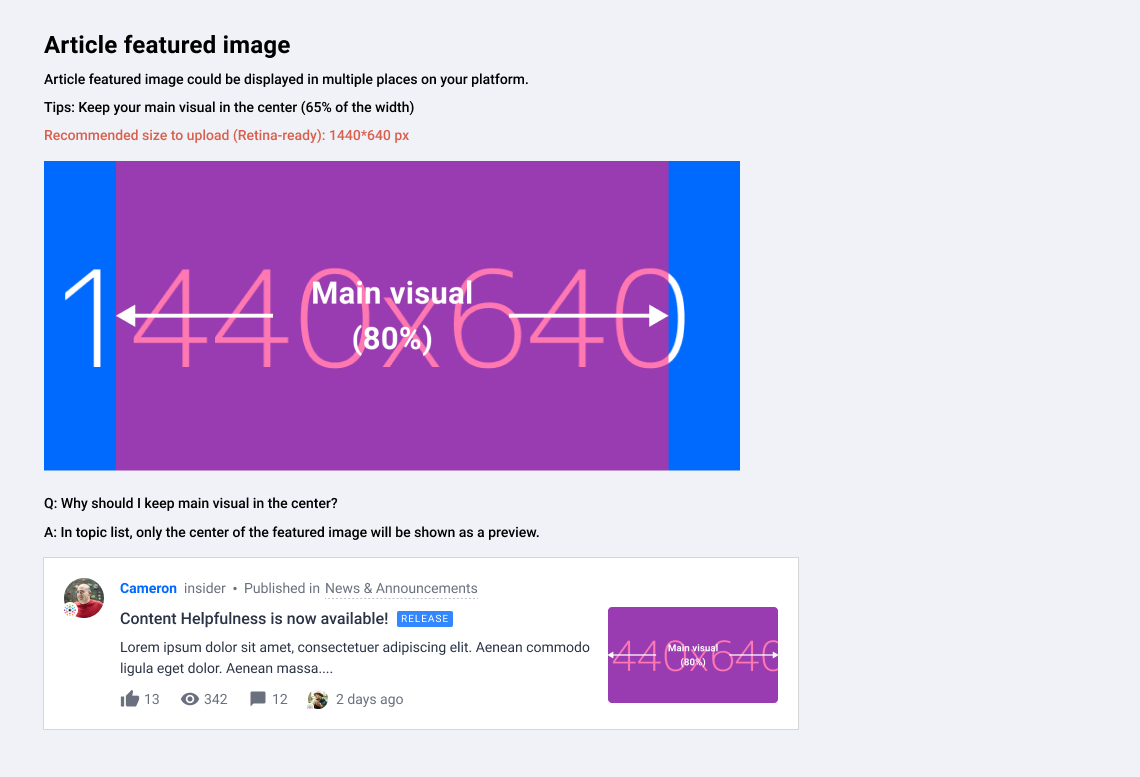


Where and how would article images be displayed on your platform?

Topic page

Example: https://community.insided.com/getting-started-customers-only-33/visual-guide-v2-0-1462
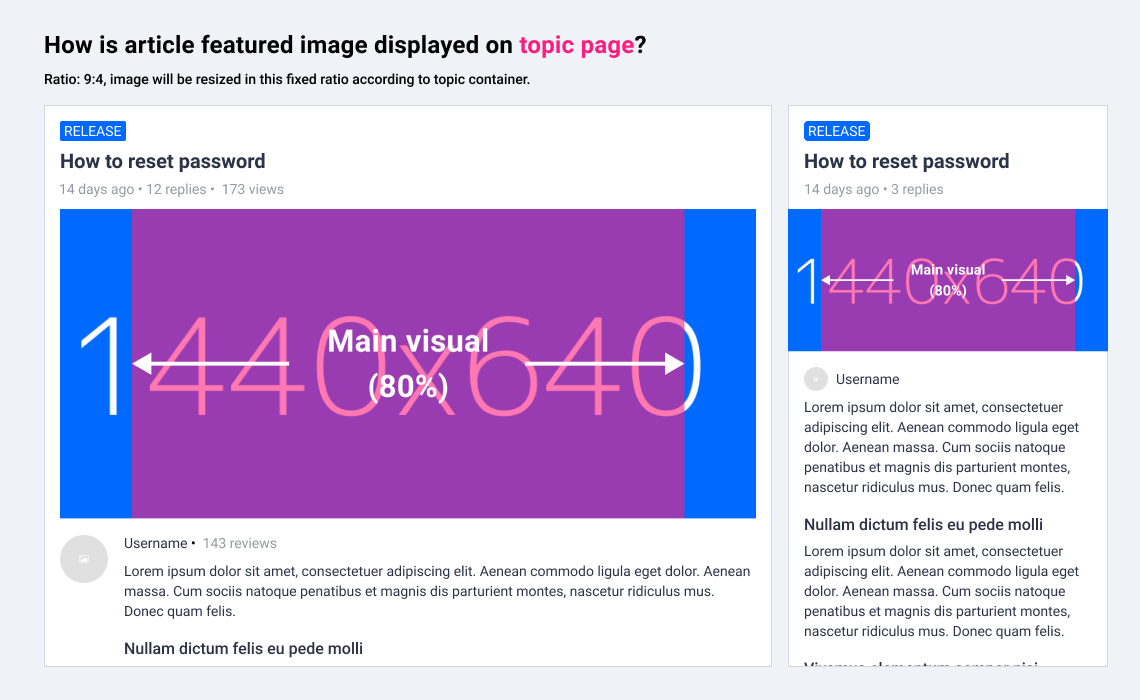
dabb423e-cb54-4268-8429-1d2d5b4ece36.jpg


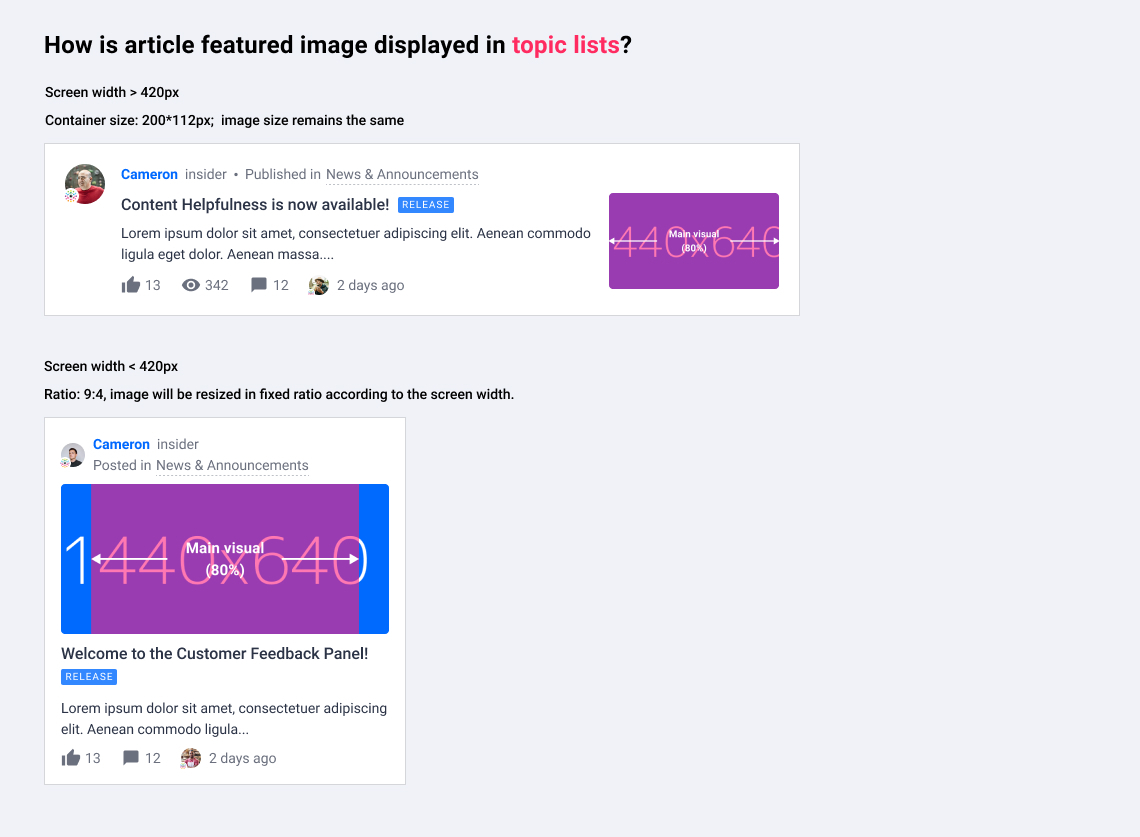
Topic list on homepage/search results/category page/etc.

Example: https://community.insided.com/news-platform-updates-16


Curated content list on category page

Example: https://community.insided.com/news-platform-updates-16
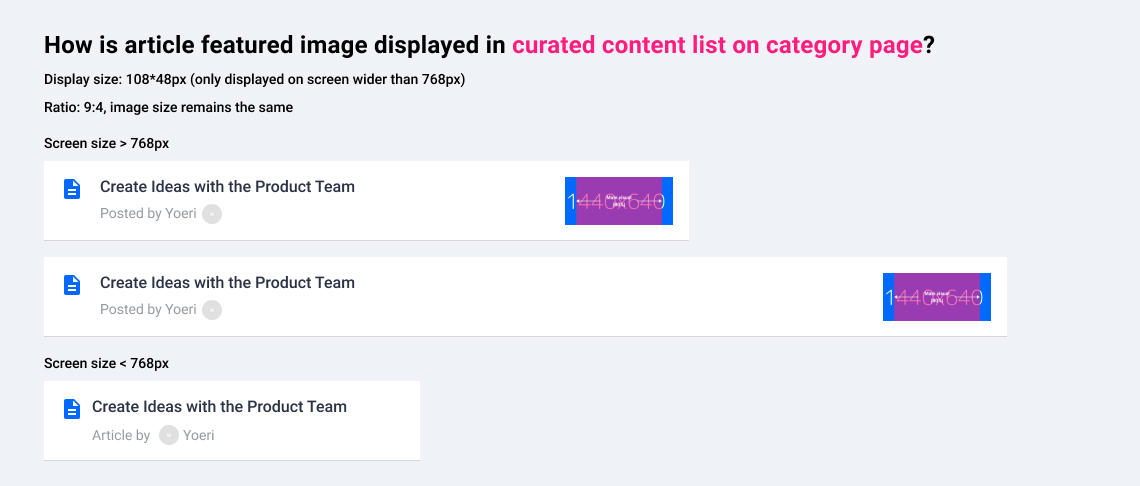
f4d1cdf3-7776-486a-8ed3-d24b635b2d04.jpg


Topic list

ee3dd755-e2b4-401c-ab4a-3e9f80b0399b.jpg


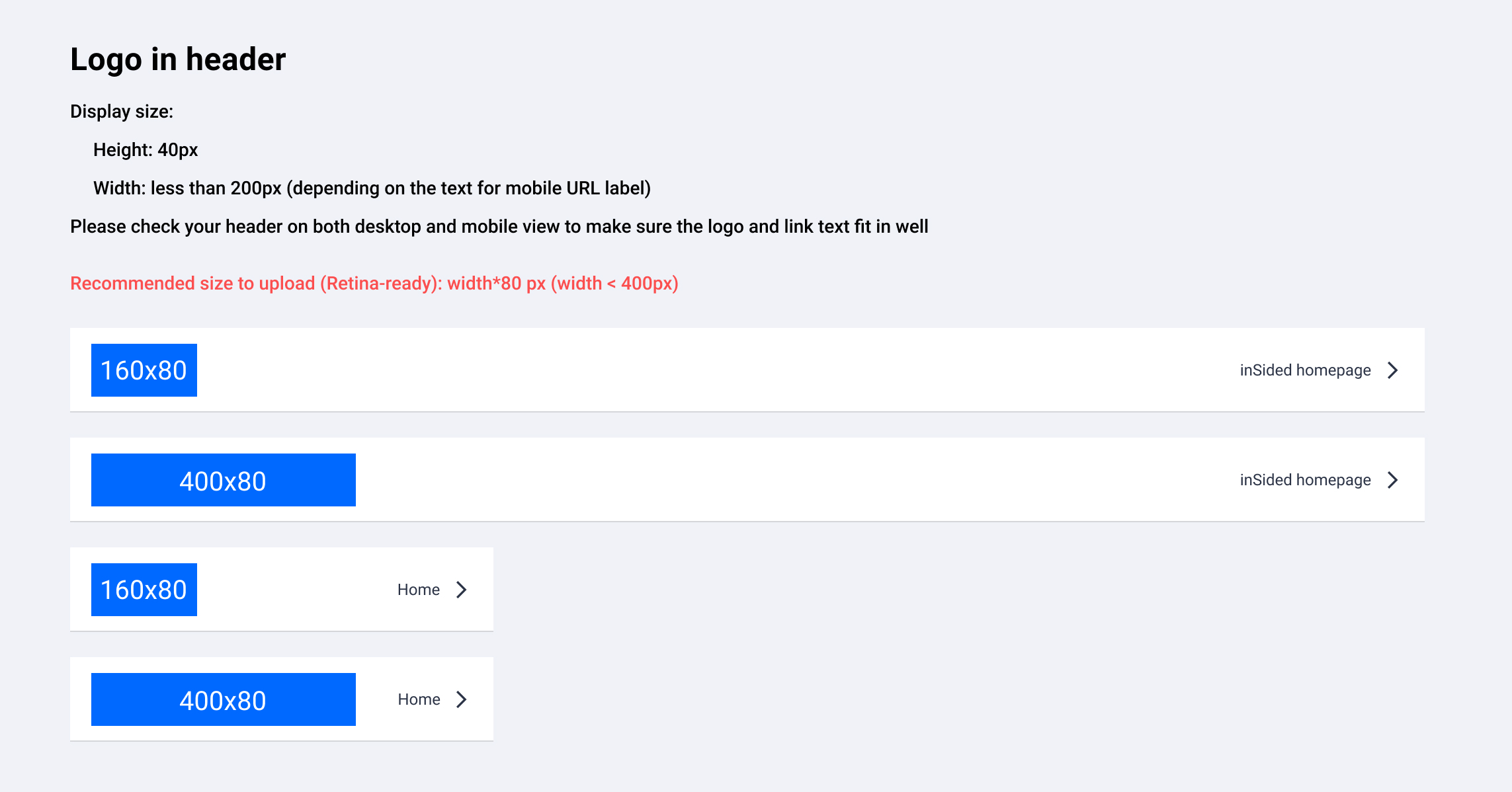
Logo in header

Where to upload? → Control> Customization > Header
 

Missing anything?


Please leave a comment below.😊


23 replies

Claire
Contributor ⭐️⭐️⭐️
April 16, 2019
Thanks for the updated guide! I've just made a test image 720x320 pixels.

When I tried to upload it to my article the uploader forced me to crop a few pixels off the bottom


I've checked how the image is displayed in various places as well.

In the list of 'Recently Active' posts the image is cropped:


It displays fine as a featured topic at the top of the forum (only if there are 2 other cards alongside it).


But in the list of posts in that forum, the image is displayed squashed:


It would be great if you could use one aspect ratio in all of these places so a single image can work, or allow us to upload a different image for display in each of these places. Unfortunately simply making article images 720x320 isn't going to work.
xiaoyu-shen
Helper ⭐️⭐️
April 22, 2019
Hi Claire,
Thanks for your detailed research and suggestion! Indeed, the article image does need more care. I will look into improvements and give you an update.

The image display in post list is a bug. Images shouldn't be squeezed in any case. It will be fixed soon.
Anne
Contributor ⭐️⭐️
May 9, 2019
Hi @Claire,

Great to read the questions and answers allready placed in this topic.

I have a new question:

When looking at this featured image https://community.insided.com/news-platform-updates-16
i see original image sizes of 3178 x 1365 and 3200 x 1371 in the code. So 720 x 320 seems a bit small also the large originals seem a bit large concerning page loading perfermance.

  • Can you give more details about this size difference / what is going on below the hood?
  • Is it wise to create larger files then 720 x 320?
  • Is there a difference in featured image size between Article and non-Article topics?
Thanks,
Anne
User is king
Claire
Contributor ⭐️⭐️⭐️
May 9, 2019
Hi @Anne, those are great questions, I'd be curious to know the answers as well. Maybe @xiaoyu-shen can help?
xiaoyu-shen
Helper ⭐️⭐️
May 10, 2019
Hi Anne,

Regarding your questions:
Can you give more details about this size difference / what is going on below the hood?
While uploading the image in control, you need to crop the image according to the required image ratio. The cropped image will be the image you actually uploaded. That is also the image size you see in code (e.g. 3178 x 1365 and 3200 x 1371). In this step, the image size will vary depending on the image you uploaded and how you cropped it. Our system will resize the images to show it properly in front-end. In some cases, the image needs to be displayed in a different image ratio, then it will be cropped automatically, e.g. homepage hero image.

Is it wise to create larger files than 720 x 320?
The suggested sizes are the smallest sizes that are required to keep the image sharp (retina display considered). A larger image can also work, but it will potentially slow down your webpage because of larger file size.

Is there a difference in featured image size between Article and non-Article topics?
Featured image is only supported in articles.

Back to featured image in article, we are currently working on some adjustments article image ratio. I will give an update after it is implemented. :)

Best,
Xiaoyu
xiaoyu-shen
Helper ⭐️⭐️
June 24, 2019
Hi all,
We've been working on improving article featured image, as well as its visual guidelines. Please check this post for further information: https://community.insided.com/news-platform-updates-16/article-image-design-specs-and-changes-1568
These info will be merged to Visual Guide 2.0 (current article) once they are all implemented.

One upcoming change is the article image in topic list. It will be live in 2 days.

Article featured image in desktop topic list
  • Currently on desktop, article featured images in topic list are displayed in original proportion in a 3:2 container (168*112px). We've noticed some featured images contain a wider visual or long text, which would be cropped quite a lot.
  • What will be changed: To provide a better view, the width of the image container will be changed from 168px to 200px.
  • Action: If you have featured images containing main visual/text, make sure they are visible in the centre. And be aware that featured image will be slightly cropped (10%) on each side in topic list.
Suvi Lehtovaara
Helper ⭐️⭐️
March 19, 2021

Hi @xiaoyu-shen ,


I’m missing guides on visuals to for example Events. I take that the image should be 1200*600, but could you confirm this? :relaxed:

Thanks!

https://yhteiso.elisa.fi/
xiaoyu-shen
Helper ⭐️⭐️
March 19, 2021

That’s correct :) @Suvi Lehtovaara 

And note that the left and right sides of the image would be cropped slightly in card view, e.g. on the event overview page. Please try to keep the main visual and text in the center. :) 

Onomatopoeia
Helper ⭐️⭐️
August 24, 2021

@xiaoyu-shen which asset types are used for the group selection screen? It looks like it’s the article featured images - but the sizes seem to be different depending on whether you’re looking at “My Groups” or “Browse Groups”:


Thanks!

xiaoyu-shen
Helper ⭐️⭐️
August 24, 2021

Hey @Onomatopoeia, happy to help out. :)

How the images get display in the group overview actually depends on the amount of cards in a row. The recommended image size is for the smaller card in your screenshot (so when there’s one or three cards in a row). When there are only 2 cards, the image will be slightly cropped on top and bottom to fill the row.