Your approach above was absolutly right above. There was just one Metatag missing.
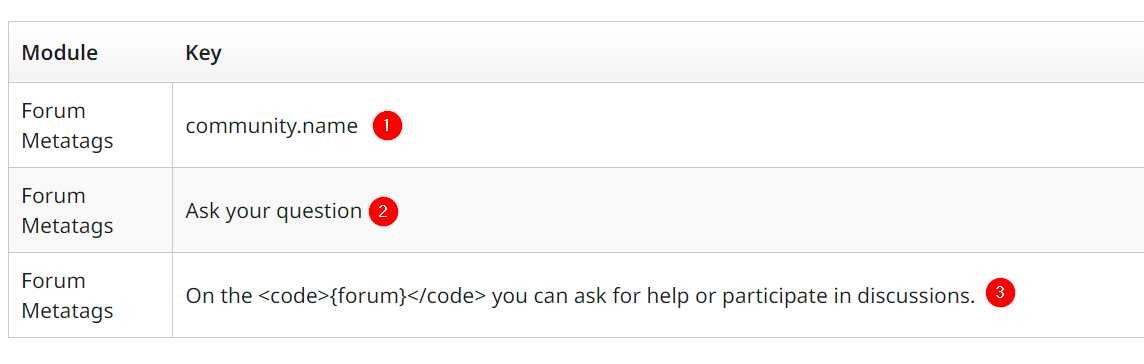
Here are the Metatags i have now to finally customize the link.
Take care when creating the key 3! The <code></code> tags are added automatically. The key to enter is just “On the {forum} you can ask for help or participate in discussions.”
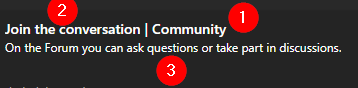
The Forum Metatags above change the Link texts as follows.
Hope this helps everybody who is also struggeling with the link text phrases.
Just as a note: If you test your links by sharing them in a Messenger like MS Teams, make sure to clean the cache! This also costs me a lot of time until I know that key 3 was already correct but i have cached the old version. 😅
Your approach above was absolutly right above. There was just one Metatag missing.
Here are the Metatags i have now to finally customize the link.
Take care when creating the key 3! The <code></code> tags are added automatically. The key to enter is just “On the {forum} you can ask for help or participate in discussions.”
The Forum Metatags above change the Link texts as follows.
Hope this helps everybody who is also struggeling with the link text phrases.
Just as a note: If you test your links by sharing them in a Messenger like MS Teams, make sure to clean the cache! This also costs me a lot of time until I know that key 3 was already correct but i have cached the old version. 😅
If you already have a profile on Gainsight Community, there's no need to create another one. If your email address has changed or you can't remember your login, email community@gainsight.com.
Otherwise, continue with the registration below.