

Daniele Cmty
Helper ⭐️⭐️
November 14, 2022
Question

How to put an "old content" warning?

  • November 14, 2022
  • 21 replies
  • 282 views

Hi there,

in our B2B / Customer Success Community we organise a thorough Community Cleanup (led by @Lena H.) every spring.

Mostly the following

  • Move topics in the right categories
  • Add more public tags to topics
  • See if we missed any follow-up questions
  • For content older >6 months: Check if the content/answer is up-to-date, and add a follow-up if something changed


Especially the last point is very tedious and involves a lot of manual work. As our Community and its content grow, we’re not sure how to tackle this.

Either we keep on checking every single topic and make sure old content is up-to-date (what we’ve been doing)

Another option that we may consider in the future is to kind of “dismiss” old topics and/or add a label/disclaimer that it may be out of date, 
(when i say content i mean mostly User-generated Questions)
→ which would save a lot of work. If a user wants to ask that question again, they can ask a new topic or more simply just follow up in a comment to check if anything changed.

Any thoughts / clever solutions to this?

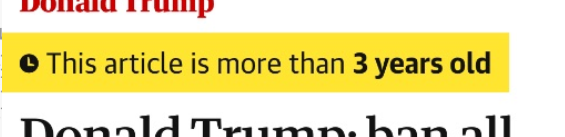
For example, the Guardian has this feature:
Basically, by putting this warning they can free themselves from liability, they don’t have to update the content anymore and the reader knows that the content could  be outdated.


21 replies

Daniele Cmty
Helper ⭐️⭐️
December 27, 2022

HI @bas,

Thanks for getting back.

We will try to move forward with this.
Would custom CSS also be a valid option for what we are trying to achieve?

Daniele Cmty
Helper ⭐️⭐️
December 27, 2022

Otherwise I will have a look at how we can implement it with Webhooks. I have 0 experience in this field but will try to get some help internally :)

bas
Helper ⭐️⭐️⭐️
January 2, 2023

Interesting idea.. unfortunately CSS cannot target the content of html.

You could do this with a piece of javascript in TPS. Tricky to make it robust since you are doing string-matching, so good to consider failure modes. Performance would be something to keep in mind too.

Daniele Cmty
Helper ⭐️⭐️
January 11, 2023

@Daniele Cmty

I would say post a separate idea. This discussion is too valid to push over to that side.


Thanks @DannyPancratz and @Blastoise186 for brainstorming! 


Done!
The idea can be found here:


Daniele Cmty
Helper ⭐️⭐️
January 17, 2023

One brief Idea I had is to change the following phrases:


So if the content is over x Year or over 2 Years old, you could add an addendum like we did below in german 
“(Attention: old Content)”


But I’m not sure if this is visible enough, as it can be easy to overlook.


I think that is the simplest, least risky, but also most elegant solution in terms of results.
However, it’s not too visible.

I’m wondering if there is a way with custom CSS to make the years timestamp a bit bolder / highlighted / in a different color? (bonus: only if it’s older than 1 year, so only when the count is years.)

Can I change the looks of the years timestamp (which affects topics and comments) without having an influence on reply count and views?

Anybody is welcome to answer, but I’m tagging @bas just in case, as I know he’s one of the CSS experts. 

bas
Helper ⭐️⭐️⭐️
January 19, 2023

Not with CSS unfortunately. It can’t change depending on the content of the HTML (so it can’t see if it says “months” or “years”).

Daniele Cmty
Helper ⭐️⭐️
January 19, 2023

@bas thank you - 

Would I still be able to change the appearance of the timestamp only, by using CSS? (without taking into account the content of the HTML)

bas
Helper ⭐️⭐️⭐️
January 19, 2023

As in, to change the formatting of the date?
Yeah, that should be fairly easy, it has a class “qa-latest-post-time” so any CSS that targets it should work, e.g.

.qa-latest-post-time{ background: red };

Would result in the following ugly thing 😀


Daniele Cmty
Helper ⭐️⭐️
January 19, 2023


Hi @bas, thank you so much!

I agree the red highlight is a monstrosity. But a “yellow” highlight doesn’t look too bad 😇


Daniele Cmty
Helper ⭐️⭐️
July 10, 2025


old User-generated topics: add a label/disclaimer that it may be out of date, 
→ which would save a lot of work. If a user wants to ask that question again, they can ask a new topic or more simply just follow up in a comment to check if anything changed.

Any thoughts / clever solutions to this?

For example, the Guardian has this feature:
Basically, by putting this warning they can free themselves from liability, they don’t have to update the content anymore and the reader knows that the content could  be outdated.


Hi ​@Kenneth R

2.5 years later,
This question is becoming more & more relevant for us (as we have a lot more potentially outdated content in our forum, and also some old “evergreen” content) and we would like to check if there are any updates re: the feasibility of this.
Are there any workarounds we could use?
Any other product/Support Folks who could support us with this?

To sum up..​​​​​​​
End goal:

Find a scalable way to avoid confusing our community users when reading potentially outdated content.

How?

​​​​​​​When a topic is older than X months, display a custom message in order to make user extra aware of topic age and encourage them to use extra discretion or ask follow-up questions about a given question.