How to put an "old content" warning?
Hi there,
in our B2B / Customer Success Community we organise a thorough Community Cleanup (led by
Mostly the following
- Move topics in the right categories
- Add more public tags to topics
- See if we missed any follow-up questions
- For content older >6 months: Check if the content/answer is up-to-date, and add a follow-up if something changed
Especially the last point is very tedious and involves a lot of manual work. As our Community and its content grow, we’re not sure how to tackle this.
Either we keep on checking every single topic and make sure old content is up-to-date (what we’ve been doing)
Another option that we may consider in the future is to kind of “dismiss” old topics and/or add a label/disclaimer that it may be out of date,
(when i say content i mean mostly User-generated Questions)
→ which would save a lot of work. If a user wants to ask that question again, they can ask a new topic or more simply just follow up in a comment to check if anything changed.
Any thoughts / clever solutions to this?
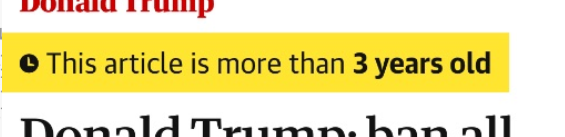
For example, the Guardian has this feature:
Basically, by putting this warning they can free themselves from liability, they don’t have to update the content anymore and the reader knows that the content could be outdated.