

Journey Orchestrator Needs Program Classification, Schedule Visibility, and Priority Bucketing
I've been administering Journey Orchestrator for nearly five years. In that time I've built periodic Active Program Audits, Queue Management reporting, custom analytics on top of Email Logs v2 and AO Advanced Outreach, and an operational framework that keeps a complex JO environment running. I say that not to brag but to establish context - because what I'm about to describe isn't a beginner's complaint. It's what you run into when you're running JO seriously and at scale.
I know I'm not alone on this - if you've ever managed more than a handful of programs, you've felt this too.
The Problem
Every active program in JO looks exactly the same.
Doesn't matter if it's an auto-renewal program with ARR tied to it or a one-time office hours invite. They sit in the same list, with the same visual weight, with zero information about what they are, how important they are, or whether they're even doing anything.
Want to know if a program is scheduled? Open it.
Want to know the send cadence? Open it.
There is a Scheduled Programs widget that gives you an abbreviated list - and credit where it's due, that's a useful starting point. But it's read-only, it has no program context beyond the name, and it tells you nothing about the actual schedule interval. Is it weekly? Monthly? Daily M-F? You still have to open every program individually to find out. None of that schedule information exists as a queryable field anywhere in the platform - not in Data Designer, not in Reports, not in Rules Engine.
I inherited this instance with several hundred active programs and quickly found out that my instance was heavily utilized, but it wasn’t managed I had to click into every single one to find out what was happening, what hadn’t sent and what could be stopped. I also had to teach myself the basics of Queue Management reporting to help make sense of things. The JO UI wasn’t doing me any favors.
This isn't administration. It's archaeology.
I currently maintain 67 active programs - a number I keep disciplined through manual audits because the platform gives me no other way to manage it. I embed scheduling signals directly into program names - putting "1X" in single-send programs, for example - because there is no field to hold that information. I’ve had to resort to using a very descriptive, easter egg laden program naming scheme to help me manage things, and while helpful, these are the workarounds of someone who has been writing their own book on JO administration because that book doesn't exist yet.
I'd bet most of you reading this have your own version of these workarounds.
What's Missing - In Plain Terms
Three things. That's it. Three things that would fundamentally change how JO is administered:
1. Program classification at setup
When I create a program, I should be able to designate what kind of program it is. Single send. Recurring clone. Lifecycle. Evergreen. Strategic. That classification should live on AO Advanced Outreach as a queryable field - visible in Data Designer, Rules Engine, Reports, and any list view I build. Right now it lives in my head and in my naming conventions.
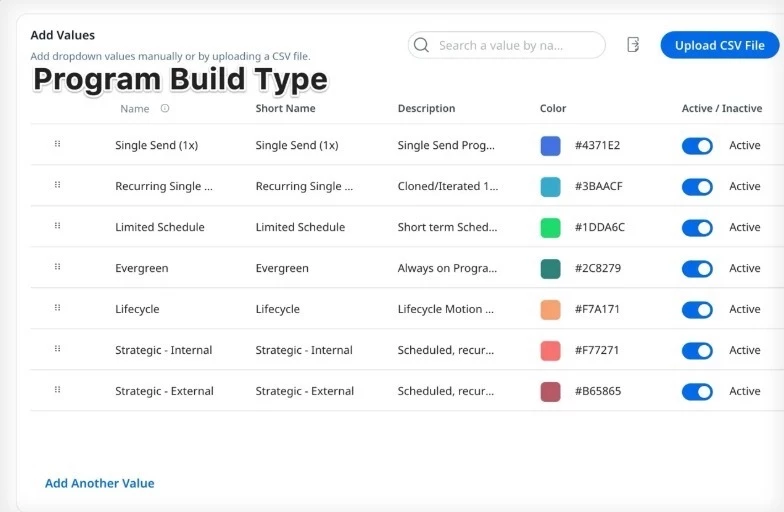
2. A scheduled Boolean and send interval field on AO Advanced Outreach
Is this program scheduled? True or false. That field does not exist natively. Neither does a field that captures what the schedule actually is - the cadence, the day, the interval. That information lives in the UI calendar and nowhere else. It is inaccessible to any query or report.
3. Days since last send as a native signal for active programs
An active program that hasn't sent in 90 days looks identical to one that sent this morning. JO does not turn off the lights when a program goes dark. This needs to be surfaced natively - not as a Data Designer workaround that every admin has to build themselves.
What the Setup Screen Could Look Like
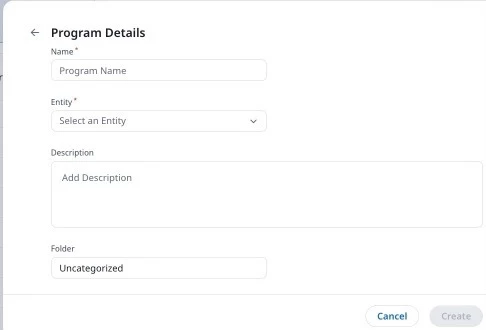
Here's the current program creation experience contrasted with what would be helpful/what I envision:
The revised version includes - a classification dropdown, a scheduled checkbox, and a send interval field that appears when scheduled is checked:
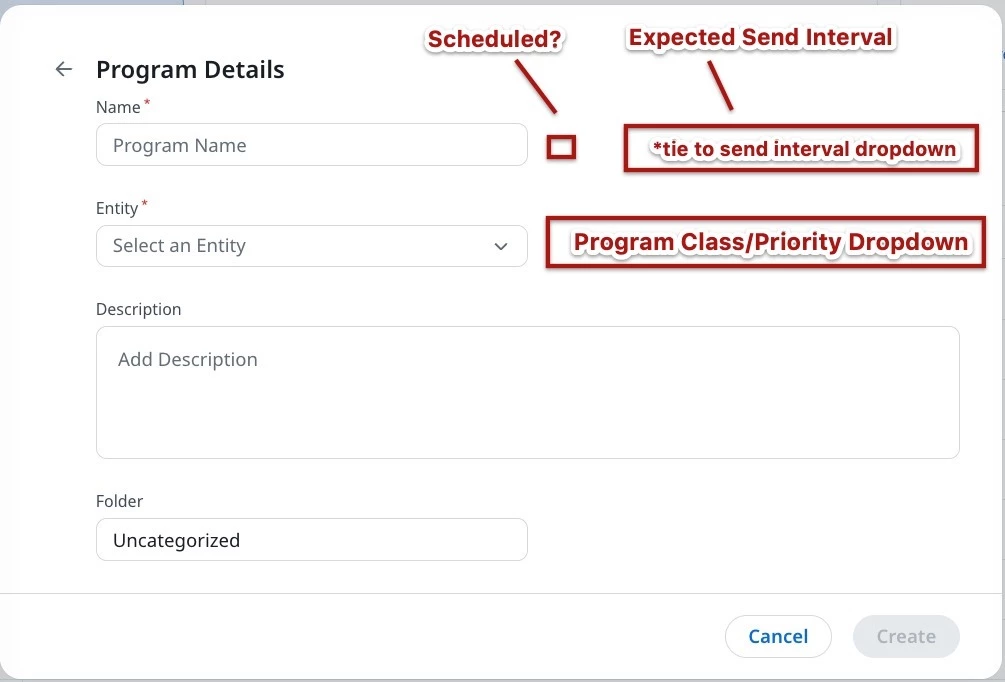
Three fields added to a screen that already exists. That's the entirety of the core ask. Classification and schedule intent captured at creation, living natively on AO Advanced Outreach, queryable everywhere.
A Few More Things on the Wish List
While we're here - these would also be game changers:
- Program pause date and stop date - recorded automatically when an admin changes program status, with the name of the user who did it. Not a GSID. A name. This matters enormously during audits.
- Rule execution failure detail - the existing failure widget is a good start. Add the date of last failure and consecutive failure count and it becomes actually actionable.
- Active programs not sending - Active programs not sending - surface this natively. Programs that are active but have gone silent are invisible dead weight right now. Admins shouldn't have to build custom Data Designer logic to find them. The current widget shows programs that haven't sent in the last 14 days, and this isn't configurable. I still have to manually check this and it takes considerable time at scale.
The Bigger Picture
What I'm really asking for is a way to bucket and monitor programs by what they actually are - not just that they exist and are active. A classification layer. A priority tier. Schedule visibility. The ability to look at my program list and immediately know what's scheduled, what's critical, what's broken, and what's dead weight.
Product has started moving in this direction - the Idle Programs (no send in last 14 days) and Active Schedules widgets are evidence that they understand the gap. But those widgets are a flag without a fact. Idle for how long? Scheduled with what cadence? The data layer underneath them is still missing.
If you've felt any of what I'm describing - programs that all look the same, schedules you can't query, audits you have to run manually - give me a like. The more of us making this case the better, and I know I'm not the only one thinking this. Cheers.