Helpful Hover Text in Dynamic JO Snapshot View
Related to
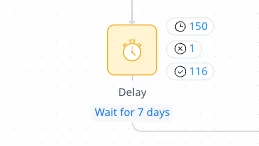
It’d be great to have hover text on the participant numbers for evaluate steps that gave a summary of what the participants were doing so we didn’t need to click into the participant info to see an overview. It makes sense for a Delay step, but for the evaluate steps, it can be hard to tell whether participants are just stuck, or if they’re waiting because there’s an action execution schedule preventing them from proceeding to the next step.
*Note – this is mainly an issue while testing evaluate step criteria prior to launching a new JO.
Unfortunately, the only way I can think of getting around this is with a workaround: to add a 1-minute Delay step between the Evaluate step and the action step if we want to confirm participants are flowing through the evaluate step correctly.