darkknight
Expert ⭐️
June 15, 2018
New Idea

Rule Execution Logs from Scheduled runs not containing Action Details

  • June 15, 2018
  • 25 replies
  • 206 views
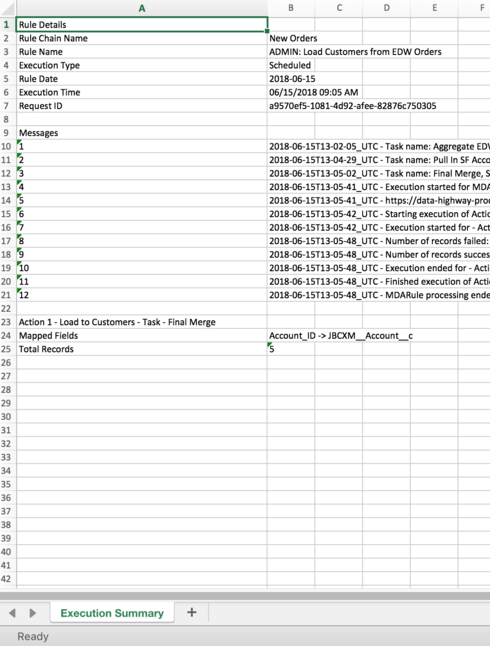
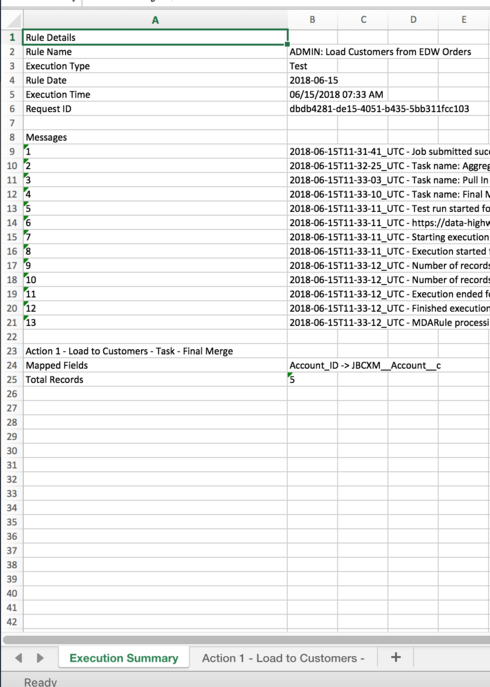
When a rule chain scheduled rule runs, the execution log does not contain the Action results the way a manual run does.

Scheduled:


Manual: 


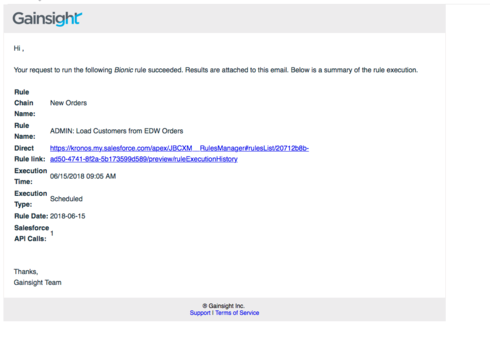
Worse still, the email that comes through doesn't even tell me the number of records from the Action the way a manual rule does:

Scheduled:


Manual:
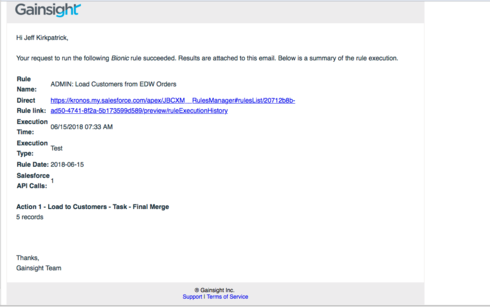


This increases the level of effort required to monitor/troubleshoot.

    25 replies

    jitin_mehndiratta
    Helper ⭐️⭐️⭐️
    June 19, 2018
    Hi Jeff,

    When you click on a Rule and go to "Execution History". It shows the execution logs for each execution of that rule.
    Does that not help?

    Regards,
    Jitin
    darkknight
    Expert ⭐️
    June 28, 2018
    Hi Jitin - no it doesn't because the execution logs do not show the results of the ACTIONS in the rule.
    Jeff Kirkpatrick
    darkknight
    Expert ⭐️
    June 28, 2018
    How high can we move this up on the priority list?  Without this capability it makes it very hard to troubleshoot when a rule "succeeds" but didn't process the actions as expected.
    Jeff Kirkpatrick
    scotty
    Contributor ⭐️⭐️⭐️⭐️⭐️
    August 20, 2018
    I would love it if the outputs were the same! The output would be very helpful for scheduled runs!
    manmeet_dosanjh
    Helper ⭐️
    August 21, 2018
    Thanks for posting this! I have this same issue when troubleshooting rules and it would be a great help if it included the action details. 
    matthew_lind
    VIP ⭐️⭐️⭐️⭐️⭐️
    August 23, 2018
    There's one (admittedly awful) work-around, which is to add an Action that WILL fail, then add your email to the rule or rule chain in the "On Failure" section. 

    If you add an action that fails, and you receive email notifications for failures, the email notification contains tabs for all Actions, success and failure, and you can review those logs.

    Of course, this means you're purposely setting up a rule to fail just to become eligible to receive automated documentation, which is definitely not a best practice, and will give you headaches if you're monitoring your Rules Engine for true failures, since you're essentially creating a false positive.

    I too miss this detailed documentation on successful rule runs, but I've just lived with it and scrambled around it when necessary.
    Making people their best....currently disguised as a CS Ops Architect. How can I contribute to your success?
    darkknight
    Expert ⭐️
    September 11, 2018
    Perfect example.  I had a rule fail today that has 6 actions that trigger CTAs.  3 of them failed with an error message " Operation not valid for this user type" but it doesn't say which records failed.

    I know what that means, but since the file doesn't include which records were successful so it makes my job harder to have to figure out which records failed.

    Jeff Kirkpatrick
    darkknight
    Expert ⭐️
    October 9, 2018
    Can we get an update on whether or not this is on the short term roadmap? It's a major administrative pain. 
    Jeff Kirkpatrick
    prithvi_vihari
    Helper ⭐️
    November 30, 2018
    Agree!

    diana_luo
    Contributor ⭐️⭐️⭐️⭐️
    November 30, 2018
    Agreed! Appreciate the notifications of successful & failed runs, but it'd be so much more helpful and actionable to have this additional level of detail. Thanks!