

Hidden Phrases: (Customer Communities standard) Login / Registration pages
Some text strings on the community cannot be edited with our live-edit tool, e.g. when you can only see a text string when you are not logged-in. In these cases, you will have to add the phrase manually. For this you will need to know the codes so you can add it via the Control environment in Control → Customization → Phrases.
In this topic you can find the details to change the phrases on your login & registration pages.
How to change a text
- Navigate to Control → Customization → Phrases.
- Click Add phrase
- Add Module and Key in the details panel (see list of modules and keys below)
- Provide Translations in the Translations panel
- Click Save changes, your new phrase should be applied
Mega menu login button
Module: Common
Key: main.navigation.login
The login page
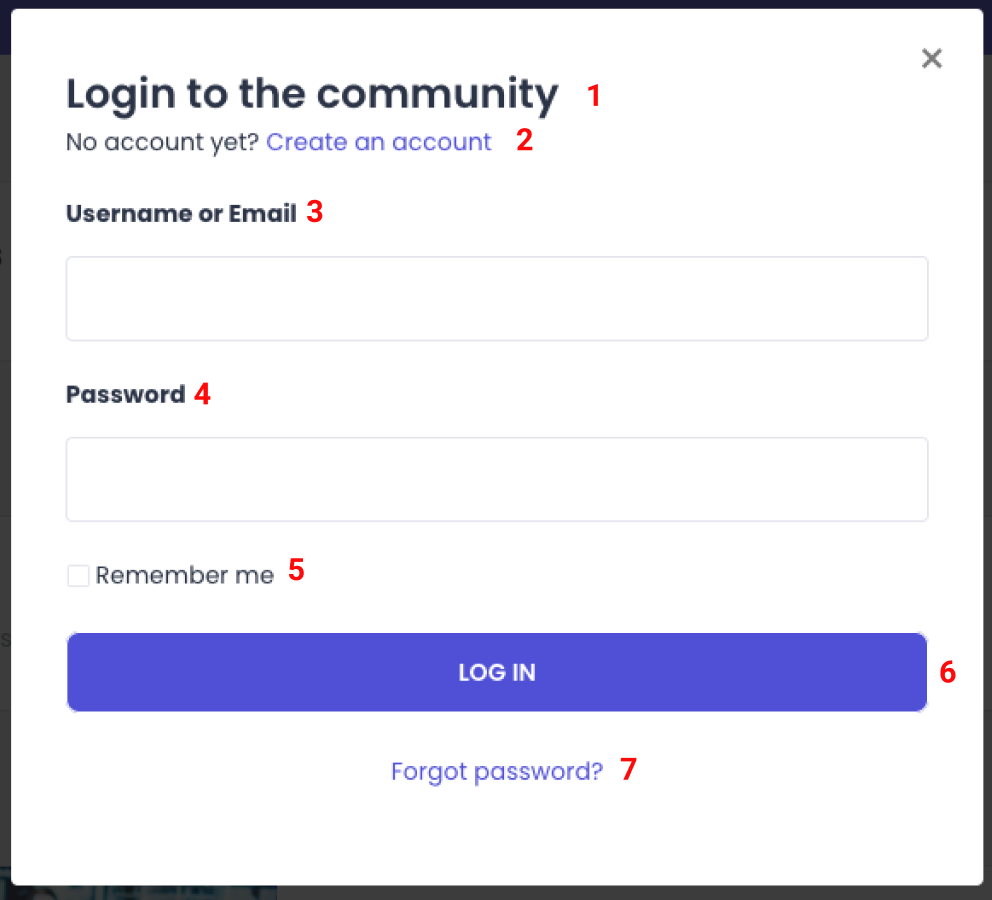
1. Title
Module: Common
Key: login.detail.title
2. Description*
Module: Common
Key: login.detail.descriptionWithRegistrationLink
*Add the variable {registrationLink} to the description to include a “Create account” link
Create account link
Module: Common
Key: common.loginBox.register
3. Username or Email
Module: Common
Key: loginBox.usernameOrEmail
4. Password
Important: Changing this will also change the phrase on the registration page
Module: Common
Key: loginBox.password
5. Remember me
Module: Common
Key: loginBox.rememberData
6. "Log in" button
Module: Common
Key: loginBox.login.button
7. Forgot password?
Module: common.loginBox.forgotPassword
Key: Forgot password?
Login page error messages
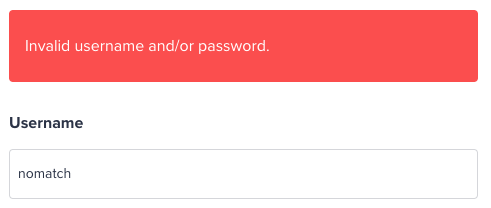
Invalid username/password:
Module: Common
Key: validation.login.invalid
This username already exists.
Module: Forum
Key: This username already exists.
The registration page
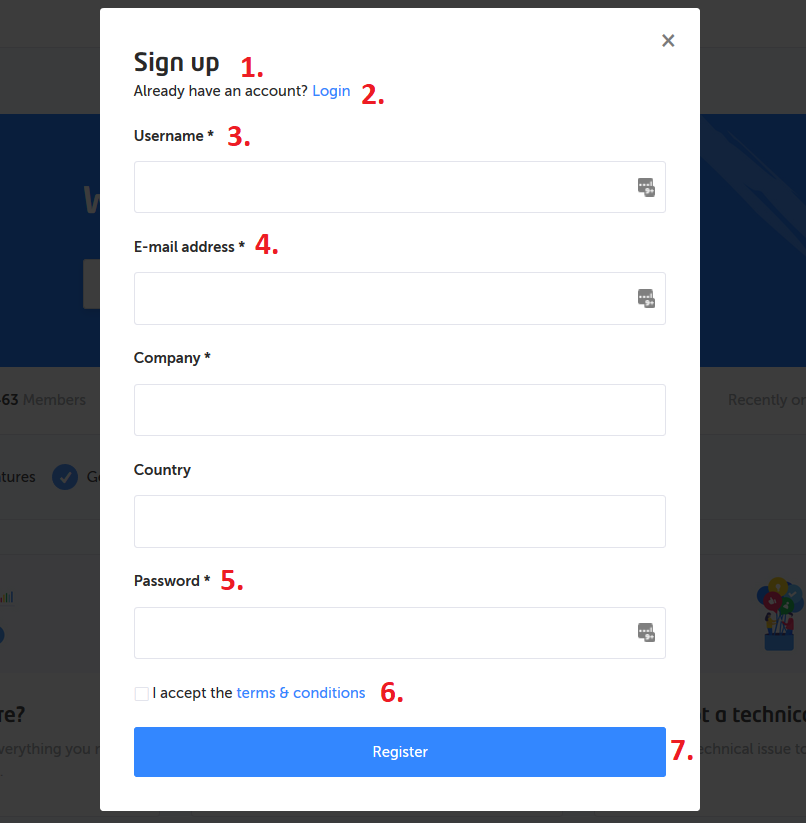
1. Title
Module: Common
Key: registration.detail.title
2. Description*
Module: Common
Key: registration.detail.descriptionWithLoginLink
*Add the variable {loginLink} to the description to include a “Login” link
Login link
Module: Common
Key: registration.detail.loginLink
3. Username
Module: Common
Key: loginBox.username
4. Email Address
Module: Common
Key: loginBox.emailaddress
5. Password
Important: Changing this will also change the phrase on the login page
Module: Common
Key: loginBox.password
6. I accept the terms & conditions*
Module: Common
Key: loginBox.terms
*Will automatically be replaced by the system with your platform terms url
7. Register button
Module: Common
Key: loginBox.register.button
Registration page error messages

Please accept the terms of use
Module: Forum
Key: Forum condition not accepted
E-mail address is required
Module: common.models.user
Key: email_required
You haven't entered user profile field*
Module: Common
Key: validation.genericProfileField.required
*This error is being displayed when a mandatory custom profile field has not been entered by the user. The text is using a variable to name the custom profile field that this error is about.
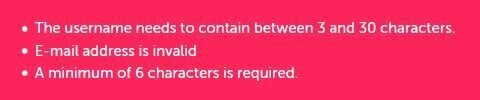
The username needs to have at least 3 characters and not more then 30 characters.
Module: Forum
Key: The username needs to have at least 3 characters and not more then 30 characters.
E-mail address is invalid
Module: Forum
Key: E-mailaddress is invalid
A minimum of 6 characters is required
Module: Forum
Key: Password need to contain at least 6 characters
We cannot process your registration. Please contact the moderator
Module: Common
Key: registration.spam_prevention.error
Your username appears to be a phone number. Please try another username.
Module: Forum
Key: validation.username.is.phone.number
Your username contains restricted text. Please try another username.
Module: Forum
Key: validation.username.restricted.text
Private community registration page:
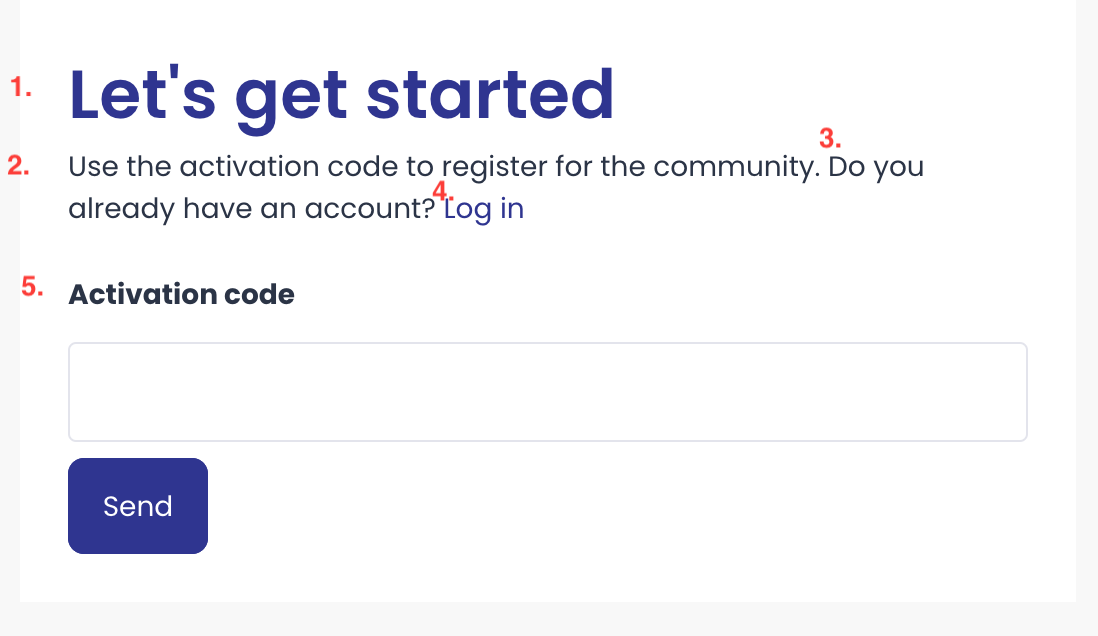
1.Let’s get started:
Module: Common
Key: privateState.register.title
2.Use the activation code…
Module: Common
Key: common.visibility.unlockregistration.description
3.Do you already have an account
Module: Common
Key: privateState.register.alreadyhaveaccount
4.Login link
Module: Common
Key: common.visibility.private.link.login
5.Activation code
Module: Common
Key: Activationcode
Phrases for custom profile fields:
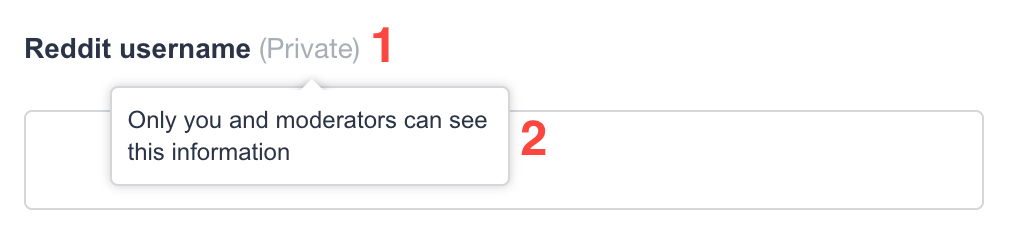
1.(Private)
Module: Common
Key: profilefield.visibility.private.label
2.Tooltip text
Module: Common
Key: profilefield.visibility.private.description
SSO Phrases

1.Login with SSO
Module: Common
Key: sso.title
2. Login with SAML2
Module: Common
Key: common.sso.oauth.login.saml
3. OpenIdConnect
Module: Common
Key: common.sso.oauth.login.openidconnect
4. Login with Openid
Module: Common
Key: sso.openidconnect.login.title
5.Title - Login with Token
Module: Common
Key: sso.token.login.title
6. Login with Token
Module: Common
Key: common.sso.oauth.login.token
7. Login with oauth
Module: Forum
Key: Login with oauth
UPDATE:
An easier way to change login and register pages is now available. While logged in as an admin you can change the phrases as you normally do by going to the following URLs
Login Page: your-community/member/login?live_edit=1
Registration Page: your-community/member/register?live_edit=1
*Note: the registration page does not work for private communities that use a registration code.