
Solved

How does the Engagement exclusion targeting filter work?
  • November 15, 2019
  • 2 replies
  • 89 views


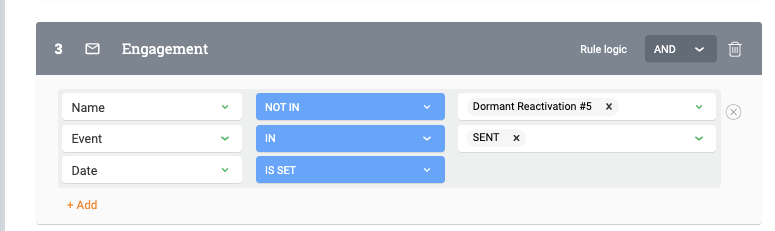
I cannot figure out how this filter works. I simply want to exclude anyone who was in the Dormant Reactivation #5 campaign, but find it impossible to understand this filter.


Is it: 

  • Not in > in: sent > is set
  • Not in > not in: sent > is not set
  • Etc?


So many many possibilities but no one makes sense to me.


Best answer by harshibanka

Hey @oskarmelking,


Thanks for asking the Community!

Unfortunately, we do not support ‘exclusion rules’ in PX currently which means you can select who you want to target but not specifically who you want to exclude.

So, while the above rule you set, ostensibly is right but it doesn’t work in the way of exclusion.

2 replies

harshibanka
Forum|alt.badge.img+2
  • Gainsight Employee ⭐️⭐️
  • Answer
  • November 19, 2019

Hey @oskarmelking,


Thanks for asking the Community!

Unfortunately, we do not support ‘exclusion rules’ in PX currently which means you can select who you want to target but not specifically who you want to exclude.

So, while the above rule you set, ostensibly is right but it doesn’t work in the way of exclusion.


  • Author
  • Contributor ⭐️⭐️
  • November 19, 2019

Hmm, the filter is still very confusing. Is there a guide on how to use this type of filter? Are you saying that there are some combinations that just don’t work? There are “Not in” and “Not set” options, which makes it seem like it’s excluding. 


What does “Not in > in: sent > is set” mean? 

What does “In > in: sent > is not set” mean? 

What does “Not in > in: sent > before data X” mean?

Etc.


I can’t really figure out what any combination of this means.