
Helper ⭐️⭐️⭐️
February 2, 2022

[Beta release] New Community overview page

  • February 2, 2022
  • 27 replies
  • 937 views
[Beta release] New Community overview page

We are delighted to release in Beta the new Community overview page :)

A couple of months ago, we released a new overview page for the Knowledge Base. We are now releasing a similar feature for the community module in Beta.

Our objective is to provide a page for end-users to explore all the community content. By using the community overview page, you can free some space on the homepage to be used as a "Customer Hub" landing page, making it easier for your end-users to explore all the resources available. Read on to see what we mean by "Customer Hub." :sunglasses: .


What's new?

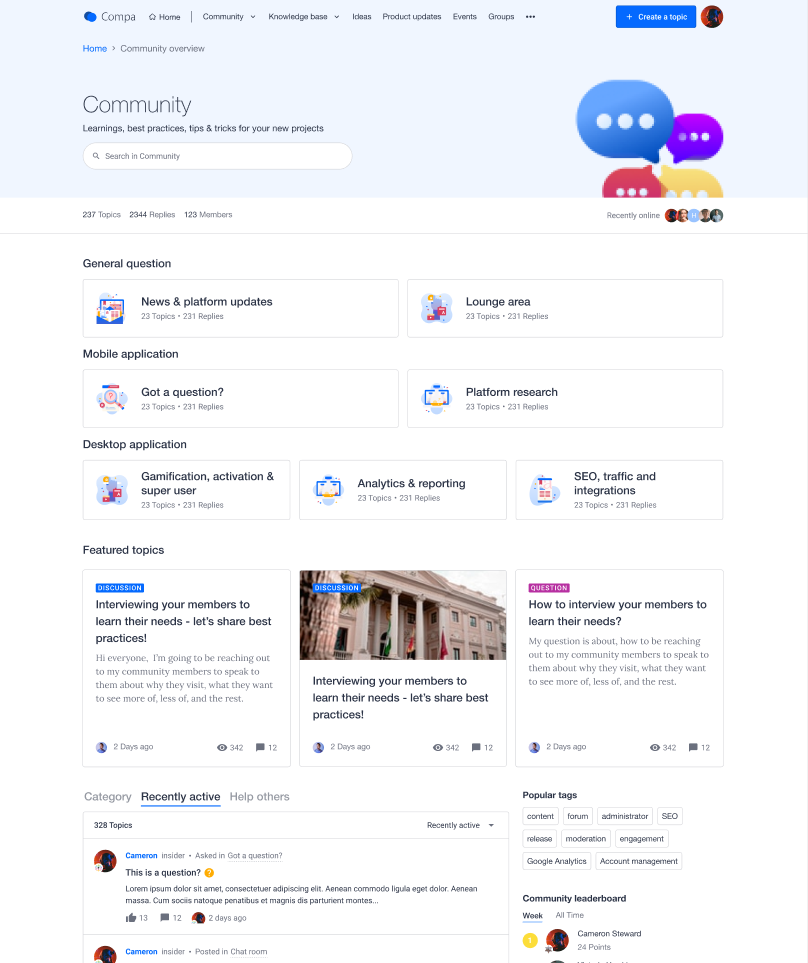
Customizable Community overview page

The main news is that this page now exists! And you can configure the look and feel of widgets displayed on the Community overview page. The rest of your theme will apply automatically. 
Link added to Mega Menu

The link to the Community overview page will be accessible from the Mega Menu in the Community dropdown. 
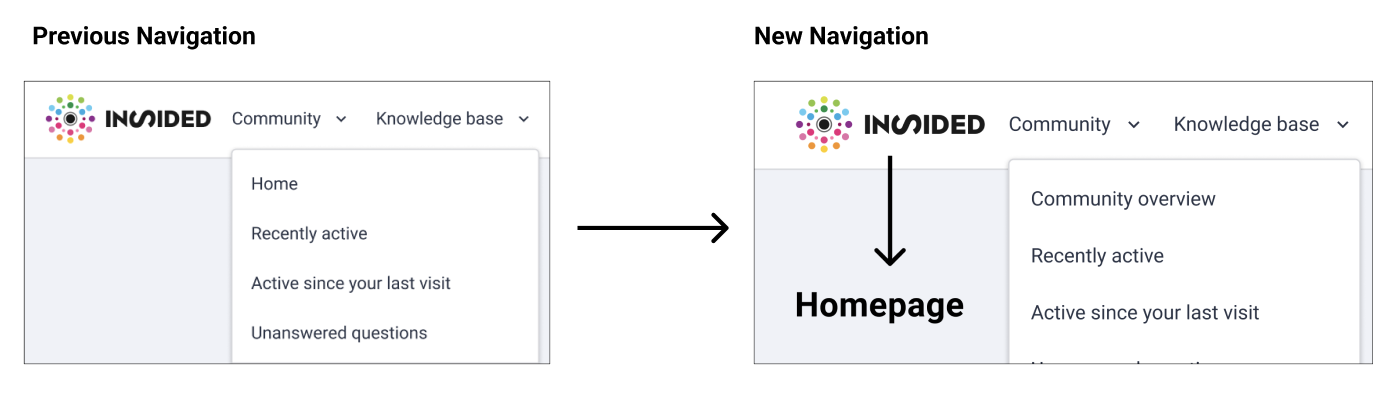
Side note: In parallel to the Community overview beta, we will run A/B tests around the discoverability of the overview pages in the Mega Menu. More to come on that topic soon :)


What is a Customer Hub?

A Customer Hub is a platform that serves as a destination for all customer communication, CS resources, and peer-to-peer best practices and knowledge exchange. It's the epicenter of your Digital Customer Success strategy. Through a Customer Hub, customers and users can access onboarding, adoption, and support content to help them reach and realize value faster throughout their customer journey. A Customer Hub enhances the customer experience by driving engagement, speeding up time to value, and fostering community.


Why do you need a Customer Hub?

Users often have trouble finding the right content at the right time. In addition, the typical split across multiple platforms (LMS, Support platform, Knowledge Base, Community…) creates confusion and friction in the community customers experience. Finally, there's a clear need to integrate CS and CRM tooling and data with a customer-facing portal to centralize information about the customer journey to understand better and improve the customer experience. 


Whether users are looking to share an idea, access training, or are just checking out a new product release, we want to offer them a single, centralized space to go: the "Customer Hub." We see a "Customer Hub" as the primary tool to help them achieve their goals and guide them to find the right content. 


How can I test the Community overview page?

Check out this article to learn how to set up and test the page:

Based on the number of InSided modules you use we recommend a different use for the community overview. The below article highlights best practices to structure your Community overview based on your use case:


Note: We enabled the feature on both your production and staging environments. 


As this feature is in beta, please share all the feedback you may have on this feature!

  • Are you happy to use this feature in its current status? If not, why?
  • Are you seeing things you would like to improve?

    27 replies

    Kseniya
    Contributor ⭐️⭐️⭐️
    February 2, 2022

    Sounds interesting, @Marion Frecaut, even though I have a few questions :blush:

    Could you please elaborate a bit more on difference between homepage and community overview page? 

    Usually homepage serves as community overview with quick links, key projects navigation and news.

    Probably I am missing something, but would be great to hear your feedback!

    Gabolino
    Helper ⭐️
    February 2, 2022

    Still need to look closely at this one. It seems like this may be a good move for some communities, but not all. 

    If you're making full use of InSided's modules and have a clear and distinct strategy for each of them this is a good way to split visitors by community area, as opposed to product areas. It may serve well community managers working on big and complex communities as it simplifies navigation 'at a glance'. 

    However if your community has a single use case (or two) and you arent using the Knowledge Base, Ideation, etc, this may be a little too much and something that your community home page can solve without the need of adding an extra layer to the entire community ecosystem. 

    Just my 2cents.

    I'll have a closer look these days to understand the new overview a little better and see if it's a good addition for our community (or not). 

    SmartlyGreg
    Helper ⭐️⭐️⭐️
    February 3, 2022

    @Gabolino I think you are absolutely 100% spot on with your analysis. Unless we are missing something I feel exactly the same way as you!

    Helper ⭐️⭐️⭐️
    February 3, 2022

    Hello @Gabolino @SmartlyGreg  thanks for your for raising this very interesting point. @Kseniya I feel the below can help answer your question as well. 

    Indeed based on the number of InSided modules you use we recommend a different use for the community overview:

    If you are using only the community module:

    • Your homepage should be used for highlighting content (e.g. featured topic widgets) and showing engaging content like user activity (e.g. “recently active” content stream).
    • Your community overview page should be used to showcase all the categories in the community module. Kind of like a "Table of content" at the beginning of a book. 


    If you are using multiple InSided modules OR you want to use the InSided platform as Hub to redirect your users to various tools outside on InSided (KB, LMS):

    • Your homepage should be used to present all the resources available across the modules and tools. The homepage should welcome users, explain the value they find. The homepage should also guide them to find the right content at the right time
    • Your community overview page should gather all the community related content. It should be as engaging as possible. Users should have that “community feel”, that this is the area where they can speak up and connect with others. The goal should be to display activity feeds, promote interesting content (that stimulates engagement), and show many call-to-actions. 

    I also recommend having a look at the best practices article by @Julian to see more in details how we recommend setting up the pages


    Thanks again for raising this. I will update the above product update to make it more explicit. 

    Do let me know your thoughts on this :)

    Gabolino
    Helper ⭐️
    February 3, 2022

    I'd also add the the URLs / naming "Community Home" and "Community Overview" can lead to confusion. For most mortals out there Home and Overview may sound like the same thing, so if I'm using the Overview Page then I need to make sure Community Home (the current home page) has a different name (maybe forum) to avoid misunderstandings. 

    Just adding another 2cents to the previous ones which makes a total of 4cents 🤣

    Kseniya
    Contributor ⭐️⭐️⭐️
    February 3, 2022

    Thanks, @Marion Frecaut! It makes sense now :blush:

    You gave me an idea of trying this page as community projects overview, programs we run VS sections in community e.g KB etc./tools outside inSided.

    I can’t put all of the community programs on the homepage and sometimes I feel like it lacks visibility. I have them in General information now, but maybe it’s better to put them in this type of page.


    I will test it and provide you with the feedback.


    Appreciate additional comments, @Gabolino:pray_tone3:  

    February 5, 2022

    @Marion Frecaut is there a reason this isn’t something that can be turned on/off?

    We’re interested in exploring if a fit, but this has us concerned as there’s no way to remove it if we find it doesn’t work for our members:


    Gabolino
    Helper ⭐️
    February 5, 2022

    @Marion Frecaut is there a reason this isn’t something that can be turned on/off?

    We’re interested in exploring if a fit, but this has us concerned as there’s no way to remove it if we find it doesn’t work for our members:


    I noticed that too and I do think it's odd you can't enable and disable depending on needs. 

    I'd also like to add another question to yours if you don't mind me :) 

    What if the community overview is not a fit for our community? Can we keep it permanently turned off? The message is worded in a way that seems to indicate we need to adopt this feature. 

    nicksimard
    Contributor ⭐️⭐️⭐️⭐️
    February 8, 2022

    This is definitely interesting, though I think it would be more flexible to simply have the ability to create new pages and use the URL/slug that you want. Then use the modules just as this page and the homepage do. Then it’s not so rigid.

    Maybe somebody wants community.company.co then put the topics on /forum, then put articles on /articles then put product updates on /changelog (or whatever).

    I understand that you’re basing this on the 5 parts of the platform (community, kb, updates, ideas, groups) but my hunch is that most people would prefer a page builder with the ability for custom slugs, and a mega menu with custom dropdowns. I feel like this would solve SO many issues that currently exist, in terms of how to set up a community with inSided :)


    Come check out the Zapier Community (built with inSided) at https://community.zapier.com!
    Sebastian
    Helper ⭐️⭐️⭐️
    February 9, 2022

    This is definitely interesting, though I think it would be more flexible to simply have the ability to create new pages and use the URL/slug that you want. Then use the modules just as this page and the homepage do. Then it’s not so rigid.

    Maybe somebody wants community.company.co then put the topics on /forum, then put articles on /articles then put product updates on /changelog (or whatever).

    I understand that you’re basing this on the 5 parts of the platform (community, kb, updates, ideas, groups) but my hunch is that most people would prefer a page builder with the ability for custom slugs, and a mega menu with custom dropdowns. I feel like this would solve SO many issues that currently exist, in terms of how to set up a community with inSided :)


    @nicksimard Thank you for your feedback and addition, this is something that’s on our radar and aligns with our vision of offering more flexibility in setting up your community as a customer hub. Can you give us some examples of what custom pages you would like to build? I.e. titles, use cases, etc.?