
Helper ⭐️⭐️⭐️
October 7, 2020
Beta release

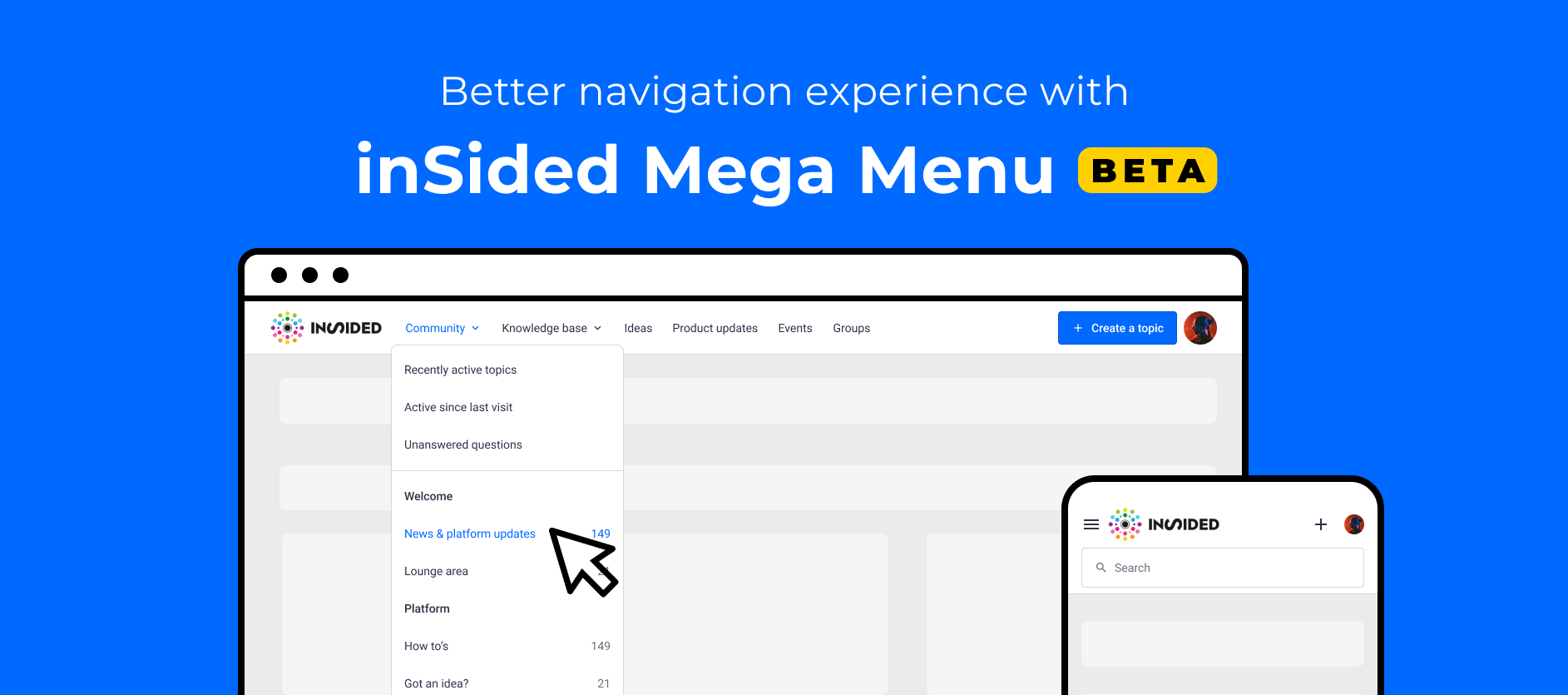
Check out the new "Mega Menu" widget on InSpired
  • October 7, 2020
  • 31 replies
  • 1027 views
Check out the new "Mega Menu" widget on InSpired

As we are adding more and more new modules, e.g. knowledge base, events, groups, product updates, ideation, we felt our existing navigation was not ideal to help users quickly find and discover the different areas of the community. We also wanted to easily allow having custom links in the navigation.


So meet the "Mega Menu"!


Thanks a lot for everyone who gave feedback on this research article and helped design this widget:

 @mstone  @aluciani  @Milla  @Kseniya  @LPortalupi  @Casstastr0phee  @Hiewwaiy  @bjoern_schulze

I will get in touch to allow you to test this Beta version!


The "Mega menu" widget allows you to:

:white_check_mark: Have a horizontal menu rather than a burger menu on desktop

:white_check_mark: Make navigation between modules more explicit

:white_check_mark: Add a logo (optional)

:white_check_mark: Enable, disable and reorder module links to knowledge base, events, groups, ideation, product updates. 

:white_check_mark: Rename entries in the menu

:white_check_mark: Add custom links to external sites

:white_check_mark: Have a search bar in the navigation

Note: It is possible to enable this new "Mega menu" widget with an SSI header :)


How to beta test the "Mega Menu" widget

If you want to have early access, you can get in touch with me or your Customer Success Manager to get it enabled in staging. You can also leave a reply below to let us know.

You will be able to switch to this new navigation using the customization mode of the home page.

Check out our knowledge base article to start using it.


What's next?

Before we officially release this widget, we are thinking of adding some extra functionalities:

  • Have permissions impact the menu (for example, end-users who can't access ideation will not see the Ideation entry in the menu)
  • Have child custom links within each entry of the menu
  • More color settings
  • Sticky navigation option
  • New UI for the dropdowns with icons to go even further in that "Mega Menu"mindset


Your feedback

As usual, we want to know your questions, what you think, and how you would like us to improve this widget! 

31 replies

xiaoyu-shen
Helper ⭐️⭐️
October 28, 2020

Hey @aluciani, you don’t need enable the search bar in navigation manually.

If you are on a page with a hero banner (with a search bar), e.g. homepage, category, etc, the search button would be hidden from the navigation bar.

You can find the search button if you are on other pages, e.g. topic page. See below: 


Casstastr0phee
Contributor ⭐️⭐️⭐️⭐️⭐️
October 30, 2020

Love the points that @mstone calls out - specifically for the partners section. Would love to be able to serve up accessible content thats only relevant based on permissions or roles. We haven’t tried to implement this yet, but I wager this helps me solve a big nav issue for our users. 

I follow Julian's nose, it always knows
Helper ⭐️⭐️⭐️
November 2, 2020

@Casstastr0phee Thanks a lot for that input. It's very helpful to help us decide on the next iteration we'll do on the Mega Menu!

bjoern_schulze
Helper ⭐️⭐️⭐️
November 11, 2020

I believe the following idea really belongs to this feedback thread as this functionality should be a part of the mega menu right from the launch, in my opinion:


bjoern_schulze
Helper ⭐️⭐️⭐️
December 2, 2020

When the background of the mega menu is black, then the Burger Menu icon on Mobile is invisible:

And I can’t find any settings where I can change the burger menu color. 

Helper ⭐️⭐️⭐️
December 3, 2020

@bjoern_schulze currently, there is no color settings in the Mega Menu. We are planning to add them in the next iteration of Mega Menu during the next quarter. Thanks for spotting the burger menu, indeed, the color is currently not customizable. I'll make sure we allow customization of the burger icon in the future. 
In the short term are you blocked by this to use the Mega Menu? We can help to change it if you contact our support. 

bjoern_schulze
Helper ⭐️⭐️⭐️
December 3, 2020

@Marion Frecaut Thank you for the response. Yes, that’s a blocker in our plans to use the Mega menu. I’ll contact @Cristina directly in order to find a solution.

Helper ⭐️⭐️⭐️
February 4, 2021

Hello everyone who will see this reply :). I wanted to check something with you:

We are thinking of having permissions apply to the Mega Menu. That would mean if a user can't access a module then they will not see the link to the Mega Menu in the module.

Do any of you see this as potentially not a desirable feature? For example, you wish to show all users that there is an idea section in the Mega Menu even if not all of them can access it?

aluciani
Helper ⭐️
February 5, 2021

I’m 50/50 on this. I like having my mega menu open to all but I can see how ideas for example could have permissions applied to you would have to login to view it.

My mega menu is open to all at this time.

nicksimard
Contributor ⭐️⭐️⭐️⭐️
March 18, 2021

Hey team! I’d love a way to have a custom dropdown menu item in the mega menu. There are several things we’d love to add but ideally we could have the main menu item and then sub-items (much like your existing Community and Knowledge Base items have dropdowns). 

Any plans to add something like this in the near/near-ish future?

Come check out the Zapier Community (built with inSided) at https://community.zapier.com!