

Release

Gainsight CS: June 2026 On-Demand Release
Related products:CS ReportsCS Success Plans & Customer GoalsCS Spaces
  • June 4, 2026
  • 6 replies
  • 320 views
Andrew Brown
Gainsight Employee ⭐️
Forum|alt.badge.img+3

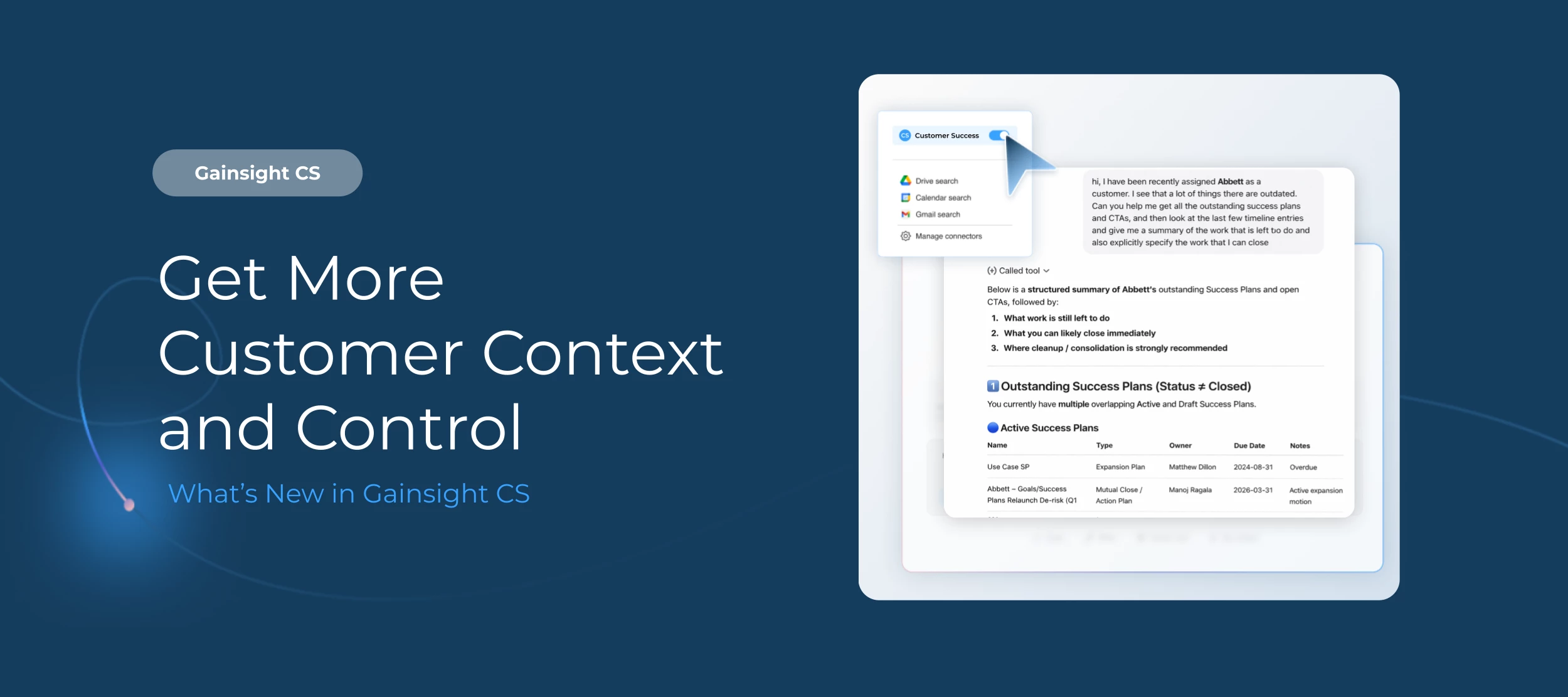
We shipped another on-demand release for Gainsight CS, and this one’s focused on making Gainsight CS MCP more powerful, the Spaces experience intuitive, and Timeline activity more connected to every customer’s goals.

Please note: MCP enhancements notated below have been enabled for all customers and a support ticket is not needed, Spaces and Timeline enhancements remain On-Demand. Please contact support to enable the Spaces and Timeline features.


Let’s dive in. 


MCP: Deeper Customer Context, Right Where You Need It


Gainsight CS MCP already connects your Gainsight data to the LLMs your team uses every day. This release goes further by making that data easier to query, more personalized, and faster to act on.

Here’s what’s new:

  • Query using reports you have already built: Your reports now serve as a knowledge layer inside MCP, with custom fields, terminology, and permissions already applied. You can also now modify report logic by adding fields, applying new filters, or removing ones that do not apply.
  • Pull your portfolio instantly: When you reference "my portfolio," MCP reads the company and relationship filters you have already configured and applies them automatically. 
  • Find key contacts fast: Ask "Who are the key contacts at [company]?" and MCP retrieves contact details from both Company Person and Relationship Person objects. You can refine by role, title, or other attributes too. 

For more information on how to set up Gainsight CS MCP, refer to the Set Up Gainsight CS MCP Server Integration article.

Spaces: Easier to Navigate, Easier to Invite


CSMs can now reorder tabs in the CSM Reports widget to keep their most-used reports within easy reach. And before any Spaces invitation goes out, admins can now send a test email to confirm that content, formatting, and tokens all look exactly right. For teams managing a high volume of Spaces invitations, catching a broken token before it reaches a customer matters. 

Timeline: Activity Connected to Success Plans


CSMs log a lot in Timeline, but that activity has traditionally lived separately from the Success Plans where customer goals actually sit. This update connects the two.

Now, admins can enable Success Plan association for Companies and Relationship types individually, or use Enable for All to activate it across the board in a single action. Once on, CSMs can search and link relevant Success Plans by name, type, status, or owner directly from the Associated Records section in Timeline. Admins can also customize which fields are searchable and what filter criteria apply to match how your team works.

Over time, this builds a much richer picture of how your team's day-to-day engagement is moving customers toward their goals, which is exactly the narrative you want when renewal conversations come around.

For more information on how to configure associated records, refer to the Configure Associated Records to Timeline article.


Want to learn more? Check out the full on-demand release notes or head over to the Gainsight Community to ask questions, share feedback, and see how others are using Gainsight.

6 replies

Jef Vanlaer
Forum|alt.badge.img+6
  • Helper ⭐️⭐️⭐️
  • June 4, 2026

Really like the reports becoming available through MCP; this will help a lot to make sure AI tools get the right (tailored) context.


mobrien14
Forum|alt.badge.img+8
  • Helper ⭐️
  • June 4, 2026

Hey ​@Andrew Brown -- appreciate you sharing these along. A couple of questions on the MCP + Reports insight:

  • Is there a way for admins to flag reports that Claude should not be considering, as in the opposite of the Quick Insights feature with Sally?
    • A fellow admin raised this as well; we often have instances where we’re building test reports just to validate data items that Claude could inadvertently pull in & surface to the CSM without them realizing it’s not an actual report worth using.
  • How is it determining last run date? We have reports that haven’t been modified in a bit but are still surfaced on dashboards/C360; when those are loaded daily, does that count as a run?

sshroff
Forum|alt.badge.img+6
  • Gainsight Employee ⭐️⭐️
  • June 4, 2026

@rakesh 


darkknight
Forum|alt.badge.img+6
  • Expert ⭐️
  • June 4, 2026

After reviewing the June 2026 release notes for both MCP enhancements, I want to respectfully share some honest concerns because, based on what I’m reading, I think both designs seem to share the same structural problem.

THE CORE ISSUE

The release notes describe this directly:

"Existing reports now serve as a knowledge layer for Gainsight CS MCP" because "reports encode your organization's terminology."

There's an important distinction here: a knowledge layer describes what exists. A semantic layer — what's actually needed to ground an LLM — governs what data means, and who can see it. 

Reports provide the former. This design, however, assumes to provide the latter.
 

FEATURE 1: QUERY USING EXISTING REPORTS

What the docs appear confirm

  • MCP searches reports you have access to, matching on names, descriptions, and filter logic
  • Once a report is identified, MCP can dynamically: incorporate fields not in the report, add/modify/remove unlocked filters
  • Only MDA-connection reports are included (SFDC and external connections excluded)
  • Only reports run in the last 90 days qualify
  • Reports without meaningful names or descriptions may not surface at all

Why this to creates a potential governance risk

  • The report isn't a boundary — it's a discovery hint. Because MCP can add fields and strip unlocked filters at query time, a deliberately narrow report becomes an unscoped query template. Locked filters are honored (a real control worth acknowledging), but locked/unlocked filter status was designed for usability, not as a security perimeter. Few orgs have audited this with "an LLM can remove unlocked filters" in mind.
  • Data and metadata hygiene becomes a functional dependency. Report naming, descriptions, field selections and filter quality now directly determine AI accuracy. In environments with reporting sprawl — inconsistent naming, legacy artifacts, overlapping definitions or (heaven forbid) self-service reporting access — the matching surface becomes both unpredictable and high-maintenance.
  • The 90-day heuristic is a poor proxy for curation quality. Frequently run doesn't mean accurate.  QBR and annual planning reports — often the most carefully curated assets — can fall out of scope. What counts as a "run" is also undefined in the docs (dashboard render? scheduled export? any user?), making the effective discovery surface hard to predict.
  • Cross-team report access is additive, not clarifying. Different teams may hold reports built with different filter logic, field selections, and naming conventions. MCP matching across that surface doesn't neutralize those differences — it inherits them.

FEATURE 2: QUERY YOUR PORTFOLIO DATA

What the docs appear to confirm

  • Portfolio scope is determined exclusively from Gainsight Home filters
  • No other Gainsight surface or configuration is read
  • At least one Home filter must be configured — or the feature doesn't work

Why this to creates a potential governance risk

  • Filter state is invisible in the query interface. Results change silently when Home filters change, with no documented indication to the user that a filter is shaping the response
  • False negatives are a design outcome, not a bug. Relevant accounts outside the current filter simply don't appear.
  • Not every team uses Gainsight Home. For those that don't, the feature is inert.
  • A UI personalization preference is not a book-of-business definition. Using Home filter state as the ownership model is a fragile abstraction for anything downstream that matters.

BOTH FEATURES CAN FAIL IN OPPOSITE WAYS — FOR THE SAME REASON

In both cases: admins have no surface to adjust the behavior to their environment.


ADDITIONAL POTENTIAL GAPS WORTH FLAGGING

  • Derived field behavior under dynamic modification is undocumented. In-report formula fields exist only at render time. What happens when MCP modifies the report's logic first is unclear. Data Designer outputs that overlap with base fields have no documented precedence model.
  • Associated record resolution is an open question. Associated Record WHOID/WHATID lookup relationships aren't consistently resolved even across core Gainsight features today. How MCP would handle this when those objects become relevant is undefined. 
  • Absence of inclusion on a Gainsight report is not evidence of unimportance.

    It's often evidence of the opposite — the analysis mattered enough to do properly (or with broader visibility) which meant doing it outside Gainsight. GS data is exported and surfaced in a BI tool because Gainsight's reporting layer couldn't handle the logic required. Those are often the highest-stakes analyses: compliance rates, portfolio-level KPIs, multi-source metrics. No Gainsight report exists precisely because the answer required something more capable. The MCP's discovery model inverts this. It treats a Gainsight report as the signal of relevance. So the analyses your org trusts most — the ones sophisticated enough to require a BI tool — are systematically invisible to it, while simpler, natively-built reports qualify.

  • No audit trail. Neither the release notes nor the admin guide indicates who to know which report was matched, or what filter/field modifications MCP applied to produce a given answer.
  • The tool surfaces changes outside admin change management. This release alone requires users to disconnect/reconnect (Claude) or an admin app refresh (ChatGPT). MCP capabilities shift between releases, outside any change process the admin controls.

And these are just the things that came to mind for me. 


WHAT'S ACTUALLY NEEDED

The release notes describe, at a high level, what each feature does — reports are matched on names, descriptions, and filter logic; locked filters are honored; only MDA-sourced reports run in the last 90 days qualify. However, it falls short on important details like how matches are ranked when multiple reports qualify, what counts as a "run," and how filter modification decisions are made at query time.

Admins are being asked to govern a surface they can observe but neither directly affect or predict.

What's needed is a purpose-built MCP configuration layer where admins can:

→ Explicitly define which objects and fields are relevant and exposed

→ Attach business meaning to fields — definitions, context, caveats

→ Designate authoritative sources (Data Designer or otherwise) rather than inheriting whatever reports

exist

→ Declare ownership logic directly, rather than inheriting Home filter state

→ Decouple AI context from UI state and report library condition entirely


The MCP Server has real potential; however until admins can explicitly define context and tune it to our own unique business requirements — rather than inherit it from artifacts that require  that business context to understand and interpret — the orgs with the most mature and customized environments are the ones who will trust it the least.


rakesh
Gainsight Employee ⭐️
Forum|alt.badge.img+3
  • Lets put your data to work!
  • June 8, 2026

Thanks for your thoughtful post Jeff. Always appreciate these. 

Governance:

I want to start by reframing one critical call out - The report isn't the security perimeter, the permission model is. Reports help the model find and name your data; this tool doesnt broaden access than what you can reach.

Continuing with governance "let admins define which objects and fields are exposed." We're doing that deliberately in three layers, not one control:

  • Fields: If you don't want a field reaching the LLM - ARR, a sensitive contract field — the answer is field level permissions and field access policies, enforced at the permission/query layer.
  • Custom objects. An admin allow-list at the MCP level / OAuth level you pick which custom objects the model can query. Read-only for now; we haven't built custom-object writes through MCP. This is WIP currently
  • External API scopes. Coarser OAuth scopes for third-party integrations sit above this and come later. 

Audit: 

Two pieces are in progress.

  • We're building a SIEM integration so MCP usage is logged in a form security teams can actually consume the high-level patterns, who's doing what which doubles as a governance view for admins.
  • We are also stamping the source field across the apps, so an action that originated in MCP shows up as MCP in Timeline, CTA and so on, and becomes reportable like any other source. That second one is the idea here: https://communities.gainsight.com/ideas/admin-reporting-on-mcp-usage-changes-31052

In your conclusion you've described a meaningful chunk of where we're already heading. 


darkknight
Forum|alt.badge.img+6
  • Expert ⭐️
  • June 8, 2026

@rakesh thanks for the quick response.

Just to clarify, I wasn’t referring to the report itself as a security perimeter, but the locked filters on a report. That said, it was probably a misnomer to call it a security perimeter. I’m aware that the MCP honors permission bundles.  

A few questions/feedback points:

  • Disable the “Report” function - I didn’t see there an option to disable the “Query Gainsight Data Using Your Existing Reports in MCP” feature.  Is that in the works? In my environment, I would not want the MCP functioning that way. I’m sure I’m not alone. 
  • Fields: what you call out here “I you don't want a field reaching the LLM - ARR, a sensitive contract field — the answer is field level permissions” - the only real option is to “hide” the field… but then that hides it from everywhere else in the platform for that user where it may be necessary in certain instances/reports, but in a contextually curated way.
  • Custom objects - I’m glad to hear this is coming.  Having this available for any object (including Standard) though would be the ideal. That would make it far simpler for an admit to flag the fields that we want exposed to the MCP rather than having to manage it across individual Permission Bundles (especially since the defaults in a PB are “read” and “edit”, depending on the field.). We would have to go redact any field that we don’t want visible every time we create a PB which isn’t scalable and can lead to errors.
  • “Portfolio” based inquiries - what is the plan for portfolio based inquiries? As I’ve pointed out, using Home filters is not scalable/sustainable and can lead to errors/gaps.  See this related post.