
Julian
Gainsight Employee ⭐️⭐️⭐️
October 14, 2019
FEATURE LAUNCH

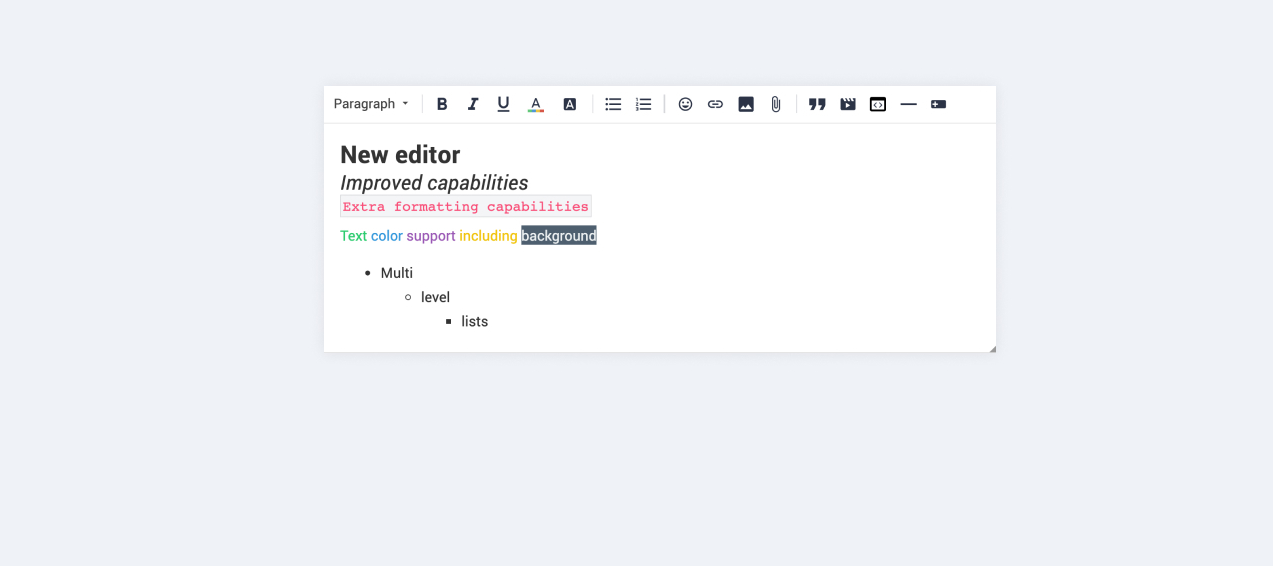
Our new text editor is now available on all communities!
Related products:CC Community
  • October 14, 2019
  • 168 replies
  • 5350 views
Our new text editor is now available on all communities!

We are very proud to announce that our completely new editor is now available for all users on all communities! :grin::raised_hands::pencil2: We have invested a lot of time to give you and your users more options to create richer content in an easy way - so we hope that you will enjoy working with the new editor as much as we do!

We are investigating line-height / spacing inconsistencies as well as problems with selecting text on some viewports (e.g. Safari on iOS).

Polls are temporarily not available, but will be added again soon.

 Overview of improvements

There are many things which have improved with the new editor, just to name a few:

Improved existing features

  • Image upload
    • Drag & drop images into the editor instead of manual upload
    • Captions (descriptive text underneath uploaded images)
  • Code
    • In-line code is now possible (previously code was in an extra line)
    • Code syntax (code is not being stripped automatically anymore)
  • Lists
    • Multi-level lists are possible now
    • Better UX in working with lists (previously lists could not be interrupted by line breaks)
  • Text styling
    • Text styling within lists was not fully supported before

New features

  • Tables!
  • Callouts
  • Text color / background color
  • Horizontal lines

Of course not all of these features are available to end users, some of these (e.g. text color, header, callouts) are only available in the Control environment for now. We have plans to make this available to front-end users via user roles in the future, so that you are in control of who can make use of these features - please share your thoughts on this with us in the comments!

Feedback

Please let us know what you think of this improvement, also how your users are feeling about it. This way we can adjust and improve the editor even further in the future!

168 replies

Ditte
Helper ⭐️⭐️
October 25, 2019

A functionality depreciation:

In the old editor it was possible to paste a link including link text in one step.

E.g.:

  • I go to the download area of the company’s website
  • I copy (ctrl + c) a link text that links to a PDF download
  • I go to the community and paste (ctrl + v) the link text into the editor and the link is also pasted as well

In the new editor only the link text is pasted, the link is ignored. This makes it harder to provide the users with documents and information. 


Agreed, and it makes it annoying to copy/paste swift reply macro responses, which our superuser use a lot.

Currently rocking the Sonos Communities
Contributor ⭐️⭐️⭐️
October 25, 2019

I don't remember if this issue has ever been mentioned. But it appears that some end sentences do not appear in their entirety when an user comments on a topic

Here’s an example:


It's written "Bonne s" but it should be "Bonne soirée". it's not the only case.
 

A superuser's remark about this:

I notice that when I realize it right away, editing the post and retyping the word doesn't really work unless I make a line break. Then the word is accepted.

This editor is really a problem, especially on mobile phones.

Some features are really not adapted to the touch screen of smartphones : double click and zone selection, it no longer works or you have to tinker...

Also on PC, it asks me every time under IE11, if he can use the clipboard to copy/paste part of text or link etc....

I also notice delays. sometimes it doesn't want to send the post and it loads for a while, so I have to refresh the page and my post is lost if I didn't copy it.....”


Yoeri
Gainsight Employee ⭐️⭐️⭐️
October 25, 2019

Pre-weekend update;

Delivered

  • NEW Right-click contextual menu for spellcheck, cut, copy, paste has been restored 
  • NEW The possibility to add spaces to hyperlinks

Quote behavior

We’re close to shipping improvements to the quoting behavior and expect these coming Monday, specifically:

  • Chopping up user quotes in smaller portions to leave detailed feedback
  • Exit a quote with double enter
  • Start typing before a quote
  • Remove a (nested) quote entirely

Priorities, next items, and investigations from the previous update still apply.

Updates on feedback since the last update

  • We’ll investigate the ‘bounce’ behavior 
  • We noticed that copy/pasting URLs with a display text from the community will be converted to underlined text. We will make sure the link + display text stays intact when you copy/paste a URL. This is already the case when you copy/paste a URL from external domains. E.g. Other respected academics have found that play can be good for business. /copied from https://modus.medium.com/why-play-matters-1be75e4ab77b. Next to this we’ll look into the former BBcode URL behavior and make sure these links are correctly converted to HTML.
  • We’ll look into ‘missing words’ – could you point us at the topic where text disappears so we can investigate this?

New functionalities

I want to re-emphasize that we won’t add new functionalities (anchor links, colored text on user roles, HTML-editing, etc.) before we reach a stable version where the functionalities and user experience satisfies us all.

Group Product Manager, Customer Communities
Jurgen
Helper ⭐️
October 26, 2019

New functionalities

I want to re-emphasize that we won’t add new functionalities (anchor links, colored text on user roles, HTML-editing, etc.) before we reach a stable version where the functionalities and user experience satisfies us all.


My suggestion would be to enable the color picker for everyone. This is returning functionality, just like polls, not adding new functionality.

Context: https://community.insided.com/news-platform-updates-16/retiring-bbcode-from-the-platform-1800?postid=6354 

bjoern_schulze
Helper ⭐️⭐️⭐️
October 28, 2019

Tables aren’t responsive. I would expect a table to have a 100% width (given a pre-defined minimum width). This way it doesn’t exceeds the viewport to the right. The cells’ width should be dynamic and the cells’ text should behave according to the width (e.g. automatically wrap into a new line).

The way it looks now is not optimal: 

ID A B C
1 Lorem ipsum dolor sit amet, consetetur sadipscing elitr sed diam nonumy eirmod tempor invidunt
2 ut labore et dolore magna aliquyam erat sed diam voluptua
3 At vero eos et accusam Stet clita kasd gubergren no sea takimata sanctus


Yoeri
Gainsight Employee ⭐️⭐️⭐️
October 28, 2019

New updates :)

Delivered

  • NEW Improved quote behavior is here (break a quoted section, multi-quotes, exit a quote, remove a quote etc.)
    • You can use the blue dotted guidelines in and around quotes to control your cursor and exit (inline) quotes.
    • Double enter inside a quote will automatically exit a quote.
    • Double enter inside a user quote will break it into multiple user quotes
    • Clicking the grey resize icon in the top left of a quote will select an entire quote. Selected quotes can be recognized by a 2px blue line. 
    • Select a quote and hit backspace to delete the entire quote
  • NEW Added Bold, Italic, Underline to all viewports and devices*

*These functionalities are not available android devices in the firefox browser as they are not supported by the editor software provider

Priority Lane

  • Return Poll functionality
  • Copy/paste URLs with display text should remain URLs

Updates on feedback since the last update

  • We’re evaluating enabling the color picker for everyone
  • We have limited control over the responsiveness of tables as content, columns and rows are unique and differ per table. We’ll see if we can add a max-width to columns so the content inside it wraps into a new line more naturally.
Group Product Manager, Customer Communities
Suvi Lehtovaara
Helper ⭐️⭐️
October 29, 2019

Hi @Yoeri!

Thanks for the update! I am not really sure if these are bugs or what.

I’ve attached a recording below of what happened to me while trying to give our community user’s a heads-up on what’s the status with the editor.

When the quote has been selected, clicking enter doesn’t do anything.


If there’s a line break after a quote and I first @mention someone, Delete does not delete the line break.


https://yhteiso.elisa.fi/
Suvi Lehtovaara
Helper ⭐️⭐️
October 29, 2019

It sees that delete/backspace is not working in all cases?

I was unable to delete the Spoiler section :point_down_tone2: (I’m using Version 77.0.3865.90 (Official Build) (32-bit))


Our community user (Firefox version 70.0 (32-bit))was unable to delete even a larger section:


https://yhteiso.elisa.fi/
Jasper
Contributor ⭐️⭐️⭐️⭐️⭐️
October 29, 2019

New updates :)

Delivered

  • NEW Improved quote behavior is here (break a quoted section, multi-quotes, exit a quote, remove a quote etc.)
    • You can use the blue dotted guidelines in and around quotes to control your cursor and exit (inline) quotes.
    • Double enter inside a quote will automatically exit a quote.
    • Double enter inside a user quote will break it into multiple user quotes
    • Clicking the grey resize icon in the top left of a quote will select an entire quote. Selected quotes can be recognized by a 2px blue line. 
    • Select a quote and hit backspace to delete the entire quote

Thanks for this update @Yoeri! There is one thing that doesn't work with the quotes yet. We can't change the name of the person who was quoted.

For example: if an user accidently has their phonenumber as username and we change that to something else, we can't change the quote to their new username. For their privacy I very much like to hide something like that. Deleting the quote altogether might make the conversation confusing, so if possible I prefer not to do that.

Is this something that can return to the quotes? This was possible with the old editor.

Jurgen
Helper ⭐️
October 29, 2019

Tables aren’t responsive. I would expect a table to have a 100% width (given a pre-defined minimum width). This way it doesn’t exceeds the viewport to the right. The cells’ width should be dynamic and the cells’ text should behave according to the width (e.g. automatically wrap into a new line).

The way it looks now is not optimal: 

ID A B C
1 Lorem ipsum dolor sit amet, consetetur sadipscing elitr sed diam nonumy eirmod tempor invidunt
2 ut labore et dolore magna aliquyam erat sed diam voluptua
3 At vero eos et accusam Stet clita kasd gubergren no sea takimata sanctus


I'm not sure what you mean and I think the current behavior of tables may be preferable in some cases. The notes app on iPhone behaves in the same way, for example.

Can you show me a page where a table behaves as you'd like it to?