
Julian
Gainsight Employee ⭐️⭐️⭐️
October 14, 2019
FEATURE LAUNCH

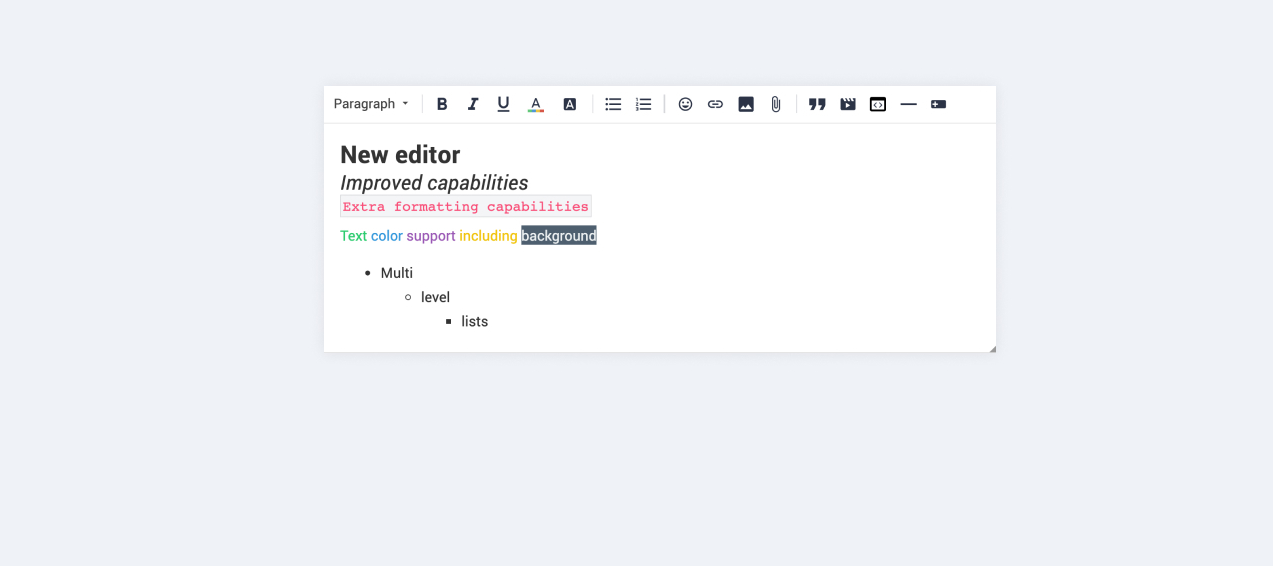
Our new text editor is now available on all communities!
Related products:CC Community
  • October 14, 2019
  • 168 replies
  • 5350 views
Our new text editor is now available on all communities!

We are very proud to announce that our completely new editor is now available for all users on all communities! :grin::raised_hands::pencil2: We have invested a lot of time to give you and your users more options to create richer content in an easy way - so we hope that you will enjoy working with the new editor as much as we do!

We are investigating line-height / spacing inconsistencies as well as problems with selecting text on some viewports (e.g. Safari on iOS).

Polls are temporarily not available, but will be added again soon.

 Overview of improvements

There are many things which have improved with the new editor, just to name a few:

Improved existing features

  • Image upload
    • Drag & drop images into the editor instead of manual upload
    • Captions (descriptive text underneath uploaded images)
  • Code
    • In-line code is now possible (previously code was in an extra line)
    • Code syntax (code is not being stripped automatically anymore)
  • Lists
    • Multi-level lists are possible now
    • Better UX in working with lists (previously lists could not be interrupted by line breaks)
  • Text styling
    • Text styling within lists was not fully supported before

New features

  • Tables!
  • Callouts
  • Text color / background color
  • Horizontal lines

Of course not all of these features are available to end users, some of these (e.g. text color, header, callouts) are only available in the Control environment for now. We have plans to make this available to front-end users via user roles in the future, so that you are in control of who can make use of these features - please share your thoughts on this with us in the comments!

Feedback

Please let us know what you think of this improvement, also how your users are feeling about it. This way we can adjust and improve the editor even further in the future!

168 replies

Patomiäs
Contributor ⭐️⭐️⭐️
October 29, 2019

New updates :)

Delivered

  • NEW Improved quote behavior is here (break a quoted section, multi-quotes, exit a quote, remove a quote etc.)
    • You can use the blue dotted guidelines in and around quotes to control your cursor and exit (inline) quotes.
    • Double enter inside a quote will automatically exit a quote.
    • Double enter inside a user quote will break it into multiple user quotes
    • Clicking the grey resize icon in the top left of a quote will select an entire quote. Selected quotes can be recognized by a 2px blue line. 
    • Select a quote and hit backspace to delete the entire quote

Thanks for this update@Yoeri! There is one thing that doesn't work with the quotes yet. We can't change the name of the person who was quoted.

For example: if an user accidently has their phonenumber as username and we change that to something else, we can't change the quote to their new username. For their privacy I very much like to hide something like that. Deleting the quote altogether might make the conversation confusing, so if possible I prefer not to do that.

Is this something that can return to the quotes? This was possible with the old editor.

Same problem here! We just had a new customer use profanity in username and he was quoted in another customers comment. Best solution would be that the quote function would check the username instead of just copying it as a text

There are 10 types of people in this world. Those that understand binary and those that don't
Contributor ⭐️⭐️⭐️
October 29, 2019

Hi,

A problem with the contextual menu. When right-clicking below the cursor line, the menu does not display correctly (there are no copy/paste/cut options).

Example :
Here, I right-clicked on the text cursor line (where there's the red circle). We see the menu with copy/paste/cut.


Here, I right clicked below the text cursor line. There is no copy/paste/cut.


This happens on all browsers :)


bjoern_schulze
Helper ⭐️⭐️⭐️
October 29, 2019

Can you show me a page where a table behaves as you'd like it to?

Sure, I can: https://www.w3schools.com/css/tryit.asp?filename=trycss_table_width 

You’ll find that this example table always uses 100% width, no matter how wide or narrow you pull the window width.

Yoeri
Gainsight Employee ⭐️⭐️⭐️
October 29, 2019

Delivered

Updates on feedback since the last update

  • The best way to delete a spoiler or (nested) quote is to select the entire box (Clicking the grey resize icon in the top left of a quote or spoiler will select it. Selections can be recognized by a 2px blue line. ) and hit the backspace/delete key on your keyboard. See the spoiler below for an animated gif


  • We’ll investigate wether it’s possible to alter the username of the person who was quoted. For now it is best to create a manual blockquote and put the username in bold above it.
  • The contextual menu works as expected. It will only show relevant options (cut/copy/paste) in the line where content is displayed
Group Product Manager, Customer Communities
Patomiäs
Contributor ⭐️⭐️⭐️
October 30, 2019

While quoting in control there’s sometimes “Common” added to customers name while editing. We tested publishing the comment and it luckily didn’t follow to finished comment

There are 10 types of people in this world. Those that understand binary and those that don't
Yoeri
Gainsight Employee ⭐️⭐️⭐️
October 30, 2019

Coming soon

Placeholders are coming back to your editor this Friday. Learn more about placeholders and how to change them in this post: Re-enabling editor placeholders (instruction text)

Group Product Manager, Customer Communities
LPortalupi
Helper ⭐️
October 30, 2019

New updates :)

Delivered

  • NEW Improved quote behavior is here (break a quoted section, multi-quotes, exit a quote, remove a quote etc.)
    • You can use the blue dotted guidelines in and around quotes to control your cursor and exit (inline) quotes.
    • Double enter inside a quote will automatically exit a quote.
    • Double enter inside a user quote will break it into multiple user quotes
    • Clicking the grey resize icon in the top left of a quote will select an entire quote. Selected quotes can be recognized by a 2px blue line. 
    • Select a quote and hit backspace to delete the entire quote

Thanks so much for your hard work to deliver these fixes, @Yoeri and all others involved. I wanted to share this post from our super superuser – evidently it’s not possible to split up a quote that’s one long paragraph:

Here’s another example, quoting Jasper’s post above. I was able to finally splice the quoted paragraph  but it took several times pressing “Enter” and then backspacing, and then entering again.


Suvi Lehtovaara
Helper ⭐️⭐️
October 31, 2019

@Jurgen, about your feedback:

Editing or replying to an @-mention causes it to be sent again.

This should not happen, it was supposed to be fixed for all cases about 8 days ago.

Edit: My colleagues informed me that it was fixed today, not a week ago. If you should get a notification for this edit, please let me know.

@Julian if a @mention is quoted, should one receive an email notification of the quoted @mention or not?

At the moment notifications are being sent if @mention is quoted.

https://yhteiso.elisa.fi/
Yoeri
Gainsight Employee ⭐️⭐️⭐️
November 1, 2019

We have some new updates to share with you :)

Delivered

In progress

We’re working on the following items and expect to release them soon 

  • Ability to add Polls to your topic

  • Links that point to a webpage outside of your community (outgoing links) will open in a new tab

Next

The following items will be enhanced over time

  • Replace default editor font with your company font

  • Display of the @mention list on mobile

  • Do not send double notifications when you’re mentioned in a quote and somebody replies to it.

Investigations update

We investigated the following feedback and came to the following conclusions:

  • The editor starts writing in italics (link). We were unable to reproduce this behavior and will stop the investigation.

  • Responsiveness of tables (link). We pushed a small fix that will wrap words, we won’t make additional changes to the responsive behavior of the table.

  • Discrepancies between editor and final view (link). This is most probably caused by the fact that the default editor font is different than your company font. We are planning to fix this.

  • Error message ‘No text’ when there was text (link). We were unable to reproduce this error state and will stop the investigation.

  • “Bouncing” behavior of the editor (link). We are not experiencing this issue, but his behavior may happen depending on the browser, viewport, display settings and content inside the editor. As each scenario is unique it’s hard to resolve the specific use cases in which this happens, therefore we’re not making any changes to the editor viewport.

  • Chromium doesn’t show a contextual menu (link). We pushed fixes to the contextual menu so that it opens on a regular right-click. 

  • Copy/pasting.GIFs are converted to a static image (link). This is how the browser’s native copy/paste works, it can also be reproduced on other services, eg: google drive. To upload gif users can download them and use the image uploader to upload the gif.

  • Selecting misspelled words moves the indicator to the beginning of the post on mobile (link). We were unable to reproduce this behavior on iOS Chrome, Safari and Firefox. We will stop the investigation.

  • The letter ‘g’ is wrongly displayed. (link) We were unable to reproduce this, but we expect that replacing the default editor font with your company font will resolve this.

Group Product Manager, Customer Communities
Patomiäs
Contributor ⭐️⭐️⭐️
November 1, 2019
  • “Bouncing” behavior of the editor (link). We are not experiencing this issue, but his behavior may happen depending on the browser, viewport, display settings and content inside the editor. As each scenario is unique it’s hard to resolve the specific use cases in which this happens, therefore we’re not making any changes to the editor viewport.

As this happens with different users, different machines, software combinations and so on, I’d ask you if you could still look into this? I’m using Win7 combined with Chrome on 27” 16:9 monitor with 1920x1080 resolution via HDMI cable as I write this. Zoom level is 100% and I’m not running anything that would modify the experience from my end. Every time line is changing, there’s the elevator bar in the field that disappears after the newest line gets longer. As this has been reported to us from our users, I’m obligated to deliver this request regarding this issue if you’d still check this :)

There are 10 types of people in this world. Those that understand binary and those that don't