
Julian
Gainsight Employee ⭐️⭐️⭐️
October 14, 2019
FEATURE LAUNCH

Our new text editor is now available on all communities!
Related products:CC Community
  • October 14, 2019
  • 168 replies
  • 5350 views
Our new text editor is now available on all communities!

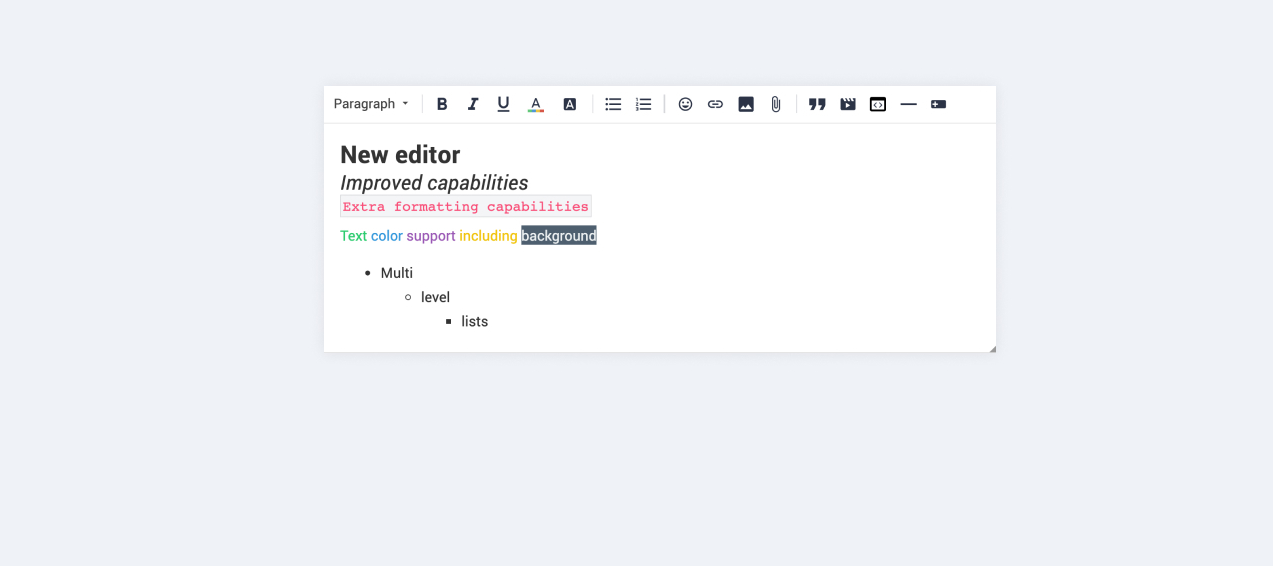
We are very proud to announce that our completely new editor is now available for all users on all communities! :grin::raised_hands::pencil2: We have invested a lot of time to give you and your users more options to create richer content in an easy way - so we hope that you will enjoy working with the new editor as much as we do!

We are investigating line-height / spacing inconsistencies as well as problems with selecting text on some viewports (e.g. Safari on iOS).

Polls are temporarily not available, but will be added again soon.

 Overview of improvements

There are many things which have improved with the new editor, just to name a few:

Improved existing features

  • Image upload
    • Drag & drop images into the editor instead of manual upload
    • Captions (descriptive text underneath uploaded images)
  • Code
    • In-line code is now possible (previously code was in an extra line)
    • Code syntax (code is not being stripped automatically anymore)
  • Lists
    • Multi-level lists are possible now
    • Better UX in working with lists (previously lists could not be interrupted by line breaks)
  • Text styling
    • Text styling within lists was not fully supported before

New features

  • Tables!
  • Callouts
  • Text color / background color
  • Horizontal lines

Of course not all of these features are available to end users, some of these (e.g. text color, header, callouts) are only available in the Control environment for now. We have plans to make this available to front-end users via user roles in the future, so that you are in control of who can make use of these features - please share your thoughts on this with us in the comments!

Feedback

Please let us know what you think of this improvement, also how your users are feeling about it. This way we can adjust and improve the editor even further in the future!

168 replies

Jurgen
Helper ⭐️
December 13, 2019

I get pretty annoyed when trying to edit a text with colors on front end, which makes the colors disappear. It's because the editing permissions I have in Control and front-end aren't equal. Will this be fixed in a future update?

Cristina
Helper ⭐️⭐️⭐️
December 13, 2019

Hi @Jurgen ! Yes it will be fixed, the team is aware of this issue and there is a ticket in the backlog to address it. 

Jurgen
Helper ⭐️
December 13, 2019

Good to know :)

Yoeri
Gainsight Employee ⭐️⭐️⭐️
January 8, 2020

I get pretty annoyed when trying to edit a text with colors on front end, which makes the colors disappear. It's because the editing permissions I have in Control and front-end aren't equal. Will this be fixed in a future update?

We enabled text- and background colors in the community editor. This should resolve the issue mentioned above :)

Group Product Manager, Customer Communities
Suvi Lehtovaara
Helper ⭐️⭐️
January 9, 2020


She said that when she types more text the scroll bar does not move.

The scroll bar shouldn’t be there in the first place :wink: What kind of content is she writing in the photo that you shared, it doesn’t look like a default paragraph

Hi @Yoeri ! What you see in my photo is the placeholder, so she has not (yet) typed in anything when she took that screen capture.

Another user had reported during the weekend, that they are facing the same problem when the browser window is 882-1030 pixels wide. They were using Firefox 70.0.1 (32-bit) on Desktop.

Edit: I was able to verify this:


@Yoeri  any updates on the fix of this bug? Our superuser is very disappointed as this really hinders her use of the community. 

https://yhteiso.elisa.fi/
Yoeri
Gainsight Employee ⭐️⭐️⭐️
January 9, 2020

@Yoeri  any updates on the fix of this bug? Our superuser is very disappointed as this really hinders her use of the community. 

We are aware of the issue and have a ticket in the backlog to investigate and resolve this :)

Group Product Manager, Customer Communities
Suvi Lehtovaara
Helper ⭐️⭐️
January 14, 2020

And another question: What editor are you planning on using for private messages? Until now, there is the old editor in action.

Almost missed that one. :)

So as far as I know, the private message text editor is (much) harder to replace with the new editor due to the way it is implemented in the platform. Of course we want all editors to be the same, however this one we had to postpone - due to the amount of extra work.

@Julian any update or ETA for the new editor in private messages? I have a vague memory of December, but that must be a dream I had? :see_no_evil:

https://yhteiso.elisa.fi/
Julian
JulianAuthor
Gainsight Employee ⭐️⭐️⭐️
January 14, 2020

Hey Suvi!

I am afraid you have been dreaming with the ETA. :stuck_out_tongue_winking_eye:

Unfortunately, we have not yet fully commited to implement the new editor into the private message feature... BUT we have planned to actually investigate this specifically, we will know more about this by the end of this month.

Again of course I know that this would be a big improvement in many ways (attachments, images, etc.) and help all of us running support via the community. Me or Yoeri will be able to give you more concrete (and hopefully positive) info about this once this has been completed. :)

I follow my nose, it always knows
Suvi Lehtovaara
Helper ⭐️⭐️
January 15, 2020

 @Julian , roger that!


https://yhteiso.elisa.fi/
Yoeri
Gainsight Employee ⭐️⭐️⭐️
January 17, 2020

Small update, we deployed a fix to the editor that should prevent a horizontal scroll bar in the editor [link to feedback] @Suvi Lehtovaara 

Group Product Manager, Customer Communities