
Julian
Gainsight Employee ⭐️⭐️⭐️
October 14, 2019
FEATURE LAUNCH

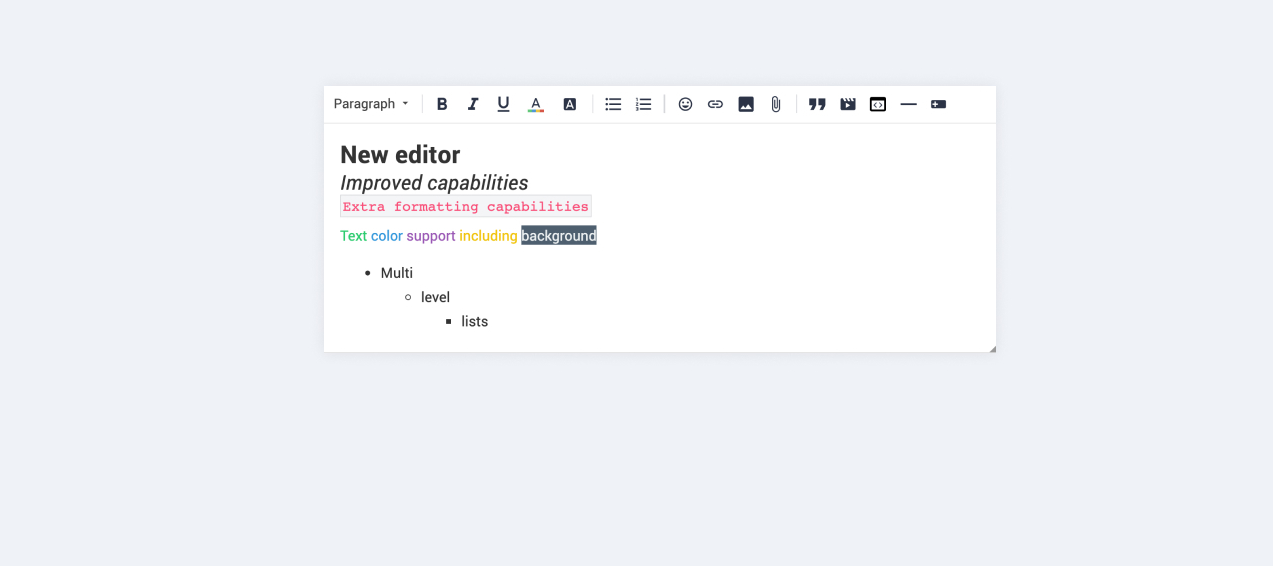
Our new text editor is now available on all communities!
Related products:CC Community
  • October 14, 2019
  • 168 replies
  • 5350 views
Our new text editor is now available on all communities!

We are very proud to announce that our completely new editor is now available for all users on all communities! :grin::raised_hands::pencil2: We have invested a lot of time to give you and your users more options to create richer content in an easy way - so we hope that you will enjoy working with the new editor as much as we do!

We are investigating line-height / spacing inconsistencies as well as problems with selecting text on some viewports (e.g. Safari on iOS).

Polls are temporarily not available, but will be added again soon.

 Overview of improvements

There are many things which have improved with the new editor, just to name a few:

Improved existing features

  • Image upload
    • Drag & drop images into the editor instead of manual upload
    • Captions (descriptive text underneath uploaded images)
  • Code
    • In-line code is now possible (previously code was in an extra line)
    • Code syntax (code is not being stripped automatically anymore)
  • Lists
    • Multi-level lists are possible now
    • Better UX in working with lists (previously lists could not be interrupted by line breaks)
  • Text styling
    • Text styling within lists was not fully supported before

New features

  • Tables!
  • Callouts
  • Text color / background color
  • Horizontal lines

Of course not all of these features are available to end users, some of these (e.g. text color, header, callouts) are only available in the Control environment for now. We have plans to make this available to front-end users via user roles in the future, so that you are in control of who can make use of these features - please share your thoughts on this with us in the comments!

Feedback

Please let us know what you think of this improvement, also how your users are feeling about it. This way we can adjust and improve the editor even further in the future!

168 replies

LPortalupi
Helper ⭐️
November 20, 2019

It’s fixed – thank you, @Julian!

LPortalupi
Helper ⭐️
November 27, 2019

Hi, not sure if I should keep adding to this thread? Our star superuser has reported another frustrating experience using the quote feature. Sharing screenshots here as she does a great job explaining it:

Here she introduces what the issue is
And here’s the example


LPortalupi
Helper ⭐️
November 27, 2019

Also, just encountered this issue when using the text editor to create a post here in inSpired. My cursor is bumped back up to the top of the post as I’m trying to add content after the emoji:


Suvi Lehtovaara
Helper ⭐️⭐️
November 28, 2019

I’ll also keep adding these here as I just happened to receive complaints of this editor on edge. It looked like this to our superuser:


She is using Edge, typically with larger fonts as she is a senior citizen 🙂 She said that when she types more text the scroll bar does not move.

https://yhteiso.elisa.fi/
Yoeri
Gainsight Employee ⭐️⭐️⭐️
November 28, 2019

Thanks for your feedback, please do keep reporting them in this topic so that we have everything centralized.
 

Our star superuser has reported another frustrating experience using the quote feature. 

Splitting up a quote with a numbered list into multiple quotes will always reset a numbered list to one. This is how the technology (html) behaves, when you split up a quote you are literally closing a quote element (and closing the numbered list inside it). The new (splitted) quote is treated as a new element, and so is the numbered list inside it, therefore it will start at 1 again. We can not change this behaviour. In this case we would suggest using unordered / bullet lists. 
 

My cursor is bumped back up to the top of the post as I’m trying to add content after the emoji:

This should not happen, we haven’t seen this behavior before. Does this happen every time you add an emoji in your post or does it happen sometimes?
 

She said that when she types more text the scroll bar does not move.

The scroll bar shouldn’t be there in the first place :wink: What kind of content is she writing in the photo that you shared, it doesn’t look like a default paragraph

Group Product Manager, Customer Communities
Suvi Lehtovaara
Helper ⭐️⭐️
December 2, 2019


She said that when she types more text the scroll bar does not move.

The scroll bar shouldn’t be there in the first place :wink: What kind of content is she writing in the photo that you shared, it doesn’t look like a default paragraph

Hi @Yoeri ! What you see in my photo is the placeholder, so she has not (yet) typed in anything when she took that screen capture.

Another user had reported during the weekend, that they are facing the same problem when the browser window is 882-1030 pixels wide. They were using Firefox 70.0.1 (32-bit) on Desktop.

Edit: I was able to verify this:


https://yhteiso.elisa.fi/
Yoeri
Gainsight Employee ⭐️⭐️⭐️
December 3, 2019

I was able to reproduce this as well, thanks for the detailed information. I will file a bug report and inform the development team :)

Group Product Manager, Customer Communities
Cristina
Helper ⭐️⭐️⭐️
December 10, 2019


@-mention in quotes

@Suvi Lehtovaara@LPortalupi:

So I have shared your feedback that the initial fix of this issue is not working (in some cases?). My colleagues have created an investigation ticket to see what is wrong exactly, so that they can resolve this as soon as possible. Thanks for reporting this to us.


The engineers finished investigating and they can confirm now that the issue is fixed. They found out the issue happened with mentions in nested quotes, as the @mentiones weren’t parsed as part of a quote (text), and the system would only see them as mentions, hence the notifications were triggered. 

This should be a great test - to see if Suvi and Laura received notifications this time. :flashlight:

Jasper
Contributor ⭐️⭐️⭐️⭐️⭐️
December 12, 2019

I've tested it yesterday on our community with two superusers who noticed it before, they didn't receive a notification mail about a quoted mention. I mentioned them today to check if they still received that and that was the only notification they received. It seems fixed :slight_smile:

Cristina
Helper ⭐️⭐️⭐️
December 12, 2019

Thank you @Jasper for the confirmation! Really glad to see it solved :smile: