
Julian
Gainsight Employee ⭐️⭐️⭐️
October 14, 2019
FEATURE LAUNCH

Our new text editor is now available on all communities!
Related products:CC Community
  • October 14, 2019
  • 168 replies
  • 5350 views
Our new text editor is now available on all communities!

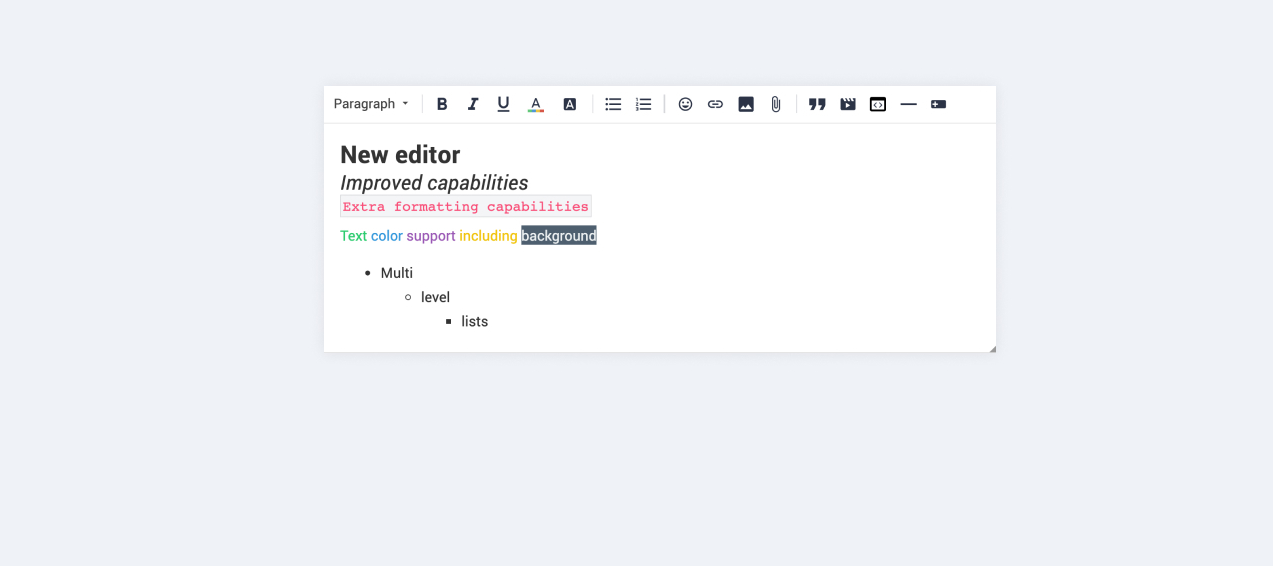
We are very proud to announce that our completely new editor is now available for all users on all communities! :grin::raised_hands::pencil2: We have invested a lot of time to give you and your users more options to create richer content in an easy way - so we hope that you will enjoy working with the new editor as much as we do!

We are investigating line-height / spacing inconsistencies as well as problems with selecting text on some viewports (e.g. Safari on iOS).

Polls are temporarily not available, but will be added again soon.

 Overview of improvements

There are many things which have improved with the new editor, just to name a few:

Improved existing features

  • Image upload
    • Drag & drop images into the editor instead of manual upload
    • Captions (descriptive text underneath uploaded images)
  • Code
    • In-line code is now possible (previously code was in an extra line)
    • Code syntax (code is not being stripped automatically anymore)
  • Lists
    • Multi-level lists are possible now
    • Better UX in working with lists (previously lists could not be interrupted by line breaks)
  • Text styling
    • Text styling within lists was not fully supported before

New features

  • Tables!
  • Callouts
  • Text color / background color
  • Horizontal lines

Of course not all of these features are available to end users, some of these (e.g. text color, header, callouts) are only available in the Control environment for now. We have plans to make this available to front-end users via user roles in the future, so that you are in control of who can make use of these features - please share your thoughts on this with us in the comments!

Feedback

Please let us know what you think of this improvement, also how your users are feeling about it. This way we can adjust and improve the editor even further in the future!

168 replies

Julian
JulianAuthor
Gainsight Employee ⭐️⭐️⭐️
October 15, 2019

Hi @Suvi Lehtovaara,

we are still collecting all feedback, I will work on an overview so that you and others are aware of things that have been reported and/or are being worked on already.

About informing you: We actually sent a mail on thursday last week to give you a heads up, can you check if you received that? I will have a look if I you are missing in the list of recipients, but maybe it just ended up in your spam inbox?

I follow my nose, it always knows
Julian
JulianAuthor
Gainsight Employee ⭐️⭐️⭐️
October 15, 2019

@SophieW thanks for sharing this with us as well! My colleagues have received your feedback and will look into it, I will get back to you once I have more information on this subject.

I follow my nose, it always knows
Julian
JulianAuthor
Gainsight Employee ⭐️⭐️⭐️
October 15, 2019

Hey @Thomas,

I just checked with the old version of the editor, there it also strips these features at 767px.

Great to see that you already worked on this yourself, however I understand that you rather like us to offer this ourselves. As I’ve said the team is looking into it, will share an update on it asap so you know what we are doing with this.

I follow my nose, it always knows
Thomas
Contributor ⭐️⭐️
October 15, 2019

Hey@Thomas,

I just checked with the old version of the editor, there it also strips these features at 767px.

Great to see that you already worked on this yourself, however I understand that you rather like us to offer this ourselves. As I’ve said the team is looking into it, will share an update on it asap so you know what we are doing with this.

I actually reversed your display:none; in the old editor as well ;)

Let me know if and when this is picked up on your end so I can possibly remove the overwrites again. However atm there are much bigger priorities so please don't focus on this one.


Hold that thought...
Jurgen
Helper ⭐️
October 15, 2019

We appreciate your feedback and we are looking into it


I assumed what@Yoeri meant here was that an update on staging would be released with the fixes the developers were working on (I couldn't imagine you'd release an unfinished feature to the masses). Therefore I didn't realize how urgent an update of the custom code was. Also, I asked for help for fixing this and got no response. 
My colleague was just as surprised as I was to see the editor live monday evening, but thankfully he quickly provided a fix :) 


I surely accept criticism on the fact that this has not been prioritized correctly on our side, this is something we can improve. 

:thumbsup:


It is not the case that we do not follow up on the feedback shared here.


My bad, I should have been more specific. You settled on releasing this version of the editor on production instead of fixing the bugs before releasing it and verifying that customers - at least the ones who provide feedback - are ready for it.

Jasper
Contributor ⭐️⭐️⭐️⭐️⭐️
October 15, 2019

There is also an issue with mentioning, especially in the backend. Before, when typing the '@’, you would see a short list of all users who have been active in that topic. Now the list is very long and has all users in all of time and existence. In the frontend is doesn't seem to happen that way. 

Usernames with a space in it seem to be an issue too, the mention-menu disappears after hitting the spacebar. 

Julian
JulianAuthor
Gainsight Employee ⭐️⭐️⭐️
October 15, 2019

Thanks for elaborating, @Jurgen!

While I understand that you reported this as an issue, for us this (limited text editing features on mobile viewports) was categorized as a change request, not as a bug. Actual bugs with the editor (e.g. selecting text on specific mobile viewports) have been logged and categorized accordingly to their actual impact. We would not release an improvement if we see that the impact is affecting all users or the core functionality. In this case, we identified two bugs which were not critical enough to stop the release from happening:

  • issues with selecting text on certain combinations of mobile device & browser
  • discrepancies in spacing / line-height in edit view & published post

We acutally did work on some things and released them on-the-go to your staging environment (e.g. better image upload, localization, etc.), and even send an email last thursday to ensure that everybody is informed and can take action until the release is performed.

Once more, I acknowledge that your feedback could have been a signal to us that this change (being more strict with mobile viewport borders) would have a bigger impact on the end user experience, however we ultimately did not regard it as having an impact of this scale. Surely a learning we ideally would have liked to do without the ramification on your users’ sentiment.

Now about the custom code:

I’m sorry to hear that we failed to help you adjusting the code to work in the new editor. 😕 Usually we acutally provide this extra service with no issues, however we are always pointing out that we cannot assure that your custom code will work once we update something, as stated in the TPS page in the Control environment:

Note: We recommend inviting a professional web developer to work with third-party scripts. Insert scripts at your own risk, and proceed with extreme caution —  inSided support won’t be able to assist you with third-party scripts issues. If you want to test your code before publishing we strongly recommend you to use your staging environment first.

Next time you feel left alone with issues around scripts (or in general, really), please drop me a private message and I promise I will help you out as good as I can! :)

I follow my nose, it always knows
Julian
JulianAuthor
Gainsight Employee ⭐️⭐️⭐️
October 15, 2019

Hi @Jasper,

thanks for flagging this. We are in the process of deploying a fix for the issues around @-mentions and “space” in usernames. I am not sure about the other issue you are reporting, I cannot reproduce it. I will test and get back to you on this, maybe you can test once I have confirmed that the first fix for the issues around mentioning has been published.

I follow my nose, it always knows
Jasper
Contributor ⭐️⭐️⭐️⭐️⭐️
October 15, 2019

Hi @Julian, I had send it to the support address before posting it here. Cristina replied that the dev team is on it. I think they were able to reproduce it:

We have noticed, indeed that in Control the @-mentions does not display a list of contributors anymore, and that usernames containing a space cannot be selected as the action is stopped. The dev team has already started working on fixing these issues. 

Contributor ⭐️⭐️⭐️
October 15, 2019

So I have some findings and some questions around this.

  • If you are mentioning a user that has a blank space in the name (like yours) it could go wrong once you enter a space. This has to do with the fact that this feature needs a signal to stop. We are checking if we can improve this somehow.
  • The issue with writing in italic without selecting it cannot be reproduced - maybe you can ask more details (browser, desktop or mobile, operating system) so that we can follow up? This could also happen if you continue to write in a quote, however this might not be the case here.
  • I have not seen a limitation in the list of mentions, however if you can provide me with a link to the topic where this happens (via pm if it is a hidden area) then I am happy to check on this as well.
  • mobile view does currently not offer tables, so I am not sure how to categorize this. Emoticons on mobile should just use those of the keyboard in use. If you have more details on this as well (browser, device) we can double check on it.

Thanks for the feedback, @Julian !
1. This is strange because there was no problem before the change of the text editor.

2. I asked the superusers to test again to see if the problem recurs.

3. This happens in all topics. We can't go any lower than the nickname below


4. Okay for the tabs. Emoticons did not send properly but i'll ask superuses if this still happens. For the rest, here is what appears on mobile (iPhone and Samsung) :