
Julian
Gainsight Employee ⭐️⭐️⭐️
October 14, 2019
FEATURE LAUNCH

Our new text editor is now available on all communities!
Related products:CC Community
  • October 14, 2019
  • 168 replies
  • 5350 views
Our new text editor is now available on all communities!

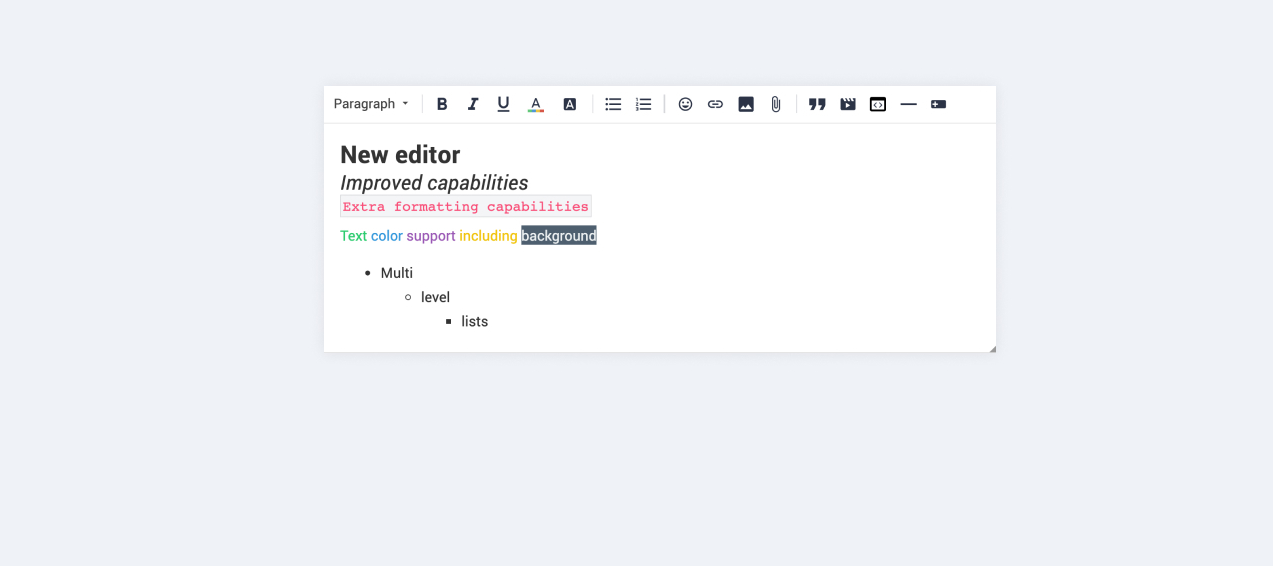
We are very proud to announce that our completely new editor is now available for all users on all communities! :grin::raised_hands::pencil2: We have invested a lot of time to give you and your users more options to create richer content in an easy way - so we hope that you will enjoy working with the new editor as much as we do!

We are investigating line-height / spacing inconsistencies as well as problems with selecting text on some viewports (e.g. Safari on iOS).

Polls are temporarily not available, but will be added again soon.

 Overview of improvements

There are many things which have improved with the new editor, just to name a few:

Improved existing features

  • Image upload
    • Drag & drop images into the editor instead of manual upload
    • Captions (descriptive text underneath uploaded images)
  • Code
    • In-line code is now possible (previously code was in an extra line)
    • Code syntax (code is not being stripped automatically anymore)
  • Lists
    • Multi-level lists are possible now
    • Better UX in working with lists (previously lists could not be interrupted by line breaks)
  • Text styling
    • Text styling within lists was not fully supported before

New features

  • Tables!
  • Callouts
  • Text color / background color
  • Horizontal lines

Of course not all of these features are available to end users, some of these (e.g. text color, header, callouts) are only available in the Control environment for now. We have plans to make this available to front-end users via user roles in the future, so that you are in control of who can make use of these features - please share your thoughts on this with us in the comments!

Feedback

Please let us know what you think of this improvement, also how your users are feeling about it. This way we can adjust and improve the editor even further in the future!

168 replies

Julian
JulianAuthor
Gainsight Employee ⭐️⭐️⭐️
October 23, 2019

Hi @Ronald Posthumus,

about your feedback:

paperclip for adding files

I am not sure about this, maybe I understand it wrong? I read it like you miss the option to e.g. add an image as an attachment rather than adding it into the text box itself?

We have changed the behaviour in a way that, if you upload an image it gets added as an attachment automatically. But attaching files now also allows you to e.g. add an image as a file to your post. Or are you missing the preview / thumbnail view of media added as attachment?

The letter ‘g’ is wrongly displayed in the reaction field

I’ve seen reports of this before, however it seems not to be caused by the platform, but rather by a missing font. But maybe I am wrong and confuse it with something else - I will investigate & dig out what I have found the last time I have heard it and will share it here!

I follow my nose, it always knows
bjoern_schulze
Helper ⭐️⭐️⭐️
October 23, 2019

Test strike

→ cmd + ctrl + x not working for me (Mac)

Edit: shift + ctrl + x is working!

But your answer implies that the button for “strike through” won’t be implemented (e.g. in Control for moderators)?

Julian
JulianAuthor
Gainsight Employee ⭐️⭐️⭐️
October 23, 2019

I just checked in the internal documentation,. In the scope / criteria it says this should work in Control. So maybe it is limited in the front-end. As it is working for me on windows in the front-end as well, I supposed it would do the same on Mac.


I will double-check with the team and also update our topic on shortcuts, so that everything is clear!

Edit: Ok, thanks for the confirmation. :)

I don't think it is planned to include it in the front-end, due to low usage of this feature. Would you like to see this added, e.g. in the bulletpoints-menu?

I follow my nose, it always knows
bjoern_schulze
Helper ⭐️⭐️⭐️
October 23, 2019

I don't think it is planned to include it in the front-end, due to low usage of this feature. Would you like to see this added, e.g. in the bulletpoints-menu?

I agree that it has almost no added value in the frontend. But I’d argue that in Control the function has a benefit for some workflows, for example (as I explained above) when we want to edit content in the most transparent way possible by striking through the old content and adding the new content below. 

bjoern_schulze
Helper ⭐️⭐️⭐️
October 23, 2019

The letter ‘g’ is wrongly displayed in the reaction field

I’ve seen reports of this before, however it seems not to be caused by the platform, but rather by a missing font. But maybe I am wrong and confuse it with something else - I will investigate & dig out what I have found the last time I have heard it and will share it here!

We have the same issue to report.

Suvi Lehtovaara
Helper ⭐️⭐️
October 24, 2019

Feedback train keeps rolling ( I would like the old editor back so you can fix all these issues first)

I’m with you on this one@Ronald Posthumus!

https://yhteiso.elisa.fi/
Suvi Lehtovaara
Helper ⭐️⭐️
October 24, 2019

Hi@Ditte &@Suvi Lehtovaara,

about this one:

when you’re typing in a reply “box”, when you get to the bottom line, for about half of the line of typing the text “bounces” up and down, until at some point it recognizes that it needs to move the scroll bar down to include enough space for the new line of text, and it stops “bouncing”.

This is likely to be related to the operating system - could you give more information so that we can reproduce and investigate? It does not happen to me on Firefox on Windows 10 for example.


Hi @Julian !

The thing is that this seems to happen randomly. I experienced this on Oct 15th in our community and now, for the second time here :point_down_tone2:  Our superuser experiences this more often (probably cause he is so active within our community).

I am using Chrome (Version 77.0.3865.90 (Official Build) (32-bit)) and Windows 10.


https://yhteiso.elisa.fi/
Jurgen
Helper ⭐️
October 24, 2019

@Julian  Can you try making a list on mobile by entering a dash “-“ before a sentence? And then try undoing it. (It's a low priority nuisance)
Also, all my mobile findings are on iPhone. 
Thanks for fixing @-mention quirks. 

(I'm giving up on quoting and such on mobile, it's making me cry)

Jurgen
Helper ⭐️
October 24, 2019

Here's a recap:

  • I'm trying to [enter] past an edited quote, but can't, so I can't reply to an edited quote. I'd just keep adding more quote. 
  • I'm trying to quickly select all text to delete it, but can't. 
  • I'm trying to select text manually, but can't from the top (because the name is unselectable). 
  • I'm trying to select text manually, but struggling from the bottom. 


  • So I go: "For my next message, I'll just use good ol' quotation marks". 
  • I'm trying to move the keyboard away pressing 'done', but can't. 
  • I'm trying to move down to press the button, nope. 
  • After some struggling, finally I succeed. 

FYI: iPhone 7, iOS 13, Chrome.

Suvi Lehtovaara
Helper ⭐️⭐️
October 24, 2019

Seems to be working differently for me?

Samsung Galaxy S9, Android9, Chrome.


https://yhteiso.elisa.fi/