
Julian
Gainsight Employee ⭐️⭐️⭐️
October 14, 2019
FEATURE LAUNCH

Our new text editor is now available on all communities!
Related products:CC Community
  • October 14, 2019
  • 168 replies
  • 5350 views
Our new text editor is now available on all communities!

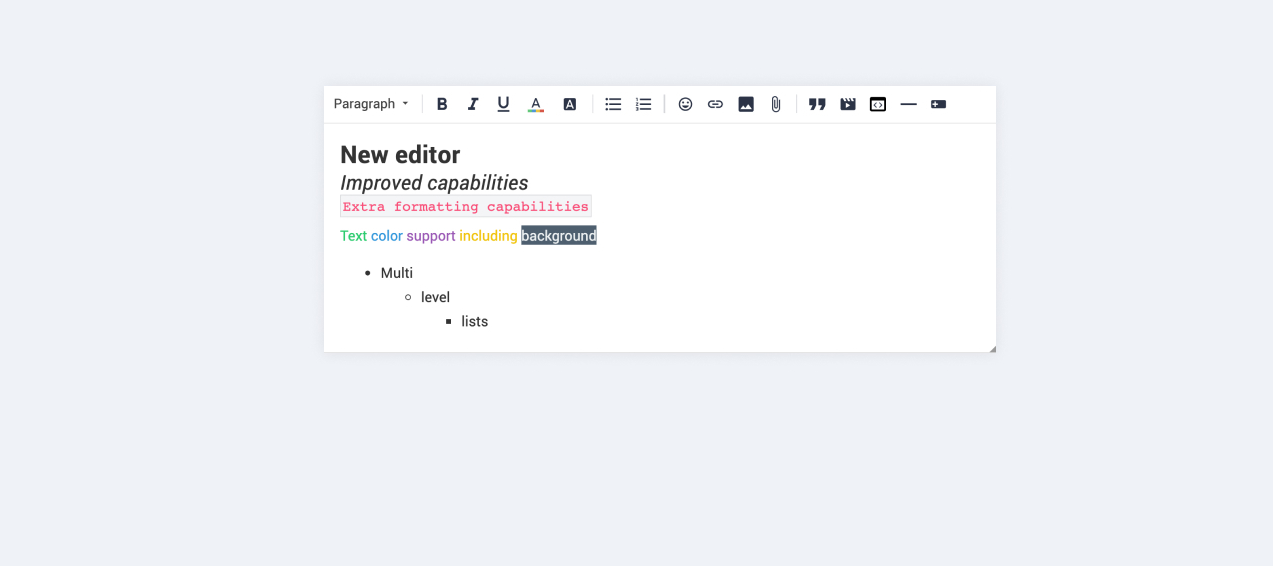
We are very proud to announce that our completely new editor is now available for all users on all communities! :grin::raised_hands::pencil2: We have invested a lot of time to give you and your users more options to create richer content in an easy way - so we hope that you will enjoy working with the new editor as much as we do!

We are investigating line-height / spacing inconsistencies as well as problems with selecting text on some viewports (e.g. Safari on iOS).

Polls are temporarily not available, but will be added again soon.

 Overview of improvements

There are many things which have improved with the new editor, just to name a few:

Improved existing features

  • Image upload
    • Drag & drop images into the editor instead of manual upload
    • Captions (descriptive text underneath uploaded images)
  • Code
    • In-line code is now possible (previously code was in an extra line)
    • Code syntax (code is not being stripped automatically anymore)
  • Lists
    • Multi-level lists are possible now
    • Better UX in working with lists (previously lists could not be interrupted by line breaks)
  • Text styling
    • Text styling within lists was not fully supported before

New features

  • Tables!
  • Callouts
  • Text color / background color
  • Horizontal lines

Of course not all of these features are available to end users, some of these (e.g. text color, header, callouts) are only available in the Control environment for now. We have plans to make this available to front-end users via user roles in the future, so that you are in control of who can make use of these features - please share your thoughts on this with us in the comments!

Feedback

Please let us know what you think of this improvement, also how your users are feeling about it. This way we can adjust and improve the editor even further in the future!

168 replies

Jasper
Contributor ⭐️⭐️⭐️⭐️⭐️
October 22, 2019

One extra new thing regarding quote's: When you are mentioned in an earlier reply and this is quoted, you get another notification mail. That seems rather double, is it possible to stop sending the notification for the second (quoted) mention?

bjoern_schulze
Helper ⭐️⭐️⭐️
October 23, 2019

Our moderators (and soon our power users will too) are missing the strike-through option in the formatting options. We use this function to transparently document changes made on our content, e.g. we strike through old information and update below with newer / correct information.

Ditte
Helper ⭐️⭐️
October 23, 2019

Superuser feedback: 

“Another new change today [22nd October] is when you’re typing in a reply “box”, when you get to the bottom line, for about half of the line of typing the text “bounces” up and down, until at some point it recognizes that it needs to move the scroll bar down to include enough space for the new line of text, and it stops “bouncing”.”


Can this be looked into, please?

Currently rocking the Sonos Communities
Suvi Lehtovaara
Helper ⭐️⭐️
October 23, 2019

Superuser feedback: 

“Another new change today [22nd October] is when you’re typing in a reply “box”, when you get to the bottom line, for about half of the line of typing the text “bounces” up and down, until at some point it recognizes that it needs to move the scroll bar down to include enough space for the new line of text, and it stops “bouncing”.”


Can this be looked into, please?

@Ditte , I’m glad you reported this. I myself experienced this last week Tuesday, but it has not happened to me since. Recording of this happening to me here

One of our superuser experiences this almost daily, but he is the only one in our community to have reported this to me. We were both using Chrome.


https://yhteiso.elisa.fi/
bjoern_schulze
Helper ⭐️⭐️⭐️
October 23, 2019

When can we expect to get polls back? We are relying on it as our community is part of a campaign right now that includes getting user feedback and using it for social media marketing. Will polls be back within a week max.?

Ronald Posthumus
Contributor ⭐️⭐️⭐️
October 23, 2019

Feedback train keeps rolling ( I would like the old editor back so you can fix all these issues first),

  • paperclip for adding files (was there, as in the screenshot, now its gone) this makes putting in additional content and not the topic itself, impossible. For stuff you don't want to be in the topic, but as extra content to see/read. Or is this user rank specific now?
  • Now also on front end: The letter ‘g’ is wrongly displayed in the reaction field as:


  • Also when posting this image, the screen gets bumping smaller and larger, giving me a headache when typing this (windows pc)


Honest, open communication is the only street that leads us into the real world... - John Powell
Julian
JulianAuthor
Gainsight Employee ⭐️⭐️⭐️
October 23, 2019

Hi all!

Once more thanks to all who contribute by sharing feedback here - I am working closely with my colleagues to make sure nothing is left behind!

Before I start commenting on new feedback, I wanted to share something about older comments in this thread:

@bjoern_schulze:

only a still image is being pasted instead of the gif.

This has been reported earlier in this thread, so the colleagues already know of it. Will come back once this is resolved, until then the manual upload should help.

@Suvi Lehtovaara 

If you select the misspelled word, the indicator is moved to the beginning of the post.

My colleagues have identified that this actually is being caused due to the quote. Luckily they are actively working on improving quote behaviour right now, so hopefully it will be improved very soon as well!

@Marie S 

the corrector does not work even when doing CRTL + right click.

My colleagues have created now a ticket for this, which includes basically all feedback regarding right-click behaviour.

I follow my nose, it always knows
Julian
JulianAuthor
Gainsight Employee ⭐️⭐️⭐️
October 23, 2019

@bjoern_schulze

Our moderators (and soon our power users will too) are missing the strike-through option in the formatting options.

you can still use strike-through in text editing, by using this short cut:

On Mac, use Cmd + Ctrl + X

On Windows, use Shift + Ctrl + X

When can we expect to get polls back? We are relying on it as our community is part of a campaign right now that includes getting user feedback and using it for social media marketing. Will polls be back within a week max.?

I have no definitive answer to this, as yoeri is not in the office today. I will forward it to him when he is back tomorrow.

Also, on the issue with file attachments on your community specifically: This has been resolved now, the setting in the Control Environment should work as expected now.

I follow my nose, it always knows
Julian
JulianAuthor
Gainsight Employee ⭐️⭐️⭐️
October 23, 2019

Hi @Ditte & @Suvi Lehtovaara,

about this one:

when you’re typing in a reply “box”, when you get to the bottom line, for about half of the line of typing the text “bounces” up and down, until at some point it recognizes that it needs to move the scroll bar down to include enough space for the new line of text, and it stops “bouncing”.

This is likely to be related to the operating system - could you give more information so that we can reproduce and investigate? It does not happen to me on Firefox on Windows 10 for example.

I follow my nose, it always knows
Julian
JulianAuthor
Gainsight Employee ⭐️⭐️⭐️
October 23, 2019

@Jurgen, about your feedback:

You can’t easily cancel an automatic list (it seems to insist you use bullets)

Just to be clear: With automatic lists you refer to a pasted list? You cannot e.g. hit 1. [enter], 2. [enter] etc. on mobile to create a list. So more info on this would be cool!

If you press the button to edit a post, you often jump to the wrong place in the browser. 

I have reported this, the team has done an initial investigation and will follow up as soon as possible.

The cursor seems to disappear if you exit a browser app and reopen it. Cursor disappearance happens randomly as well. 

I could not reproduce this, however the initial assesment is that it is related to general mobile browser behaviour. Did you also come across this on an iPhone?

The ‘save’ button triggers the keyboard unnecessarily. 

Reported, added to an existing ticket about mobile browser behaviour.

Some bbcode, including images and colored text, doesn't seem to work. (Edit: this turns out to be intentional)

Please read my response to this in the topic you have linked to.

Editing or replying to an @-mention causes it to be sent again.

This should not happen, it was supposed to be fixed for all cases about 8 days ago.

Edit: My colleagues informed me that it was fixed today, not a week ago. If you should get a notification for this edit, please let me know.

I follow my nose, it always knows