
mdfahd
Gainsight Employee ⭐️⭐️
September 10, 2025

How to Use the Moderation AI Agent

  • September 10, 2025
  • 46 replies
  • 1587 views

 This article helps moderators understand how to use Gainsight’s AI Moderation.


Overview


Community moderators are responsible for ensuring that user-generated content aligns with established guidelines and maintains a respectful, trustworthy environment. However, manually reviewing high volumes of content can be time-consuming, delay content publishing, and introduce inconsistencies in moderation.

Using the AI Moderation from the Pre-Moderation Rules in the community settings, moderators can streamline this process. The Moderation AI Agent uses powerful AI models to evaluate content in real time, helping moderation teams screen posts faster and more consistently.


Why AI Moderation?


Moderation AI Agent helps enforce your community’s code of conduct by:

  • Automatically detecting potentially inappropriate or harmful content.
  • Flagging submissions for manual review or blocking them automatically based on risk level.
  • Complementing existing tools such as Keyword Blocker and Spam Prevention.

Moderation AI Agent can reduce the manual workload of your moderators, improve consistency, and accelerate content verification, while continuing to provide a safe and high-quality experience for all community members.


How Does AI Moderation Work?


Moderation AI Agent classifies posts and replies into Approved, Pending, or Trash, applying informative reasoning and descriptive moderator tags for human intervention, filtering, and review.

It provides a fully automated moderation by immediately processing all User-Generated Content (UGC) through OpenAI's Moderation API, ensuring initial compliance. Post-clearance, the AI Moderation further validates content against detailed checks for adherence to community guidelines, absence of NSFW content, PII protection, and spam detection.


Community Code of Conduct


The code of conduct provides guidelines for the Moderation AI Agent and sets clear guardrails for moderation. This ensures that AI-powered moderation aligns with the unique needs of your community.

You can reuse your existing public-facing community rules, code of conduct, or equivalent guidelines. In addition, you may include internal training documents that community managers use during onboarding. The Moderation AI Agent evaluates content against your code of conduct to make the initial decision about what is acceptable within your community.

Note: The Community Code of Conduct can be up to 5,000 characters in length.
 

Moderation Status


Moderation AI Agent scores content on a scale of 0.0 - 1.0 and currently has three possible outcomes:

Status

Confidence Score

Description

Approved

0.0 - 0.4

Content is considered safe and appropriate. Content is approved, published, and visible in the community

Pending

0.4 - 0.7

Requires manual review; borderline or uncertain content. Content is held in the Pending status, is not published, and is not visible in the community.

Trash

0.7 - 1.0

Content violates community or Gainsight moderation guidelines. Content that is Trashed or Trashed and Reported is not published and is not visible in the community.


Moderator Tags


Moderation AI Agent adds tags to each topic or reply that it reviews, to share insights on sorting, filters, and other analytics based on all content moderated.


Category

Tags

Positive Case

  • Meets code of conduct
  • SFW
  • No PII
  • No Spam
  • Approved

Pending Case

  • Pending code of conduct
  • Pending NSFW
  • Pending PII
  • Pending Spam
  • Pending

Negative Case

  • Does not meet the code of conduct
  • NSFW
  • Contains PII
  • Contains Spam
  • Trash

Other Cases

  • Flagged by OpenAI
  • AI Moderator
  • To be reviewed by the community manager


Configure AI Moderation


Moderators can configure Moderation AI Agent in addition to Keyword Blockers and Moderator Approval to ensure that the AI evaluates the content before it is published in the community.

To configure AI Moderation:

  1. Log in to Control.
  2. Navigate to AI > Moderation AI Agent
  3. Turn on the Use AI Moderation toggle.
    Note: When AI Moderation is enabled, an AI moderator user is created. Gainsight recommends not deleting this user.
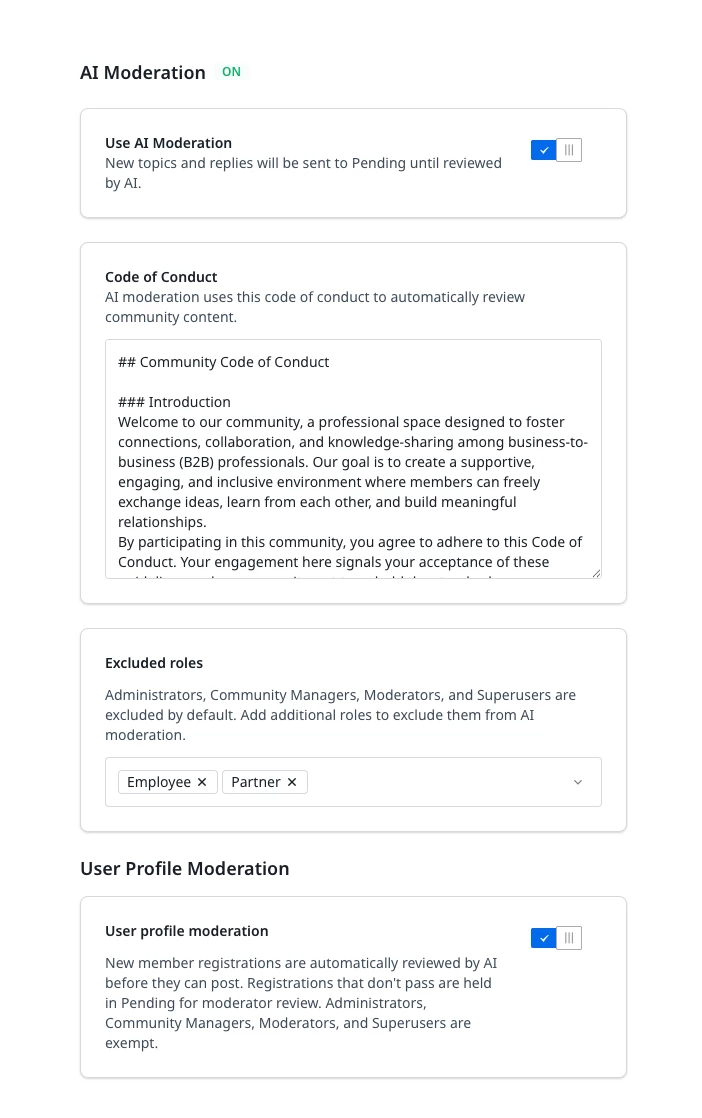
     

  4. In the Code of Conduct, enter your community guidelines.
  5. (Optional) In addition to Administrator, Community Manager, Moderator, and Superuser, you can add additional roles whose content can be excluded from AI Moderation

  6. (Optional) Enable User profile moderation to review New member registrations. Registrations that don't pass are held in Pending for moderator review. Administrators, Community Managers, Moderators, and Superusers are exempt.

  7. Click Save changes.

Content Moderation Widget


Once Moderation AI Agent is configured, any Topics or Replies that do not meet your community’s guidelines are automatically tagged with Moderator Tags. These posts are then moved to Trash and Reported.


You can review this content in the Content Moderation widget on the Control Home page.
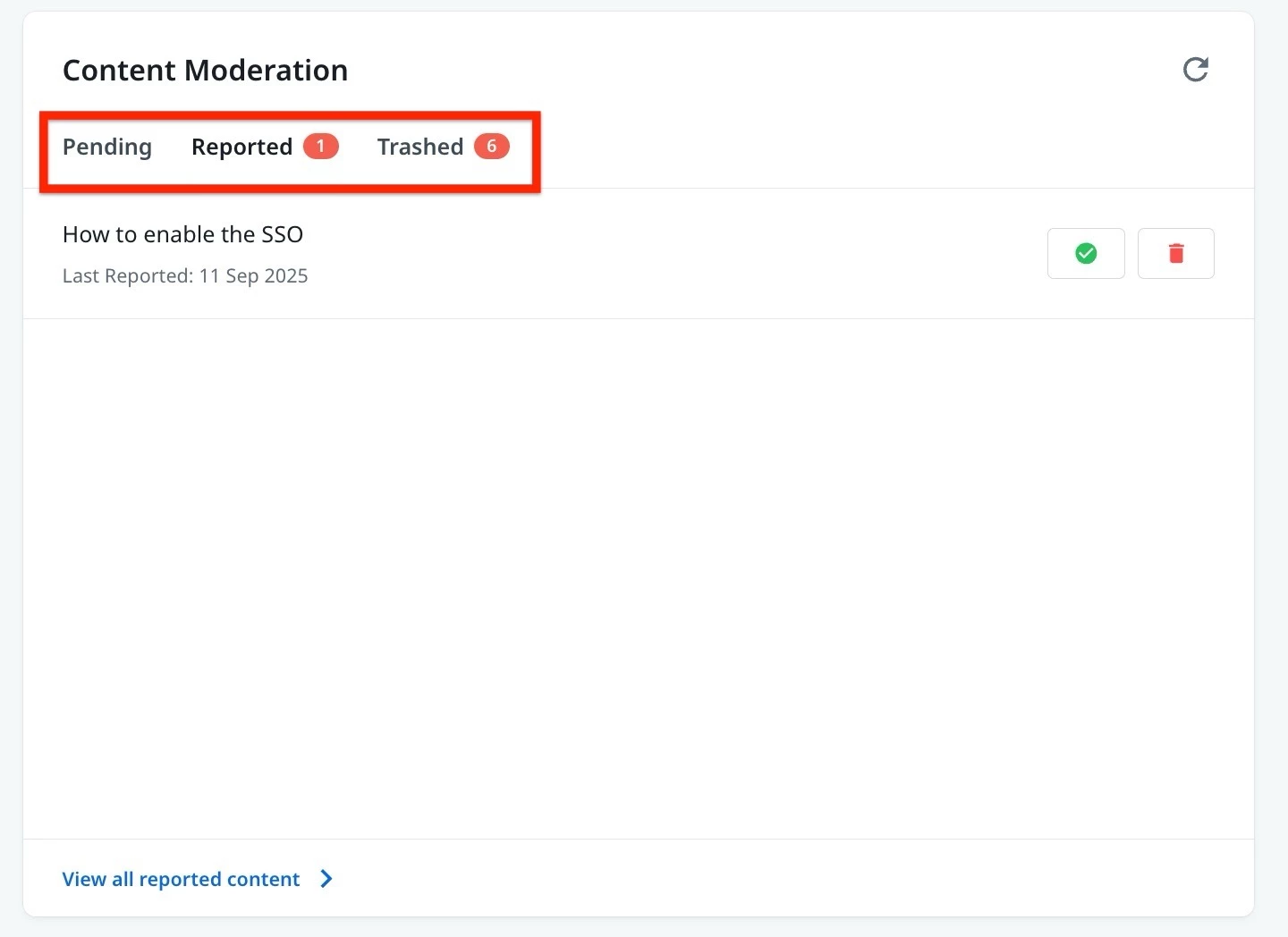
For more information on how to add this widget, refer to the Overview of Control Home article.

    46 replies

    erin.brisson
    Contributor ⭐️⭐️⭐️⭐️⭐️
    March 5, 2026

    Also, I just had a community member reach out because they posted a link to one of our help articles but part of the link was automatically removed by the AI moderator thus breaking the link. I wouldn’t have known about this if the member hadn’t reached out.

    I was under the assumption that if AI moderator flags a post, it would place the post into Pending so I have the ability to approve or edit.

    Having the AI moderator automatically remove part of a link but keep the link clickable in the post knowing it’s broken, is a very poor experience.

    Additionally, the member informed me that the moderator pop up happens every time he replies to a post, which adds to the poor experience.

    Any way to troubleshoot this ASAP ​@Larry ? If not, I will most likely have to turn AI mod off.

    Erin
    Larry
    Gainsight Employee ⭐️
    Gainsight Employee ⭐️
    March 6, 2026

    Also, I just had a community member reach out because they posted a link to one of our help articles but part of the link was automatically removed by the AI moderator thus breaking the link. I wouldn’t have known about this if the member hadn’t reached out.

    I was under the assumption that if AI moderator flags a post, it would place the post into Pending so I have the ability to approve or edit.

    Having the AI moderator automatically remove part of a link but keep the link clickable in the post knowing it’s broken, is a very poor experience.

    Additionally, the member informed me that the moderator pop up happens every time he replies to a post, which adds to the poor experience.

    Any way to troubleshoot this ASAP ​@Larry ? If not, I will most likely have to turn AI mod off.


    @erin.brisson  Just heard back from my team earlier today as we took a deeper dive to best understand all the scenarios in which this could happen.

    In short, you are correct. This is occurring solely due to the AI Moderator enablement. This is behavior we are going to prioritize fixing within the next week. While we address this fix, you can decide whether you disable AI moderation temporarily or not, but regardless, this is an issue I’m going to have the team get started early next week.

    I’ll report back here with an update soon but please add any questions or comments here so I see them!

    Larry Imgrund || Senior Product Manager & Community Nerd
    Suvi Lehtovaara
    Helper ⭐️⭐️
    July 30, 2026

    I’ve been testing AI Moderation in the sandbox and my prompt seems to be quite good already. We do not want the AI to redact any PII information > we just don’t want it published. My prompt says

    “Do not include phone numbers, customer numbers, or any personal information in your messages. Messages containing such information will be moved to the Reported folder.”

    Now it seems to trash all posts containing PII, which is what I wanted, but we have a massive moderation problem which is blocking us in taking this into use.  All of our moderators have the role of “Staff Moderator” which means that they do not have access to Control home. So they’d have to separately go through the trash can in order to find the content AI trashed. That’s not really a lean process.

    Could this idea be implemented?


    https://yhteiso.elisa.fi/
    Suvi Lehtovaara
    Helper ⭐️⭐️
    July 30, 2026

    @Nadia Nicolai 

    https://yhteiso.elisa.fi/
    bjoern_schulze
    Helper ⭐️⭐️⭐️
    August 20, 2026

    We’re currently testing AI Moderation in the o2 Community.

    As I understand, AI Moderation only chooses from the default moderator tags you’ve provided in the opening post. However, they don't match the moderation framework we've already established internally. I’d like to have the ability to define our own moderation tags as part of the AI Moderation Code of Conduct and have the AI use those tags when classifying content.

    For example, instead of fixed platform tags, we'd like to be able to define:
    • violation category (commercial_spam, fraud, pii, abuse, illegal_content)
    • severity of violation (low, medium, high)
    • confidence of the assessment (low, medium, high)

    In fact, I have defined all of this in our Code of Conduct, but it’s being ignored (or the tool isn’t able to).

    This is the excerpt from our Code of Conduct, FYI:

    Moderator Tags

    When a violation is detected, a violation category, a severity level, and a confidence level should also be assigned.

    Violation categories for evaluation:
    - commercial_spam = unsolicited bulk or off-topic content, or targeted advertising for products or services
    - pii = personally identifiable information
    - fraud = attempts at fraud, deception, or identity theft
    - abuse = offensive, discriminatory, provocative, or harassing content
    - illegal_content = illegal content

    Severity levels for evaluation:
    - low
    - medium
    - high
    - critical
    The selected violation category and severity level must correspond to the provided justification and the recommended moderation action.

    Confidence Level of the Assessment:
    - low
    - medium
    - high
    The confidence level describes how certain the AI is that the selected violation category applies.
    A low confidence level does not automatically mean that no violation exists. It merely indicates that the classification is based on less clear signals.
    The confidence level is intended to assist moderators in prioritizing and reviewing decisions.This would make AI decisions much easier to understand for moderators, align classifications with our existing processes, and improve reporting and analysis.

    It would also help a lot during testing and tuning, because we could immediately see whether the AI is classifying content according to the categories defined in our Code of Conduct. As of now, we don’t fully understand the AI’s decisions and where to adjust the Code of Conduct in order to make it do what we’re expecting it to do.

    bjoern_schulze
    Helper ⭐️⭐️⭐️
    August 20, 2026

    Corresponding to my comment above I want to plus-one the feature request of ​@revote to have moderator tags at every post, not only on the topic level.

    Alternatively, there could be a new field - like “AI moderator tags”, in order to separate automatic tags from manual ones.