

steve_davis
Gainsight Employee ⭐️⭐️
January 24, 2018

Bigger Text Box For Scorecard Comments

  • January 24, 2018
  • 21 replies
  • 168 views
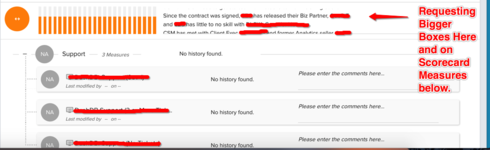
I have a request for a customer to increase the overall size of the comments box. Users are typing in several sentences into this box and the window is very small. Users have to scroll through the box to get the full message which can be a bit frustrating. 
    21 replies

    brandy_guillory
    Contributor ⭐️⭐️⭐️
    January 24, 2018
    I agree several on my CSM team have the same limitation, they are not able to see all of their comments and/or the size of the comments in which they are pasting is larger than the alloted character limit
    Contributor ⭐️
    January 24, 2018
    And, each text box seems to get smaller as you progress down the page.  
    sarah_post
    Helper ⭐️
    January 29, 2018
    +1 to this idea - I've had customers ask for this as well. 
    chris_mudd
    Gainsight Employee ⭐️
    Gainsight Employee ⭐️
    February 9, 2018
    This reply was created from a merged topic originally titled Adjust Scorecard Comments.

    We would like to see the ability to adjust the scorecard comments section on the C360.  Right now if you have more than a few lines you need to scroll thru the box.  It would be nice if this would adjust dynamically or if you had the ability to change the font size so everything shows without having to scroll.
    shiv_kumar_katiyar
    Gainsight Employee ⭐️⭐️
    July 9, 2018
    This reply was created from a merged topic originally titled [Request] Ability to adjust the height of the comment section in Scorecard.

    When entering comments in the Scorecard, the box on the right hand side of the scorecard is used by our CSMs to capture contextual data supporting the manual score. The box's height, however, is not tall and it is very tedious to see what has been written or to make changes where there is a significant amount of text. Is it possible to make the box taller?
    jeanne_mitchell
    Contributor ⭐️⭐️
    August 1, 2018
    We have the same request. Our CSMs add comments to their subjective scorecards whenever a score has declined. Although they date their comments, both the CSMs and others viewing the comments find it very difficult to review the history without scrolling.
    aditya_marla
    Helper ⭐️⭐️⭐️
    August 1, 2018
    Hi All, 

    Thanks for sharing this. Agree that when there is a lot of content in the comments section, it's difficult to consume the date. Would having the option to view the comments in a pop-up/overlay make sense (i.e something like when the user click on the comments section, the selected measure comments open in a pop-up/overlay more...with more space to read or edit the comments?)
    marcelo
    Helper ⭐️
    August 1, 2018
    From my point of view, that would be introducing another element to the UI. The optimal solution for us would be to have a box that is dynamic in size depending on the amount of text available.
    brandy_guillory
    Contributor ⭐️⭐️⭐️
    August 1, 2018
    +1
    aditya_marla
    Helper ⭐️⭐️⭐️
    August 1, 2018
    Got it, agree that it should not be invasive like a pop-up. Don't you think that with dynamic sizing, as the size of the comments increases the number of measures that are visible in the screen would keep going down? 
    Would something like, when you click on the measure it expand in the same place to show more comments be better? Something like this: