

steve_davis
Gainsight Employee ⭐️⭐️
January 24, 2018

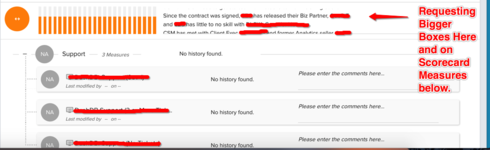
Bigger Text Box For Scorecard Comments

  • January 24, 2018
  • 21 replies
  • 168 views
I have a request for a customer to increase the overall size of the comments box. Users are typing in several sentences into this box and the window is very small. Users have to scroll through the box to get the full message which can be a bit frustrating. 
    21 replies

    jeanne_mitchell
    Contributor ⭐️⭐️
    August 1, 2018
    I checked with some of our CSMS and here's their response: In general I like the idea, but would have a few clarifying questions.  1.  Would it function as a "hover" option such that when you hover of the comments that a pop up screen displays?   2.  Could comments be added to the pop up window that displays or is it read-only (hopefully not just read only)?  3.  Would the pop up window be a set specific size or could the CSM drag on a corner to make it bigger? What about CSMs that update comments on a scorecard dashboard - same need to have more room for comments.... Thanks!
    marcelo
    Helper ⭐️
    August 1, 2018
    I can see the logic behind your option. The problem I'm trying to solve is for upper management quick access to the info without scrolling or clicking. An alternative solution would be to be able to size each field based on text lines plus available space in the screen, that way you have all in one screen but if the text box needs more space, include a visual queue on the side (scrolling bar) that is visible only on those boxes with hidden text but no need to hover over or click. Makes sense?
    aditya_marla
    Helper ⭐️⭐️⭐️
    August 2, 2018
    Hi Jeanne,

    1)It would not be a hover option...basically, when the user clicks on the comments section today we show them only in the limited space that is available. The idea is to have more space for it (so that the user can easily consume the comments / edit the comments).
    2)The user can read or/and update the comments (do you think there is a need to have it read-only?)
    3)Good point, we are thinking that it would be dynamic (the size would be based on the existing comments) & that would have a max height - after which it would start scrolling
    Would that help your CSM's

    Regards
    aditya_marla
    Helper ⭐️⭐️⭐️
    August 2, 2018
    Hi Marcelo,

    If I understand correctly, based on the screen size the comments can take up more space (i.e, if you are seeing it in a large screen, provide more space for the comments)
    Agree on the second point, even today we can scroll within the comments section..but the visual cue is missing. Also do you think scrolling within the limited height is a good experience?

    marcelo
    Helper ⭐️
    August 2, 2018
    Aditya,

    Correct on your first statement, so it should be dynamic hight based on screen sizing.
    Scrolling with limited hight for me is not a good option right now as most people miss it (specially if they are not actively using Gainsight - upper management). If we get dynamic hight and still have text hidden withn the box, the scroll bar should be visible regardless on if you hover the text or not.
    michael_sweeney
    Helper ⭐️
    September 21, 2018
    I have been speaking with a customer who is seeing this as a pain point as well and would like to add their use case to the conversation. 

    Use Case: Our CSMs exert a great deal of time documenting their observations and justifications of the manual risk scores (in the scorecard). In fact, some of the comments are upwards of 1,000 characters. The CSM's manager would like to read through the comments entered by the CSM however the size of the comment box is very small and the navigation of the comment box is a bit tedious. Since the user experience of the manager is not so great, we are wondering if those comments would be exposed on a report. The example I would like to implement is that a manager could have a report (on a dashboard) of all their staff's customer risk scores and comments (yes, 1,000 characters if the CSM entered that much). The manager would not be able to read the verbose comments on the screen but we were hoping that the manager would have the ability to download the report details as a csv/excel (normal functionality on reports ... or emailed if the file is too large). Once downloaded/emailed by the manager, they could open the document up in excel and format the columns as appropriate so they can see the entire set of comments
    darkknight
    Expert ⭐️
    September 21, 2018
    Agree.
    Jeff Kirkpatrick
    mark_gecsey
    Contributor ⭐️⭐️⭐️⭐️
    September 21, 2018
    We find ourselves using the comment section - particularly for manual measures - a lot in terms of validating or addressing the measure trends whether they be positive or negative.
    Mark Gecsey
    steve_davis
    Gainsight Employee ⭐️⭐️
    September 21, 2018
    It should likely be adjustable too, that way a customer can define the perfect size based on user feedback. 
    sai_ram
    Expert ⭐️⭐️
    September 27, 2019
    Hi All, We have good news for all the Scorecard users! We are releasing an amazing feature called Scorecards-Timeline integration, with this most of the Scorecard comments issues will be solved.We have done Scorecards-Timeline integration and now we maintain a history of comments for each scorecard measure. With this, you can see the scorecard comments related information like when and who gave the scorecard comment.

    • Multiple customers asking to change the size of the scorecard comments box, with this enhancement the sizing issue will be fixed.
    • You can create a Timeline Activity for a Measure or the Overall score.
    • When you create a Timeline Activity from Scorecard, the current score of the Measure or Overall score is also captured.
    • Timeline Activities in Scorecard can be created either from the C360/R360 or Mass Edit report pages and from a Rule.

    This will be available in the upcoming release! cheers everyone !!!