

james_whitehead
Contributor ⭐️⭐️⭐️⭐️⭐️
June 5, 2019

Playbook Usability

  • June 5, 2019
  • 13 replies
  • 172 views
Good Morning-

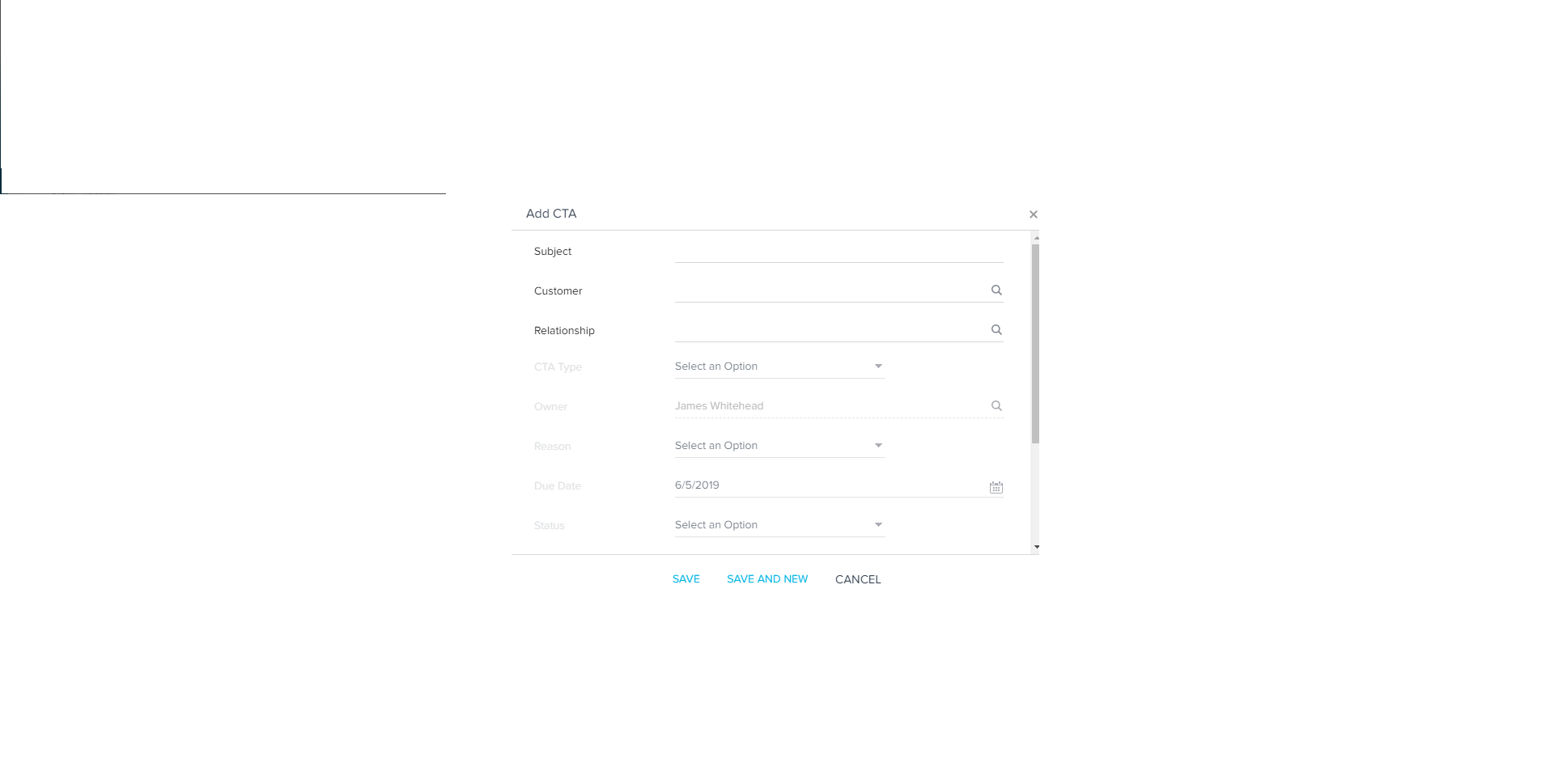
We've received some feedback from our CS team that manually creating a CTA is too click heavy. Our CSMs have requested that they have a list of all playbooks available when manually creating a CTA and have the CTA type (Risk, Expansion, Lifecycle, Activity) pre-determined by the admin team and pre-programmed to populate.

Having to figure out what type of CTA you want to create to see the playbook you want to use is confusing and driving down our adoption of Gainsight.
Thanks

-Jim

    13 replies

    dan_ahrens
    Expert ⭐️⭐️⭐️
    June 5, 2019
    Hi James,

    Are you asking that there only be one type of CTA for your entire org? I'm trying to understand what your intent was when you mentioned that you'd want to have the CTA type pre-determined when it's created manually.

    VP of Customer Success at Forcepoint
    keith_mattes
    Helper ⭐️⭐️
    June 5, 2019
    I think I get this... present a list of playbooks instead of CTA and then use the configuration of the playbooks to assign values to the CTA once created?

    A partial alignment we just performed was making sure our CTA names matched their associated Playbooks.

    I'd support this use-case as I think our CSM's could benefit from this click-path approach.

    Sr. Customer Success Operations Analyst/Gainsight Admin/Data Nerd
    faust_belarmino
    Helper ⭐️⭐️
    June 5, 2019
    I agree here. It's too time consuming to manually create these CTAs. There are so many fields that need to be populated.

    james_whitehead
    Contributor ⭐️⭐️⭐️⭐️⭐️
    June 5, 2019
    Exactly. Much more concise than what I communicated. Thanks Keith.

    james_whitehead
    Contributor ⭐️⭐️⭐️⭐️⭐️
    June 5, 2019
    Sorry I wasn't clear enough in my original post.

    No, we are not looking for one CTA Type for our entire organization.

    What we're looking for is to have a way so as to not require a CSM to select a particular CTA type to find the playbook they need.

    Example:

    A CSM receives information that their Day-to-Day Contact is leaving the company and a replacement has not been found yet.

    CSM goes to the client's R360 and adds a manual CTA.

    The CSM wants to use the "POC is leaving" playbook

    Current workflow to add a manual CTA:

    CSM has to click on the +CTA button

    CSM has to type in the CTA Name

    CSM has to select CTA Type

    CSM has to assign an owner (If not themselves)

    CSM has to choose a reason

    CSM has to choose a due date

    CSM has to choose a status

    CSM has to choose a Priority

    CSM has the option to enter comments

    CSM has to choose the "POC is leaving" playbook

    -----This playbook is dependent on the Type of CTA chosen.

    -----If the CSM chooses a Type other than "Risk" they do not have access to the

    "POC is leavingP playbook

    Ideal workflow:

    CSM clicks on +CTA Button

    CSM types in CTA Name

    CSM assigns owner (if applicable)

    CSM chooses Due Date

    CSM chooses Playbook they want to use

    -----The Playbook setup automatically determines that the CTA Type is Risk

    -----The Playbook setup automatically determines the reason

    -----The Playbook setup automatically determines the status

    -----The Playbook setup automatically determines the priority

    -----The Playbook setup (could) automatically determine the due date (i.e. we want the CSM to have a new POC within 7 business days, and by selecting this playbook the Due Date is automatically over-ridden to reflect CTA Creation Date + 7 business days)

    CSM has the option to enter comments

    So in the current workflow, there are 9 required steps, one optional.

    In the idealized workflow there are 4 required steps, one optional.

    Is this more clear?

    Thanks

    -Jim

    dan_ahrens
    Expert ⭐️⭐️⭐️
    June 5, 2019
    Hi Jim, thanks for clarifying. One of the reasons the flow is setup this way is that we had customers with hundreds of playbooks and they found it was confusing for their CSMs to be presented with all of those playbooks. So by first selecting the CTA type, it filters the list of playbooks to just those that would be relevant for that CTA type.

    Would love to get your input on this as well, @aditya_marla

    VP of Customer Success at Forcepoint
    james_whitehead
    Contributor ⭐️⭐️⭐️⭐️⭐️
    June 5, 2019
    @dan_ahrens : I actually met with @aditya_marla at Pulse and e-mailed him a link to this thread.

    Curious to see his response.

    Thanks

    -Jim

    keith_mattes
    Helper ⭐️⭐️
    June 5, 2019
    Perhaps when creating a CTA, after clicking the +CTA button there is a dialogue box that asks if you would like to create your CTA from a filterable Playbook list or "Manually" (the ol' fashioned way).

    From an admin perspective, perhaps there is some opportunity in the "call to action" --> "Account" --> "Call to action type" or "Call to action reason" section to associate or define Playbooks as an additional field/config option for this purpose? This would permit 1:many config options for the reasons to playbooks association.

    Sr. Customer Success Operations Analyst/Gainsight Admin/Data Nerd
    james_whitehead
    Contributor ⭐️⭐️⭐️⭐️⭐️
    June 5, 2019
    That could work. Or maybe an Admin-selectable option for "Easy Mode" vs. "Manual Mode" (for instances where "Easy Mode" becomes too cumbersome becuase of the volume of playbooks that are available).

    aditya_marla
    Helper ⭐️⭐️⭐️
    June 6, 2019
    Hi Jim,

    Thanks a lot for sharing this.

    You can configure what the default status, reason and priority cab be (and these are pre-populated in the create CTA form)

    Most of the CTA configuration is completely driven off CTA Types , so there is no default for that. But once the CTA type is selected...the other fields (status,priority,reason,duedate) are auto-filled with defaults & based on the CTA Type the available playbooks are displayed.

    Is the main problem that users are not aware what playbook is available for what CTA Type (i.e they select a CTA Type & later on realize that the playbook is not for that type, but something else...and need to go and updae the form) ? Also how many playbooks do you have set up?

    Regards