

darkknight
Expert ⭐️
September 21, 2015

Reports 2.0: Ability to change X or Y axis numbering to exclude decimal notation

  • September 21, 2015
  • 28 replies
  • 185 views
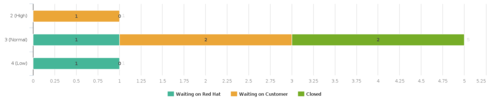
When I create a support case report and a customer's case volume is low, the X-axis shows decimal notation, but there is no such thing as 0.25 of a support case. (see image)


Need the ability to determine whether or not the decimal notation is contextually applicable and enable or disable where appropriate.
    28 replies

    gaurav_kotak
    Expert ⭐️
    June 1, 2016
    Yep. My explanation is the proposal I'll get engineering to work on, not today's behavior
    connor_kasser
    Contributor ⭐️⭐️⭐️
    June 1, 2016
    Understood. Thanks so much
    cornelius_oconnor
    Contributor ⭐️
    June 8, 2016
    This reply was created from a merged topic originally titled Only display whole numbers in bar chart graphs. We don't have half customers :).

    I've recently made a handful of new reports/dashboards to track customers in different stage's. The bar charts are displaying 1.5, 2, 2.5 etc... which seems odd. We are tracking customers stage - so there should not be and half increments here. It looks as though it happens when the scale of the report is under ten. For the comparable reports that have a scale bigger than 10, the half increments vanish and whole numbers are used. For consistency sake looking at the reports, it would be AMAZING to just have everything in whole numbers!   Can you share a few examples of why someone would use half numbers in gainsight?  I'd love to hear a few ideas!
    gaurav_kotak
    Expert ⭐️
    June 8, 2016
    This is planned for Q2 / Aug release
    darkknight
    Expert ⭐️
    September 14, 2016
    Was this ever released?  I see a "Display X Decimal Places" option but if that is intended to give me the ability to restrict the decimal functionality it doesn't seem to be working....

    Jeff Kirkpatrick
    darkknight
    Expert ⭐️
    October 19, 2016
    Bump.
    Jeff Kirkpatrick
    venky_reddy_k
    Helper ⭐️
    March 22, 2017
    The above issue has been taken up for Spring 2017 release. The idea is to present decimals on axes ONLY when the measure represented on the axis has decimals. If the measure is a whole number, then represent the axis labels using whole numbers only (so in case of CTAs /Cases closed, which is a whole number, you will not see decimal labels).
    leanne
    Contributor ⭐️⭐️⭐️⭐️⭐️
    October 19, 2017
    We're seeing this again in some of our reports (half of a service?)  Anyone else?
    tom_gerth
    Gainsight Employee ⭐️⭐️
    October 23, 2017
    I'd like to bump this post as well.  I understand that this happens based on fitting the data into the report UI in an attractive way, but it is inconsistent based on the amount of data shown in a report, and can definitely be deceiving when trying to look at data where there are no decimal values to report.
    Enterprise Support Manager, Gainsight
    darkknight
    Expert ⭐️
    November 29, 2017
    Anyone paying attention to this thread?  

    Example as of today:

    Jeff Kirkpatrick