

darkknight
Expert ⭐️
March 12, 2018

Scorecard 2.0: Apply weightings by group

  • March 12, 2018
  • 12 replies
  • 126 views
There have been related postings t( a couple links below) but I do not find one that is specifically this request:

Allow the ability to configure the weighting at the group level.

If I have multiple score measures but I want each group to equate a certain percentage, I have to try and come up with the right math to make that happen, and it can get very difficult without the ability to use decimals.  
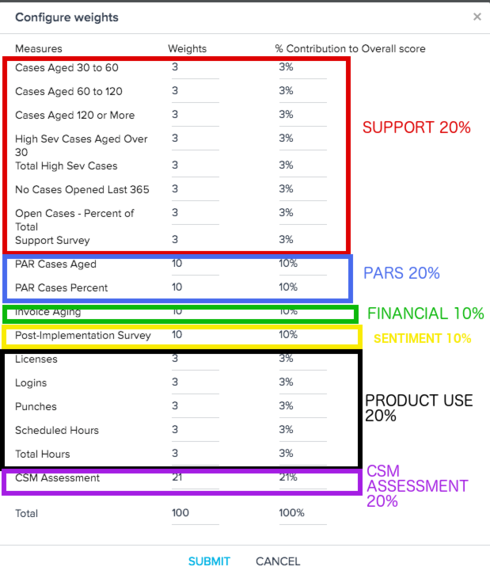


However - even if decimals were possible I would prefer the ability to score by Group so separating this out into its own idea.

    12 replies

    samantha_braastad
    Contributor ⭐️⭐️⭐️⭐️⭐️
    March 12, 2018
    Would love this addition as well. It would also making training and changes to the score card much more manageable and consistent. Right now, if you add a new measure for support each measure of the entire scorecard needs to be adjusted in order to keep the overall support health as 20% of the overall score. This would allow you to focus on the changes only within the support group. 
    dan_ahrens
    Expert ⭐️⭐️⭐️
    March 12, 2018
    Hey Jeff,

    One way to get this to work today is to set the weights as follows (top to bottom in your screenshot):

    25
    25
    25
    25
    25
    25
    25
    25 (first 8 dimensions each at 25 points for 200 points total for support)
    100
    100 (both PARS dimensions each at 100 points for 200 points total for PARS)
    100 (invoice aging)
    100 (post implementation survey)
    40
    40
    40
    40
    40 (5 product use dimensions for 40 points each totaling 200 for product)
    200 (CSM assessment)

    This will give you a points total of 1000 and doesn't need decimals. You'll note that no matter how many points you have total in the left column, the weights will prorate each dimension so that the total points will equal 100%. 
    VP of Customer Success at Forcepoint
    darkknight
    Expert ⭐️
    March 12, 2018
    Ok but it would be so much easier to be able to say Support = 20%, Adopti20%. We should be going towards ease of use.

    But thank you for the interim workaround!
    Jeff Kirkpatrick
    samantha_braastad
    Contributor ⭐️⭐️⭐️⭐️⭐️
    March 12, 2018
    I think this still has a lot of complexity if a new measure is added or if a customer does not have a value for one of the measures within a group. Say you have 8 support measures and add another but want to keep the impact that the support group has on the overall score to 20%. The first thought would be to adjust all the support measures to 22.2 to get to 200. However, decimals are not an option requiring you to review all measures and adjust accordingly. 

    The other kicker is how the overall score is impacted if one of the measures is null or N/A. Say two of the support measures in the example above are null for whatever reason. All of a sudden, all your weights are thrown off and support is no longer 20% of the overall score. 
    darkknight
    Expert ⭐️
    March 12, 2018
    Agree!
    Jeff Kirkpatrick
    dan_ahrens
    Expert ⭐️⭐️⭐️
    March 13, 2018
    Hey Samantha, you're correct that if a new measure is added, there needs to be some thought into the weights within that group. 

    In the case where you had 8 support measures and add another but still want to keep the overall contribution of support to 20%, you'd have to subtract points from the other 8 measures to have enough points to distribute to the new measure. 

    If you want to retain the group weights even if one of the measures goes to N/A, make sure you have Enable Overall Rollup checked:

    Select Enable overall rollup if you want to roll-up the scores from measures to the relationship/account level based on the weight applied to the measures in the scorecard. See: https://support.gainsight.com/Product_Documentation/Scorecards_(1.0_and_2.0)/Admin_Configuration/Con...

    If that's checked and in your example one of the 8 support measures goes to N/A, the support group will still be 20% of the overall and the points belonging to the dimensions that went to N/A status will be redistributed in that group and not overall. It's a pretty cool feature! 🙂
    VP of Customer Success at Forcepoint
    dan_ahrens
    Expert ⭐️⭐️⭐️
    March 13, 2018
    Hey Jeff - Agreed that the definition of group weights could be a bit clearer. And since the decimal support right now isn't great, the capabilities to allow the score points to equal higher than 100 (I've tested up past 10,000 points!) let you do a lot of creative things. 🙂
    VP of Customer Success at Forcepoint
    darkknight
    Expert ⭐️
    March 13, 2018
    I think you’re missing the point though - if the weights could apply at the group level no one has to worry about working out the math. Its a big pain.
    Jeff Kirkpatrick
    dan_ahrens
    Expert ⭐️⭐️⭐️
    March 13, 2018
    I agree with you. 🙂 And I also know that for many admins who have use cases for grouped scorecards, they can't wait until a future release, hence some shorter term solutioning is also needed. 🙂
    VP of Customer Success at Forcepoint
    darkknight
    Expert ⭐️
    March 13, 2018
    Haha ok glad to hear it.
    Jeff Kirkpatrick