


CS Newsletter March 2026
Customer Success March 2026
The latest insights from across the Gainsight community are here. Keep reading to take a closer look at recent Copilot updates, new flexibility in Journey Orchestrator, ways to improve how your team works with AI, and a few opportunities to sharpen your skills with upcoming training and events.
Let’s dive in!😀

Empower Your Teams with Copilot Insights
CSMs are managing more than ever, which leaves less time for the conversations that actually move customers forward. That’s where Copilot comes in. It’s built directly into Gainsight and gives teams quick, contextual answers about customers, product functionality, and CS best practices—and it’s only gotten more useful over the past few releases:
- More complete answers: Copilot now pulls from Scorecards, Success Plans, and Cockpit—not just Timeline—so responses reflect the full customer picture.
- Aligned to your business: Define key terms like “at risk” and reuse proven prompts with the Prompt Library, so Copilot's responses stay consistent with how your team operates.
- Visibility into usage: Track adoption and identify where teams may need more guidance.
- Embedded in your workflow: Access Copilot directly in C360 to get insights relevant to that customer, and instantly email them to others, without switching screens.
We’re also expanding how Copilot fits into your broader workflow. With the recent on-demand release, you can now access it as an external API. If you're interested, just submit a support ticket. Otherwise, it'll be generally available in April.
For more information, refer to the Copilot API Documentation article or this best practices article.
More Flexibility to Edit Journey Orchestrator Programs
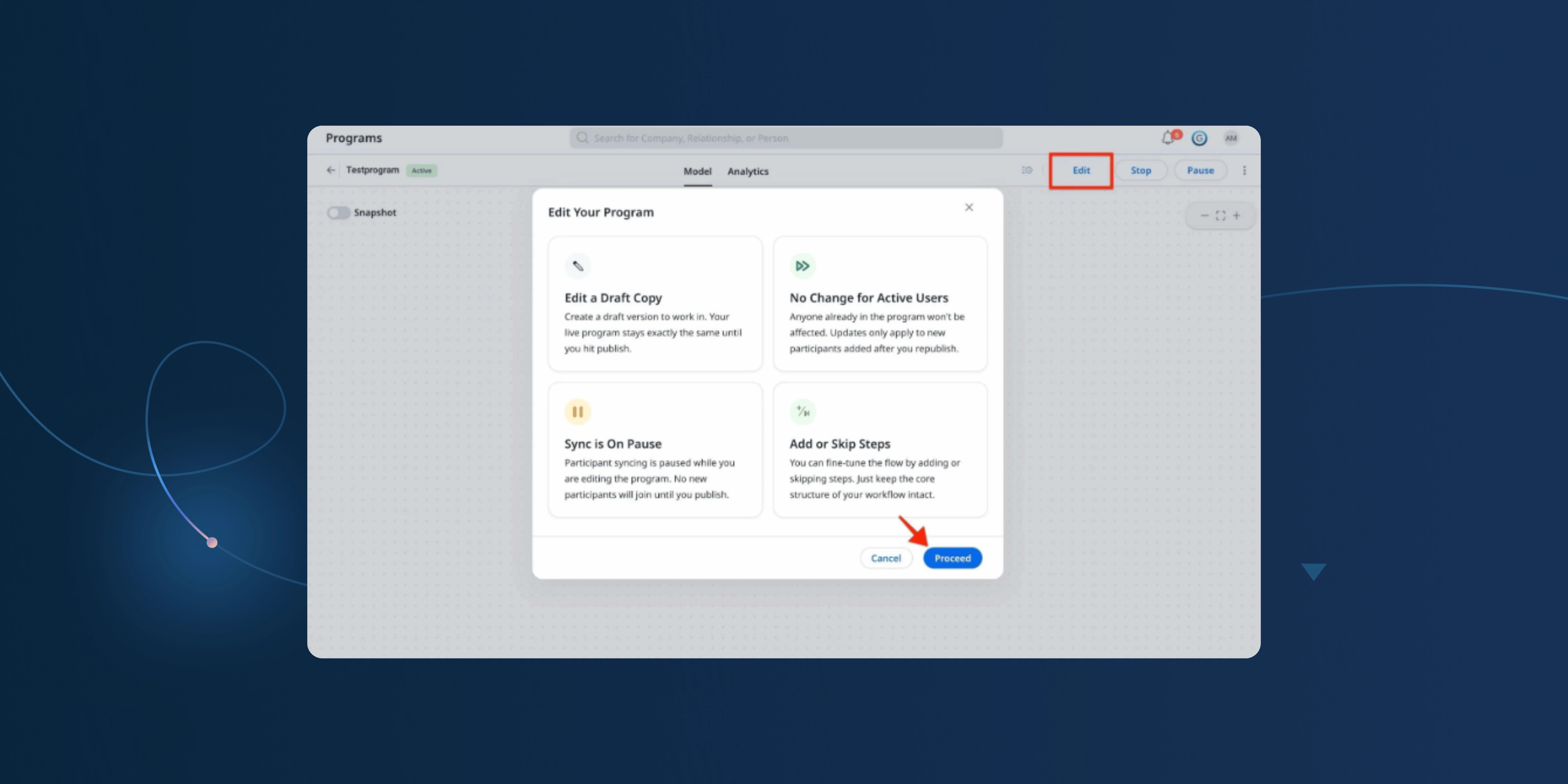
Journey Orchestrator helps CS teams automate onboarding, adoption nudges, risk outreach, and more without relying on manual effort. But making changes to live programs hasn’t always been easy. That’s changing with a few key enhancements from recent releases:
- Preview and test programs before you launch: See how participants will move through a program and test drafts with up to 30 real participants.
- Add or skip steps in active programs: Insert new steps, skip steps without disrupting the flow, and adjust delays or logic without cloning or breaking reporting.
This is available as part of our on-demand release. Please submit a support ticket to enable. For more information, refer to the Edit an Advanced Program article.

Use (and Audit) Copilot's Key Definitions to Improve Responses
If you’re looking to get more consistent, reliable answers from Copilot, it’s worth starting with your Key Definitions, which shape how Copilot understands your business and determines what data it pulls into its responses. We introduced 13 default definitions in November, but they might not reflect how your team and organization actually operates. Taking a few minutes to review and adjust them can make a noticeable difference, and checking back in over time helps ensure they stay aligned as your processes evolve.
Use # to Tag Company Names in Your Copilot Prompts
When you’re asking Copilot about a specific account, using # helps make sure you’re pointing to the right one. It brings up a quick company selector so you can choose the exact record instead of relying on name matching. It’s a simple step, but it helps keep responses accurate and avoids any confusion.
Use CTAs in Your JO Programs to Bridge Digital and Human Touchpoints
Automated emails and touchpoints are great for scale, but the best programs know when to hand things off to a real person. Adding a Create CTA step to your JO program lets you automatically surface a follow-up task in Cockpit when a participant hits a key moment, such as a non-response after two nudges or a negative survey score. This helps ensure that critical signals don’t get missed and that the right person can step in at the right time to move things forward. For more Gainsight CS best practices, visit our community.
Read the Full Story

Improving Scorecard Accuracy with Data
Dough Courtot recently raised an important question around validating customer health score accuracy using quantitative analytics — and it’s already sparked responses from other customers.
How do you move beyond gut feel and actually test whether your health score is predictive and effective?
If you’ve worked on refining or validating your scoring model, this is a great discussion to explore different approaches and ideas from peers.
Join the Conversation
CS March 2026 Feature Updates
Shayeri Sen shared the latest March 2026 On-Demand Features Release Notes for Gainsight CS, now available for EU and US customers.
This release includes updates to Copilot API documentation, enhancements to Journey Orchestrator program editing, and improvements to Survey Properties.
Check Them Out

New Experienced Admin VILTs Launching in April

New Experienced Admin VILTs are launching this April, designed to help Gainsight Admins build deeper expertise through hands-on, real-world learning.
These sessions will cover key areas like data preparation, designing dynamic programs in Journey Orchestrator, and building end-to-end workflows to reduce risk and churn. Each session focuses on practical techniques you can apply directly to improve efficiency and drive better outcomes.
If you’re looking to strengthen your admin skills and work more effectively with Gainsight, these sessions are a great opportunity to learn and apply advanced concepts.
- Admin Experiential - Mastering Data Preparation
- Admin Experiential - Design, Build, and Refine Dynamic Programs
- Admin Experiential - Configure Processes to Reduce Risk and Churn
Pulse Academy Live – May 26

Join Pulse Academy Live on May 26 for a full day of in-person training and peer learning ahead of the Pulse conference.
Featuring sessions for advanced Admins and CS end users, including the Admin 200: Advanced Series, this is your opportunity to sharpen your skills and learn from real-world use cases.
Learn More and Reserve Your Spot
H1 FY27 Roadmap Webinar: The Road Ahead for Customer Success
April 8, 2026 | 8:00 AM PST
The tech landscape is evolving fast—and Customer Success is evolving with it. Join us for an inside look at where we are today and the bold bets shaping the future of CS.
What you’ll learn:
- How Gainsight CS is driving stronger sales alignment and expansion impact
- How Staircase is enabling smarter, more prescriptive AI-driven workflows
- How Atlas Agents are scaling engagement across long-tail customers
Discover how AI agents, smarter signals, and scalable execution are transforming how CS teams operate.
Save Your Spot
Webinar Recording Now Available: A Day in the Life of a CSM
In this session, Elliot Hullverson shared how he uses Gainsight to stay focused and drive outcomes across his book of business, starting with Gainsight Home as his central workspace. He demonstrated how tools like Copilot, Timeline, Success Plans, and Staircase AI help streamline workflows, improve collaboration, and surface actionable insights.
A key takeaway was the importance of strong data inputs for effective AI outputs and using AI as an iterative tool to enhance productivity and decision-making.
Watch the Recording