

How to Use the Moderation AI Agent
This article helps moderators understand how to use Gainsight’s AI Moderation.
Overview
Community moderators are responsible for ensuring that user-generated content aligns with established guidelines and maintains a respectful, trustworthy environment. However, manually reviewing high volumes of content can be time-consuming, delay content publishing, and introduce inconsistencies in moderation.
Using the AI Moderation from the Pre-Moderation Rules in the community settings, moderators can streamline this process. The Moderation AI Agent uses powerful AI models to evaluate content in real time, helping moderation teams screen posts faster and more consistently.
Why AI Moderation?
Moderation AI Agent helps enforce your community’s code of conduct by:
- Automatically detecting potentially inappropriate or harmful content.
- Flagging submissions for manual review or blocking them automatically based on risk level.
- Complementing existing tools such as Keyword Blocker and Spam Prevention.
Moderation AI Agent can reduce the manual workload of your moderators, improve consistency, and accelerate content verification, while continuing to provide a safe and high-quality experience for all community members.
How Does AI Moderation Work?
Moderation AI Agent classifies posts and replies into Approved, Pending, or Trash, applying informative reasoning and descriptive moderator tags for human intervention, filtering, and review.
It provides a fully automated moderation by immediately processing all User-Generated Content (UGC) through OpenAI's Moderation API, ensuring initial compliance. Post-clearance, the AI Moderation further validates content against detailed checks for adherence to community guidelines, absence of NSFW content, PII protection, and spam detection.
Community Code of Conduct
The code of conduct provides guidelines for the Moderation AI Agent and sets clear guardrails for moderation. This ensures that AI-powered moderation aligns with the unique needs of your community.
You can reuse your existing public-facing community rules, code of conduct, or equivalent guidelines. In addition, you may include internal training documents that community managers use during onboarding. The Moderation AI Agent evaluates content against your code of conduct to make the initial decision about what is acceptable within your community.
Note: The Community Code of Conduct can be up to 5,000 characters in length.
Moderation Status
Moderation AI Agent scores content on a scale of 0.0 - 1.0 and currently has three possible outcomes:
| Status | Confidence Score | Description |
| Approved | 0.0 - 0.4 | Content is considered safe and appropriate. Content is approved, published, and visible in the community |
| Pending | 0.4 - 0.7 | Requires manual review; borderline or uncertain content. Content is held in the Pending status, is not published, and is not visible in the community. |
| Trash | 0.7 - 1.0 | Content violates community or Gainsight moderation guidelines. Content that is Trashed or Trashed and Reported is not published and is not visible in the community. |
Moderator Tags
Moderation AI Agent adds tags to each topic or reply that it reviews, to share insights on sorting, filters, and other analytics based on all content moderated.
| Category | Tags |
| Positive Case |
|
| Pending Case |
|
| Negative Case |
|
| Other Cases |
|
Configure AI Moderation
Moderators can configure Moderation AI Agent in addition to Keyword Blockers and Moderator Approval to ensure that the AI evaluates the content before it is published in the community.
To configure AI Moderation:
- Log in to Control.
- Navigate to AI > Moderation AI Agent
- Turn on the Use AI Moderation toggle.
Note: When AI Moderation is enabled, an AI moderator user is created. Gainsight recommends not deleting this user.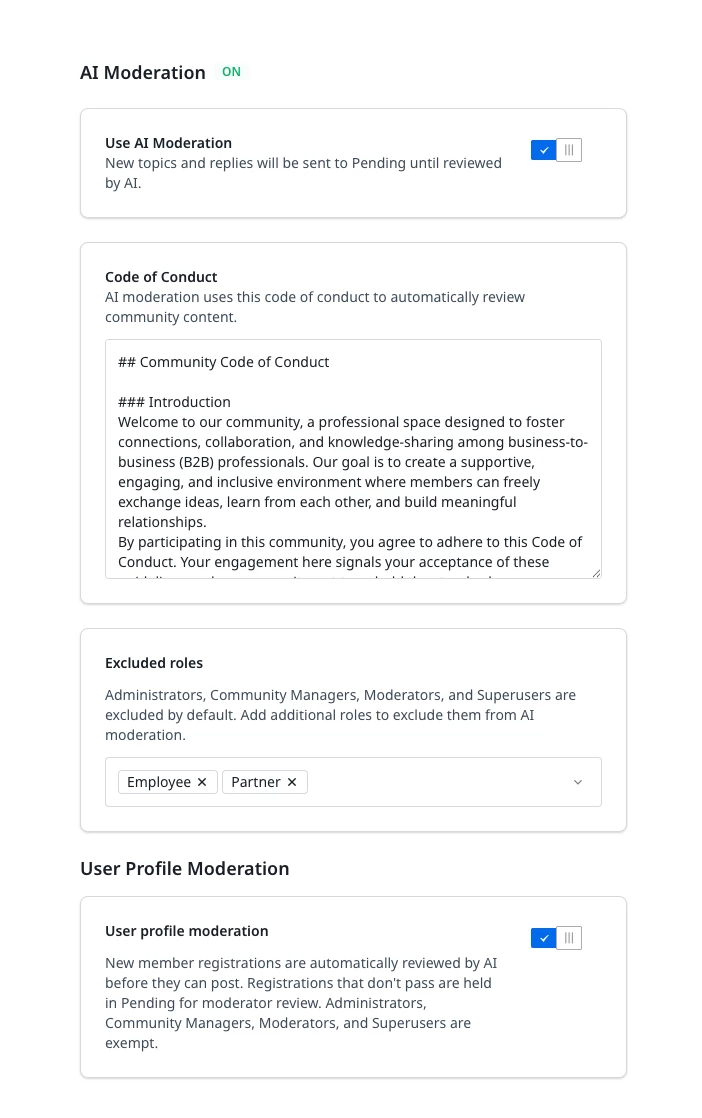
- In the Code of Conduct, enter your community guidelines.
-
(Optional) In addition to Administrator, Community Manager, Moderator, and Superuser, you can add additional roles whose content can be excluded from AI Moderation
-
(Optional) Enable User profile moderation to review New member registrations. Registrations that don't pass are held in Pending for moderator review. Administrators, Community Managers, Moderators, and Superusers are exempt.
-
Click Save changes.
Content Moderation Widget
Once Moderation AI Agent is configured, any Topics or Replies that do not meet your community’s guidelines are automatically tagged with Moderator Tags. These posts are then moved to Trash and Reported.
You can review this content in the Content Moderation widget on the Control Home page.
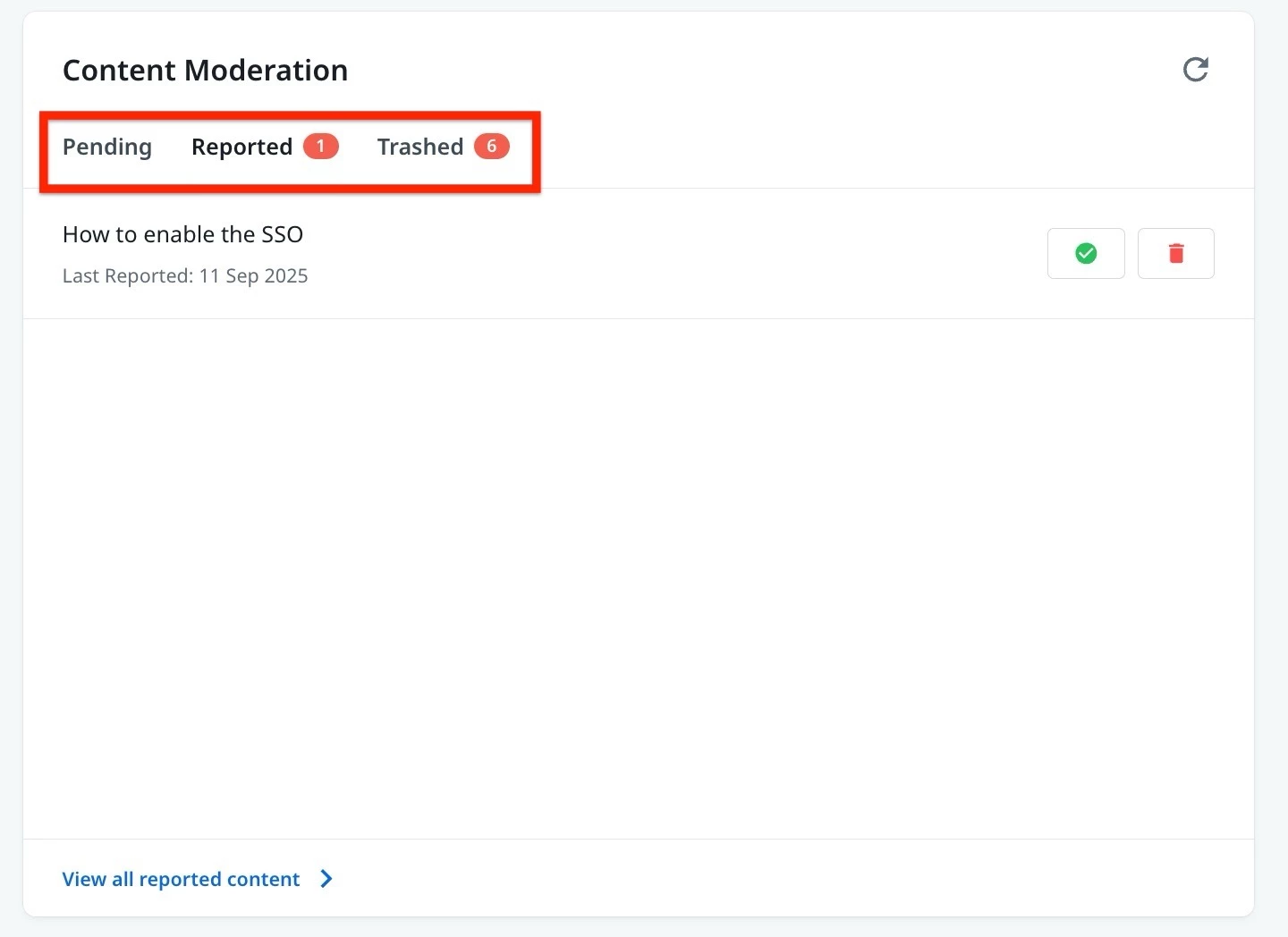
For more information on how to add this widget, refer to the Overview of Control Home article.