

link_black
Gainsight Employee ⭐️⭐️
Jun 8, 2020 9:25 PM UTC

Tip of the Week: Using a PX Dialog Engagement to collect additional information from your users to store on their PX User Profile

I had a great conversation with one of our PX customers last week about this use case.   


As a refresher, PX does not create PX Users and User attributes on its own.  PX relies on your user/account data to be passed through the PX Identify call code in your applications, developer inserts/updates using our PX REST API, imports/updates using our PX Data Loader, mapped fields synched with the CRM system using our Salesforce integration, and/or updates from the Customer Success platform using our new “Load to PX” CS Rule Action type.


All of the above are great options for creating rich PX User profiles with many attributes that can be leveraged for PX Analytics and PX Engagement targeting … plus many other use cases for sure.  


So, the specific use case that we discussed was… “In addition to application usage data, how can PX help us to collect additional user information that we do not already have available within our business systems, such as job role, job responsibility, interests, etc.?”  Well, PX has you covered here too!



Here is how it can be done…


Our PX Web SDK (JavaScript) API has a newer method available that can be used as a standalone JavaScript call within your application or even used on a Custom Button in a PX Dialog Engagement, which is the focus of this post.  This Javascript method looks like the following:


“aptrinsic('set', 'user', {'[attribute_api_name]':’[attribute_value]’});"


[attribute_api_name] is the PX User Attribute API name from your Users Model in PX.

[attribute_value] is the PX User attribute value you want to record on the users profile in PX.


While you cannot add a bunch of JavaScript code to the source of a PX Engagement, you can make simple JavaScript calls when the user clicks a Custom Button using the “onclick” <a href> property.  You will need to edit the source code of your Engagement to do this, but it is not hard, and below is an example screenshot of how this can be implemented on a PX custom button:

apt_Wgg2hDMBY5HxipV9fIyZiVL98SJWRWBM2GB-vHNiEdhgmePczAfZ0kTkbMINwBv_jl2r4fAei_IKKOaf-4zg84xXc34CNouBhKPLKkg_LBov4uU-cLWa2ySMUtusCRlMDRCQ


And here is how the actual PX Dialog Engagement could look for your users:

vT2bxwzmgpjB3btXBvSLkHUQuCyzb11VFRRBYjZbhKOn1oM9zvLkoARvBQ21tV9j8ex78e9GdGDZ04YbGLdzg8yzsydT1ArFiSSA1DHuF3AP99Cmget7blrWxu4ttgv8LMUEUJ8O


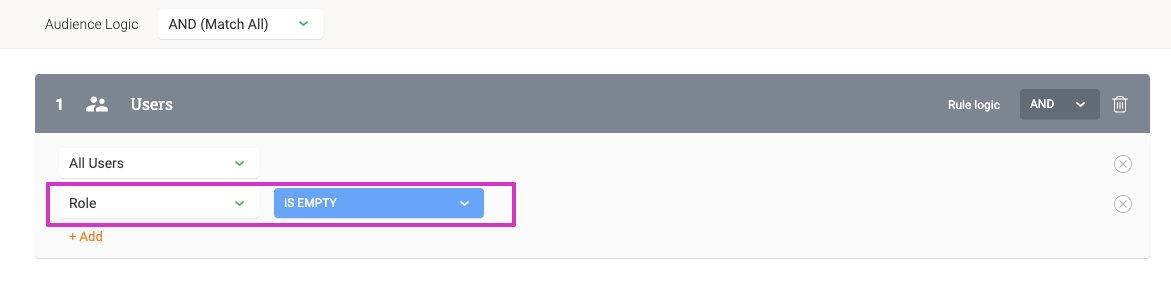
As for Audience Logic, you will probably want to set this up to be triggered when the desired PX User Attribute field is empty such as the following:
m6c8EKtTono0RGmNaIzeyVu-raNZKAmVs55hfdxZXb3h5xF2Wcby10dvQggs30hx-GCEVoErwbxCKFYtkpHwieAGgItzzPg_eLr35Niw2fscNhErkbYombzcIBNa1m90t0-XVw8i

And, for Qualification Scope you would probably want to give the user many chances to update their data with some time in between requests such as the following.

ps19BG_Ec81VH4iVmnqDzqNu5KNUka33ScpeVsmfxIFSZWhBNJmOnmc9crFgVMZn_d0w9P7fVoc9DKy57yGnoAgJYYxlyNNq5Ca1R2nlIHJe22I8a9lK4Q5nB2lD2t7cUTxP5iA1


I hope this helps someone with similar use cases, but we would love to get your feedback and other interesting use cases that you come up with too.


Happy PX-ing!

11 replies

harshibanka
Gainsight Employee ⭐️⭐️
Jun 8, 2020 11:14 PM UTC

Thanks for sharing this idea in such details Link, this is very cool!

This very much tied with considering user context as we trigger in-app. The method you mentioned will help build/add attributes to the ICP (Ideal Customer Profile) which can be used to do very targetted user-segmented in-apps and analysis.

Translate
Harshi (pronounced like the Hershey's chocolate); PLG and Digital CS Evangelist
dileepnalla
Gainsight Employee ⭐️⭐️
Jul 30, 2020 5:19 PM UTC

Hello All,

Thanks @link_black  for this impressive community post.

Here is a short video on implementing the above 

Code:

onclick="aptrinsic('set','user',{'role': 'Support Analyst' });"

https://www.loom.com/share/036972a9894f4ae591da69a38db86024

Click here to access the video

Thanks

Dileep Nalla


Translate
Thanks, Dileep Nalla
JPKelliher
Contributor ⭐️⭐️⭐️⭐️⭐️
Mar 4, 2021 4:02 PM UTC

Thanks @link_black . If this can be sent using an “onclick” DOM event, could it in theory also be used in an “onchange” DOM element type of checkbox? This would allow a specific attribute to be sent to the user’s profile by checking off certain boxes in an on boarding questionaire.  Please see the example below. For some reason, this DOM event continues to get stripped from the HTML when I save the engagement.


        <div class="px-dialog-title">Please take a minute and let us know what you need to get done using this product.
</div>
<div class="px-dialog-content">
<p>Check this box for Testattribute</p>
<input type="checkbox" id="myInput" value="x" onchange="aptrinsic('set','user',{'attributeTest':'JPsAttribute'});">
<label> I need to learn how to add and manage users on my account.</label>
<p id="demo">
<br>
</p>
<p>Check this box for Testattribute2</p>
<input type="checkbox" id="myInput" oninput="aptrinsic('set','user',{'attributeTest2':'JPsAttribute2'});" value="x">
<p id="demo">
<br>
</p>
</div>


Translate
J.P. Kelliher
link_black
Gainsight Employee ⭐️⭐️
Mar 4, 2021 4:54 PM UTC

Hi @JPKelliher, thanks for replying.

PX does strip out unsupported/invalid HTML and JavaScript code automatically.  However, I was able to use your HTML above with the simple JavaScript code in a PX Engagement successfully.  See my results below:


In the case of using a form checkbox, the attribute is set with every select/deselect, so this may not be the best way to implement this use case.  Anyways, thanks for taking my tip to the next level!!!!! :)


Translate
-- Link
JPKelliher
Contributor ⭐️⭐️⭐️⭐️⭐️
Mar 4, 2021 7:07 PM UTC

@link_black  I am not sure if this is a bug or what, but Gainsight is stripping our the DOM event every time I try to save. I have tried this in several instances, along with several engagement types.


First it is there.

Code with simple java event


can see the checkbox with the WYSIWYG view


Then it is gone when I go back to the HTML view.

the DOM event has been stripped automatically

I have tried this in a Dialog engagement and a Tooltip engagement. Both with the same results. The strange thing is that this worked for us in test last week. :disappointed:

Translate
J.P. Kelliher
link_black
Gainsight Employee ⭐️⭐️
Mar 4, 2021 9:56 PM UTC

Please create a PX Support ticket for further review (pxsupport@gainsight.com).

Translate
-- Link
dileepnalla
Gainsight Employee ⭐️⭐️
Mar 5, 2021 6:13 PM UTC

Hi @JPKelliher,


Exposing scripting was determined to be XSS vulnerability on the templates, so considering this factor, those customers that were using it were added to an allowed list... but security blocked for others.


Thanks

Dileep Nalla

Translate
Thanks, Dileep Nalla
brian.atkins
Contributor ⭐️⭐️⭐️
Nov 13, 2022 11:39 PM UTC

Can you use this function for Custom Attributes at the Account level?


I tried this - 

aptrinsic('set','account',{'payrollvendor':'TestValue'});

but it did not seem to work, I can set user account values this way i.e.

aptrinsic('set','user',{'role':'Director'});


Translate
link_black
Gainsight Employee ⭐️⭐️
Nov 17, 2022 9:35 PM UTC

@brian.atkins Nope.  But, check this post out to see how to do this with the Identify call. 


Translate
-- Link
aharkut
Gainsight Employee ⭐️
Feb 28, 2023 12:16 PM UTC

We have released a “No Code” solution to this on new Guide Editor. Please check the below release notes:


https://support.gainsight.com/PX/Release_Notes/Current_Release_Notes_-_2023/PX_Release_Notes_February_2023_Interim_Release_Version_3.13.0#New_Action_Type_in_Custom_Buttons


Translate