
Julian
Gainsight Employee ⭐️⭐️⭐️
October 14, 2019
FEATURE LAUNCH

Our new text editor is now available on all communities!
Related products:CC Community
  • October 14, 2019
  • 168 replies
  • 5350 views
Our new text editor is now available on all communities!

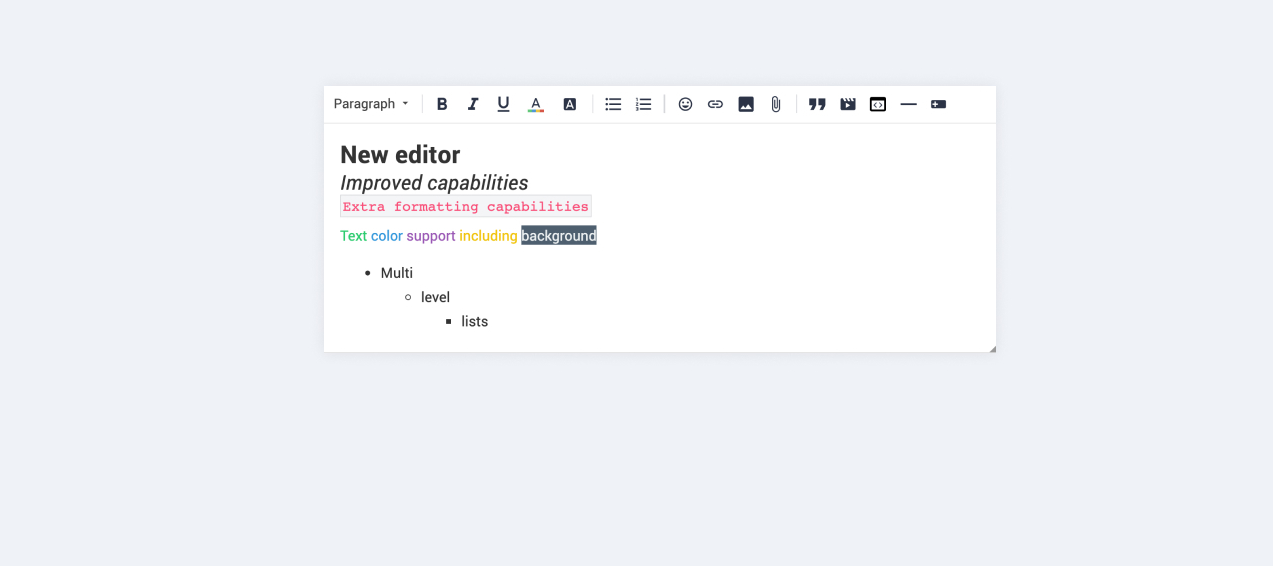
We are very proud to announce that our completely new editor is now available for all users on all communities! :grin::raised_hands::pencil2: We have invested a lot of time to give you and your users more options to create richer content in an easy way - so we hope that you will enjoy working with the new editor as much as we do!

We are investigating line-height / spacing inconsistencies as well as problems with selecting text on some viewports (e.g. Safari on iOS).

Polls are temporarily not available, but will be added again soon.

 Overview of improvements

There are many things which have improved with the new editor, just to name a few:

Improved existing features

  • Image upload
    • Drag & drop images into the editor instead of manual upload
    • Captions (descriptive text underneath uploaded images)
  • Code
    • In-line code is now possible (previously code was in an extra line)
    • Code syntax (code is not being stripped automatically anymore)
  • Lists
    • Multi-level lists are possible now
    • Better UX in working with lists (previously lists could not be interrupted by line breaks)
  • Text styling
    • Text styling within lists was not fully supported before

New features

  • Tables!
  • Callouts
  • Text color / background color
  • Horizontal lines

Of course not all of these features are available to end users, some of these (e.g. text color, header, callouts) are only available in the Control environment for now. We have plans to make this available to front-end users via user roles in the future, so that you are in control of who can make use of these features - please share your thoughts on this with us in the comments!

Feedback

Please let us know what you think of this improvement, also how your users are feeling about it. This way we can adjust and improve the editor even further in the future!

168 replies

Suvi Lehtovaara
Helper ⭐️⭐️
November 4, 2019

It sees that delete/backspace is not working in all cases?

I was unable to delete the Spoiler section :point_down_tone2: (I’m using Version 77.0.3865.90 (Official Build) (32-bit))


Our community user (Firefox version 70.0 (32-bit))was unable to delete even a larger section:


@Yoeri & @Julian what’s up with this one?

I know you suggested that 

“The best way to delete a spoiler or (nested) quote is to select the entire box (Clicking the grey resize icon in the top left of a quote or spoiler will select it. Selections can be recognized by a 2px blue line. ) and hit the backspace/delete key on your keyboard. See the spoiler below for an animated gif”

but in our community we seem to have quite a few cases in which users would like to edit the quote - in these cases the quoted comment is usually long and complex - therefore it’s simpler to have only the relevant part as a quote :)

https://yhteiso.elisa.fi/
Yoeri
Gainsight Employee ⭐️⭐️⭐️
November 4, 2019

The same principle applies to edit larger and complex quotes that contain multiple elements (quotes, spoilers, images, videos, quotes in quotes, etc.). Each element represents a box that can be individually selected. 

When selecting elements by dragging your mouse cursor you have less control over how to delete or edit elements within a quote (because you can select multiple elements at the same time like your last screenshot)

Here’s how I edited your quote which contains multiple elements:


Hope this helps :)

Group Product Manager, Customer Communities
Suvi Lehtovaara
Helper ⭐️⭐️
November 5, 2019

The same principle applies to edit larger and complex quotes that contain multiple elements (quotes, spoilers, images, videos, quotes in quotes, etc.). Each element represents a box that can be individually selected. 

When selecting elements by dragging your mouse cursor you have less control over how to delete or edit elements within a quote (because you can select multiple elements at the same time like your last screenshot)

Here’s how I edited your quote which contains multiple elements:


Hope this helps :)

Hi @Yoeri ! Thanks for your quick reply :)

I don’t know if this is a language barrier - but I’m not really sure if we’re discussing the same issue here.

Our issue is that a user might only want to quote one single sentence of a long topic - meaning that deleting an element is not an option when the user wants to be able to edit the text within that element. And that seems to be impossible for some users as back space or delete don’t erase text.

https://yhteiso.elisa.fi/
Yoeri
Gainsight Employee ⭐️⭐️⭐️
November 5, 2019

Small update

Delivered

  • NEW From now on new links that point to a webpage outside of your community (outgoing links) will open in a new tab, links that point to a page inside your community will still open in the same tab

Soon

  • Polls will be re-enabled this week 

Feedback on previous posts

Our issue is that a user might only want to quote one single sentence of a long topic

Is this what you mean? Chopping a larger quote (I used the post above) into a single sentence? :)

And that seems to be impossible for some users as back space or delete don’t erase text.

I do experience the same (usually when there is a @mention inside a quote) sometimes I need to trigger backspace multiple times in order to erase the text, but I’m always able to erase text. We look into this and see if we can make improvements here 

Group Product Manager, Customer Communities
Suvi Lehtovaara
Helper ⭐️⭐️
November 6, 2019


Feedback on previous posts

Our issue is that a user might only want to quote one single sentence of a long topic

Is this what you mean? Chopping a larger quote (I used the post above) into a single sentence? :)

And that seems to be impossible for some users as back space or delete don’t erase text.

I do experience the same (usually when there is a @mention inside a quote) sometimes I need to trigger backspace multiple times in order to erase the text, but I’m always able to erase text. We look into this and see if we can make improvements here 

 @Yoeri - yes, that’s exactly what I mean! I’ve also been able to edit quotes myself - most of the time - but some users experience more problems. I’ll ask them to provide details of their browsers etc if this problem persists.

https://yhteiso.elisa.fi/
Yoeri
Gainsight Employee ⭐️⭐️⭐️
November 6, 2019

Delivered

Group Product Manager, Customer Communities
Ronald Posthumus
Contributor ⭐️⭐️⭐️
November 6, 2019

Hi@Ronald Posthumus,

about your feedback:

paperclip for adding files

I am not sure about this, maybe I understand it wrong? I read it like you miss the option to e.g. add an image as an attachment rather than adding it into the text box itself?

We have changed the behaviour in a way that, if you upload an image it gets added as an attachment automatically. But attaching files now also allows you to e.g. add an image as a file to your post. Or are you missing the preview / thumbnail view of media added as attachment?

The letter ‘g’ is wrongly displayed in the reaction field

I’ve seen reports of this before, however it seems not to be caused by the platform, but rather by a missing font. But maybe I am wrong and confuse it with something else - I will investigate & dig out what I have found the last time I have heard it and will share it here!


Hey Julian,


I was away for a couple of days (not a good thing to do when these issues are running arround haha). The G letter is also showing on the Inspired Community when typing in ‘italic’. So its the same. I don't see the company font solving this, looks to be something else (using Chrome Versie 77.0.3865.120 Officiële build 64-bits)?


As for the image/paperclip, lets start at the beginning, so lets forget about the paperclip.

In the previous editor we did not have attachments turned on for our users. but by default everyone can always add images.

When they would add an image, then it would automatically become an attachment. 

then you could choose to make it appear in the text and as an attachment, or only as an attachment or only as in text. 

The new editor does not support this anymore and will always display an image in the text.

(So again, this is without the function to add attachments)


Hope this clarifies a bit.


Cheers,


Honest, open communication is the only street that leads us into the real world... - John Powell
LPortalupi
Helper ⭐️
November 8, 2019

Small update

Delivered

  • NEW From now on new links that point to a webpage outside of your community (outgoing links) will open in a new tab, links that point to a page inside your community will still open in the same tab


Thanks, @Yoeri. I just tried this and it didn’t work as expected. For example, with this post, I have two links that go to coursera.org pages. Both links opened in the same tab, taking me away from the community platform. Because our community page is coursera.community, I assumed this would cause coursera.org pages to open in a new tab. Is this correct?

Yoeri
Gainsight Employee ⭐️⭐️⭐️
November 8, 2019

It’s been over 3 weeks that we released the editor and meanwhile quite some things have changed and improved because of your feedback ✌️ Here’s the latest update:

In progress

  • UI fix that resolves an issue where the @mention list goes out of the screen on smaller viewports

Investigating & Next

The following items are still being investigated and/or on the list to be improved over time: 

  • Replace editor font with your company font
  • Send a single notification on a quote that contains a mention
  • ‘Bouncing’ behavior
  • Change the username of a user quote
  • Quotation mark behavior in finnish
  • Open up text colors for users (psst vote on the poll if you haven’t done this yet, so far it looks like you want to give your users the possibility to add custom text- and formatting colors) 

Feedback on previous posts

  • The new editor has 2 different scenarios as it comes to adding an image: 1) Insert image will directly show the image in the content and 2) Upload files will attach an image to the post. It is correct that you no longer can select an image from your hard-drive an both insert it into the text and attach it. We deliberately choose for the new set up as it makes more sense to choice up front wether you want to 1) insert a photo or 2) attach a photo
  • @LPortalupi have you tried to post an URL that does not include your primary domain (coursera) and see if that does open a new tab. The way this functionality behaves is that it looks at the domain name of your community and all links with the same structure will open in the same tab

This was the last update from my side for a short while as I will be out of office the coming time. If you have any questions, feedback and ideas still do not hesitate to let us know, my colleagues will be happy to help and support :)

Group Product Manager, Customer Communities
LPortalupi
Helper ⭐️
November 8, 2019

Feedback on previous posts

  • The new editor has 2 different scenarios as it comes to adding an image: 1) Insert image will directly show the image in the content and 2) Upload files will attach an image to the post. It is correct that you no longer can select an image from your hard-drive an both insert it into the text and attach it. We deliberately choose for the new set up as it makes more sense to choice up front wether you want to 1) insert a photo or 2) attach a photo
  • @LPortalupi have you tried to post an URL that does not include your primary domain (coursera) and see if that does open a new tab. The way this functionality behaves is that it looks at the domain name of your community and all links with the same structure will open in the same tab

This was the last update from my side for a short while as I will be out of office the coming time. If you have any questions, feedback and ideas still do not hesitate to let us know, my colleagues will be happy to help and support :)


Actually the links in that example post I linked to were bit.ly links, and they opened in the same tab. I just tested this with another post’s link to a different Coursera.org page and it opened in a new tab. This seems to be inconsistent; it doesn’t seem like expected behavior.